

Secure Notes - Memo and lists
Secure Notes - Memo and lists is made and published by Emanuele Floris. AppBrain is an independent app data site and isn't affiliated with Emanuele Floris. The app name, icon, screenshots and description belong to Emanuele Floris and are shown as published on the App Store.
AppBrain's verdict
Established- Rating on App Store
- 1.00
- 1 ratings
- Last updated
- June 7, 2026
It doesn't have enough ratings yet to judge what users think.
Rankings
App Store top chartsApp Store Rankings for Secure Notes - Memo and lists
Competitors
Similar apps and more from Emanuele FlorisAlternatives to Secure Notes - Memo and lists





More from Emanuele Floris


Releases
Updates seen on the App Store- Version
- 2.5
- Launched
- April 2013
No changelog data
User feedback
Ratings and reviews on the App StoreComments on Secure Notes - Memo and lists for iOS
We don't have enough comments to show example comments. Please check back later.
Technology
Found in the app by AppBrain- Price
- Free
- App size
- 14.2 MB
- Content rating
- Everyone
Technologies used by Secure Notes - Memo and lists
About the app and developer
About Secure Notes - Memo and lists
Secure Notes - Memo and lists is a productivity app developed by Emanuele Floris.
User Ratings
Secure Notes - Memo and lists is rated 1.00 out of 5 stars. The rating is based on one rating ratings.
App Information
Secure Notes - Memo and lists is freely available from the App Store. The app size is 14.17 MB. The latest version available is 2.5. The last update was on June 7, 2026.
Technical Requirements
The app has a content rating of Everyone. The app has been available on the App Store since April 2013.
Developer information for Emanuele Floris
Address:
Frequently asked questions about Secure Notes - Memo and lists
Is Secure Notes - Memo and lists free?
Yes. Secure Notes - Memo and lists is free on the App Store.
Is Secure Notes - Memo and lists still available?
Yes. Secure Notes - Memo and lists is on the App Store, and the last update we saw was on June 7, 2026.
How large is Secure Notes - Memo and lists?
Secure Notes - Memo and lists is 14.17 MB.
Is Secure Notes - Memo and lists suitable for children?
App Store rates the content of Secure Notes - Memo and lists as suitable for everyone.
How do people rate Secure Notes - Memo and lists?
Secure Notes - Memo and lists has one rating of 1.00 stars on the App Store.
Who made Secure Notes - Memo and lists?
Secure Notes - Memo and lists was developed by Emanuele Floris. It is listed in the productivity category on the App Store.
What are the best alternatives to Secure Notes - Memo and lists?
People looking at Secure Notes - Memo and lists also look at these productivity apps: InfoSafe, HELLO-DATA LINK, SeltronHome Clausius, power grid calculator, QuotTeleprompter.
Store listing
By Emanuele Floris, from the App Store


Description by Emanuele Floris Written by the developer, not by AppBrain. Click to read.
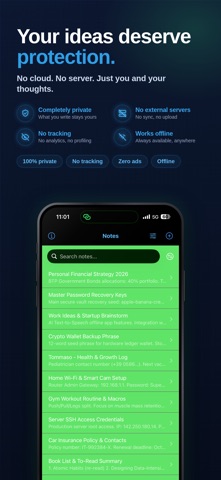
Some ideas are too personal to risk. Passwords, secret plans, private memories — this app keeps them locked away on your device, always.
No cloud. No servers. No one but you.
BUILT FOR PRIVACY
Your notes never leave your device. No syncing, no uploading, no exposure. What you write stays with you — period.
LOCK IT DOWN
Protect everything with a password. Enable Face ID or Touch ID for instant, secure access in seconds.
MAKE IT YOURS
Choose from 16 beautiful backgrounds to match your mood. A notes app that feels personal.
SIMPLE AND POWERFUL
Create, edit, search, and sort your notes effortlessly. Find anything instantly with smart search. Available on iPhone, iPad, and Mac.
ZERO ADS
No distractions. No tracking. Just you and your thoughts.
Whether you are storing passwords, journaling private thoughts, saving business ideas, or keeping sensitive info away from prying eyes — this is the vault you always needed.
You may purchase an auto-renewing subscription through an In-App Purchase.
• Auto-renewable subscription.
• Subscription durations: Monthly or Annual (both include a free trial period).
• Your subscription will be charged to your iTunes account at confirmation of purchase and will automatically renew (at the duration selected) unless auto-renew is turned off at least 24 hours before the end of the current period.
• Current subscription may not be cancelled during the active subscription period; however, you can manage your subscription and/or turn off auto-renewal by visiting your iTunes Account Settings after purchase.
Privacy Policy: https://sites.google.com/site/privacycoldat/
Terms of Use: https://www.apple.com/legal/internet-services/itunes/dev/stdeula/