

SecureFile – File Encryption
SecureFile – File Encryption is made and published by Code Stars. AppBrain is an independent app data site and isn't affiliated with Code Stars. The app name, icon, screenshots and description belong to Code Stars and are shown as published on the App Store.
AppBrain's verdict
- Last updated
- May 19, 2026
- Size
- 31.7 MB
User feedback
Ratings and reviews on the App StoreComments on SecureFile – File Encryption for iOS
We don't have enough comments to show example comments. Please check back later.
Store listing
By Code Stars, from the App Store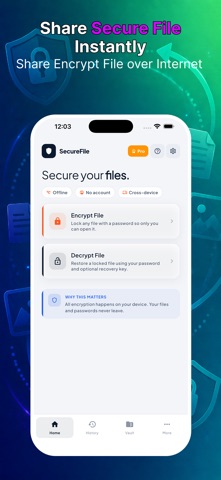
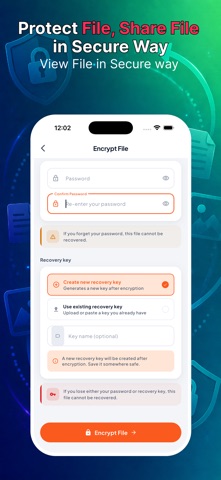
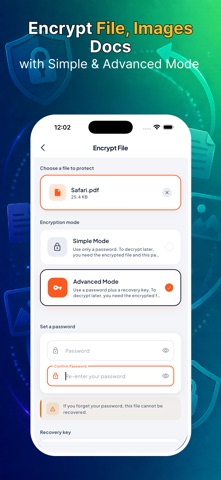
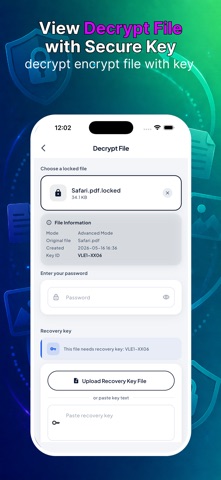

Description by Code Stars Written by the developer, not by AppBrain. Click to read.
HOW IT WORKS
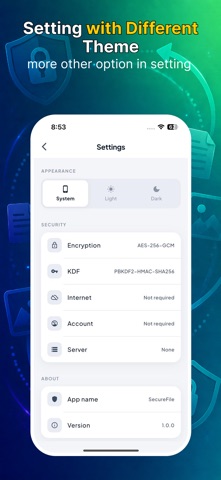
SecureFile uses AES-256-GCM authenticated encryption with PBKDF2-HMAC-SHA256 key derivation. That means your password is never stored — instead it's used to derive a strong encryption key. If someone gets your encrypted file without the password, they get nothing readable.
TWO ENCRYPTION MODES
Simple Mode
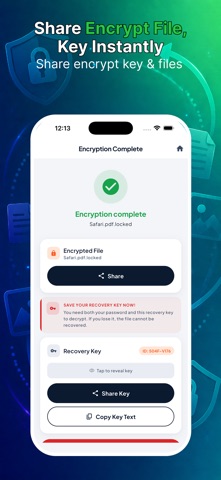
Protect a file with just a password. Pick a file, set a password, tap Encrypt. To decrypt later: the encrypted file plus the same password is all you need.
Advanced Mode
Add a second layer with a recovery key. Decryption requires the encrypted file, your password, AND the recovery key file. Even if someone learns your password, they still can't open the file without the key.
COMPLETELY PRIVATE
• No internet connection required — ever
• No account or sign-up needed
• No data sent to any server
• Everything happens on your device, offline
HISTORY
Every encryption and decryption is logged locally in the History tab so you always know which files you've protected and when.
HONEST SECURITY
We don't hide what we use. AES-256-GCM is the same cipher used by banks, governments, and security professionals worldwide. PBKDF2 with 300,000 iterations makes brute-forcing your password computationally impractical. You can verify every detail in the Settings screen.
IMPORTANT NOTE
SecureFile uses standard encryption as defined under U.S. export regulations (EAR). It qualifies for the encryption exemption (ENC) and does not require an Encryption Registration Number (ERN) — it implements only publicly available, standard cryptographic algorithms and is not designed for confidentiality of communications.
If you lose your password (and your recovery key in Advanced Mode), your files cannot be recovered. There is no "forgot password." Store your credentials safely.
Terms of Use: https://www.apple.com/legal/internet-services/itunes/dev/stdeula/
Privacy Policy: http://codstars.com/policy.html
Safety and technology
Found in the app by AppBrain- Price
- Free
- App size
- 31.7 MB
- Content rating
- Everyone
Technologies used by SecureFile – File Encryption
Releases
Updates seen on the App Store- Version
- 1.0.0
- Launched
- May 2026
No changelog data
Alternatives
Similar apps and more from Code StarsAlternatives to SecureFile – File Encryption


More from Code Stars


Rankings
App Store top chartsApp Store Rankings for SecureFile – File Encryption
About the app and developer
About SecureFile – File Encryption
SecureFile – File Encryption is a productivity app developed by Code Stars.
User Ratings
The app has no ratings yet.
App Information
SecureFile – File Encryption is freely available from the App Store. The app size is 31.67 MB. The latest version available is 1.0.0. The last update was on May 19, 2026.
Technical Requirements
The app has a content rating of Everyone. The app has been available on the App Store since May 2026.
Developer information for Code Stars
Address:
Frequently asked questions about SecureFile – File Encryption
Is SecureFile – File Encryption free?
Yes. SecureFile – File Encryption is free on the App Store.
Is SecureFile – File Encryption still available?
Yes. SecureFile – File Encryption is on the App Store, and the last update we saw was on May 19, 2026.
How large is SecureFile – File Encryption?
SecureFile – File Encryption is 31.67 MB.
Is SecureFile – File Encryption suitable for children?
App Store rates the content of SecureFile – File Encryption as suitable for everyone.
Who made SecureFile – File Encryption?
SecureFile – File Encryption was developed by Code Stars. It is listed in the productivity category on the App Store.
What are the best alternatives to SecureFile – File Encryption?
People looking at SecureFile – File Encryption also look at these productivity apps: The Relief Room, Secure-Me App, Pique: Keep thoughts afloat, Focus Friend: ADHD Planner, PDF Scanner: AI OCR.