




AppBrain's verdict
- Last updated
- November 9, 2026
- Size
- 95.2 MB
User feedback
Ratings and reviews on the App StoreComments on Securitas Personal Safety for iOS
We don't have enough comments to show example comments. Please check back later.
Store listing
By Securitas AB, from the App StoreDescription by Securitas AB Written by the developer, not by AppBrain. Click to read.
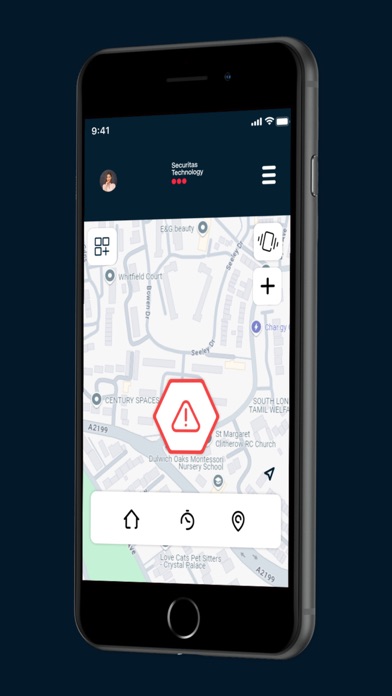
Step 1: When you are in an emergency situation, trigger an alert through the app by simply shaking the phone, swiping a button in the app, double tapping, or entering a code. Your phone starts recording live audio and video clips.
Step 2: Your campus/company security team is notified of your alert, your GPS location, your phone’s recorded audio/video clips, and your personal profile information. Or, if you prefer, an alert can only be sent to your list of pre-determined contacts.
Step 3: Your campus/company security team dispatches security personnel to respond through the Securitas™ Personal Safety App. Security Response is routed to your location for assistance. Plus, use the Securitas™ Personal Safety app to ensure your safety in the following situations:
Meetings: Schedule a meeting timer in the Personal Safety app, and when the meeting time is over, you can confirm you’re ok, or extend the meeting time. Your campus/company security team will receive an alert if you don’t cancel the meeting or extend it.
Journeys: When travelling from one location to another, enter the final destination into the Personal Safety app. When you arrive, the app will ask to confirm if you’ve arrived safely. If you do not confirm, your campus/company security team will receive an alert.
Man-down: Schedule a meeting timer in the Personal Safety app. If there is no movement for a pre-set duration of time, your campus/company security team is alerted.
We are now integrated with the Health Kit to improve battery usage for location when stationary.
NOTE: Your campus/company security team must have the Securitas Technology Command Center Portal and the Securitas Technology Response app for security officers in order for the Personal Safety App to be functional as outlined above.
Continued use of GPS running in the background can dramatically decrease battery life.
Now integrated with the Health Kit to enhance the journey feature.
Safety and technology
Found in the app by AppBrain- Price
- Free
- App size
- 95.2 MB
- Content rating
- Everyone
Technologies used by Securitas Personal Safety
Releases
Updates seen on the App Store- Version
- 4.13.8
- Launched
- September 2015
No changelog data
Alternatives
Similar apps and more from Securitas ABAlternatives to Securitas Personal Safety


More from Securitas AB





Rankings
App Store top chartsApp Store Rankings for Securitas Personal Safety
About the app and developer
About Securitas Personal Safety
Securitas Personal Safety is an utilities app developed by Securitas AB.
What is the rating of Securitas Personal Safety?
Securitas Personal Safety has no ratings yet.
Is Securitas Personal Safety free?
Securitas Personal Safety is free. The app size is 95.25 MB. The latest version available is 4.13.8. The last update was on November 9, 2026.
What are the requirements for Securitas Personal Safety?
The app has a content rating of Everyone. The app has been available on the App Store since September 2015.
Securitas Personal Safety is made and published by Securitas AB. AppBrain is an independent app data site and isn't affiliated with Securitas AB. The app name, icon, screenshots and description belong to Securitas AB and are shown as published on the App Store.
Developer information for Securitas AB
Address: