

sfirion BIM is made and published by Sfirion AG. AppBrain is an independent app data site and isn't affiliated with Sfirion AG. The app name, icon, screenshots and description belong to Sfirion AG and are shown as published on the App Store.
AppBrain's verdict
- Rating on App Store
- 4.00
- 1 ratings
- Last updated
- September 26, 2023
It doesn't have enough ratings yet to judge what users think.
Rankings
App Store top chartsApp Store Rankings for sfirion BIM
Competitors
Similar apps and more from Sfirion AGAlternatives to sfirion BIM





Also available on Google Play

Releases
Updates seen on the App Store- Version
- 1.04
- Launched
- May 2022
No changelog data
User feedback
Ratings and reviews on the App StoreComments on sfirion BIM for iOS
We don't have enough comments to show example comments. Please check back later.
Technology
Found in the app by AppBrain- Price
- Free
- App size
- 65.6 MB
- Content rating
- Everyone
Technologies used by sfirion BIM
About the app and developer
About sfirion BIM
sfirion BIM is a business app developed by Sfirion AG.
User Ratings
sfirion BIM is rated 4.00 out of 5 stars. The rating is based on one rating ratings.
App Information
sfirion BIM is freely available from the App Store. The app size is 65.64 MB. The latest version available is 1.04. The last update was on September 26, 2023.
Technical Requirements
The app has a content rating of Everyone. The app has been available on the App Store since May 2022.
Developer information for Sfirion AG
Address:
Frequently asked questions about sfirion BIM
Is sfirion BIM free?
Yes. sfirion BIM is free on the App Store.
Is sfirion BIM still available?
Yes. sfirion BIM is on the App Store, and the last update we saw was on September 26, 2023.
How large is sfirion BIM?
sfirion BIM is 65.64 MB.
Is sfirion BIM suitable for children?
App Store rates the content of sfirion BIM as suitable for everyone.
How do people rate sfirion BIM?
sfirion BIM has one rating of 4.00 stars on the App Store.
Who made sfirion BIM?
sfirion BIM was developed by Sfirion AG. It is listed in the business category on the App Store.
What are the best alternatives to sfirion BIM?
People looking at sfirion BIM also look at these business apps: StreamBIM, BIMxr, Viewer 360, BIMserver.center, Zutec BIM.
Store listing
By Sfirion AG, from the App Store





Description by Sfirion AG Written by the developer, not by AppBrain. Click to read.
SFIRION BIM
With the sfirion BIM app, you can import, view, share, comment on, and enrich IFC models with photos and documents. If the IFC file also contains schedule information and the corresponding links to the components, the 4D simulation can be played in the viewer.
FEATURES
- Compatible with IFC-2x3 and IFC-4
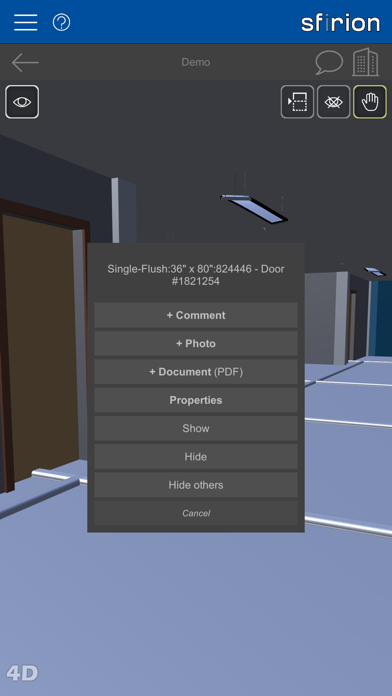
- Show/hide components
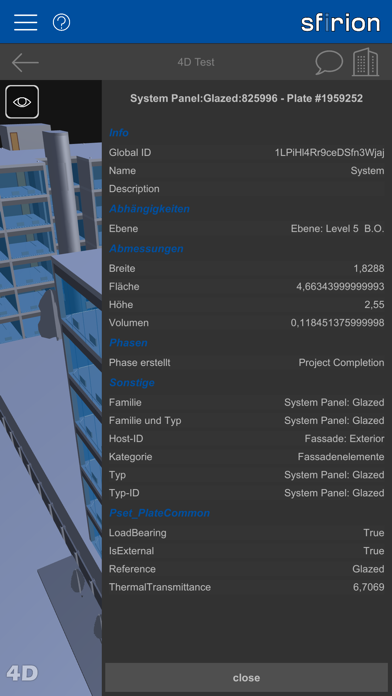
- Examine element properties
- Intuitive handling with gestures
- Cutting face for cutting open the model
- Placing comments with reply function in the model
- Placing photos and documents in the model
- Documents, photo list / GPS grid
- Sharing projects with other users
- 4D simulation (prerequisite: IFC model contains appointment links)
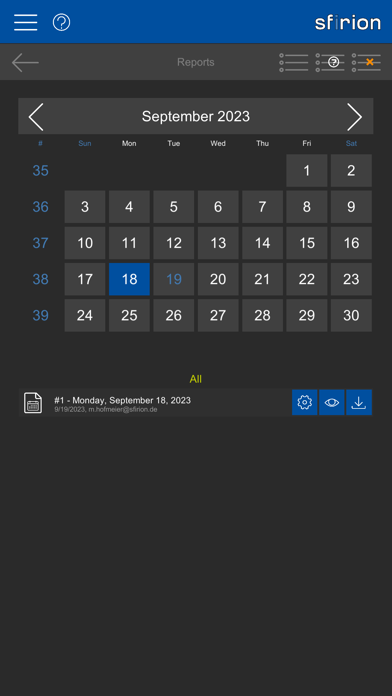
- Daily Reports
BIM MODEL VIEWER
View the 3D model and inspect the building elements for their properties. Hide elements or insert a cutting plane to look inside the model. Use the hierarchical model structure to hide and show entire groups of elements.
COMMENTS
Pin comments to specific positions in the model and color them (red, yellow, green) or reply to comments already set by other users with access to the project. Involved persons are notified about your entry by e-mail.
PHOTOS
Attach photos to specific positions in the model or add them via the photo list. If no location has taken place via the model, but GPS coordinates are available, these are stored and GPS photos can be viewed in relation to each other on a corresponding grid. If you take a photo directly via the app, an attempt is made to address the GPS transmitter of your device.
DOCUMENTS
Pin documents in PDF format to specific positions in the model or add them via the document list. These documents can then be accessed by you or by users with the appropriate authorization. This can be done via the list or via the corresponding markers in the model.
4D VISUALIZATION
If the IFC file provided contains schedule information including links to the construction elements, you can view this information as a 4D visualization.
DAILY REPORTS
Create daily reports for the planning or construction process. Depending on your role, you have the option to create or read and countersign reports. Reports are automatically distributed via the app and email as PDFs.
OTHER
Supported languages: English, German