SFTP360 is made and published by
乐祥 胡.
AppBrain is an independent app data site and isn't affiliated with 乐祥 胡.
The app name, icon, screenshots and description belong to 乐祥 胡 and are shown as
published on the App Store.
About SFTP360
SFTP360 is an overall app developed by 乐祥 胡.
What is the rating of SFTP360?
SFTP360 has no ratings yet.
Is SFTP360 free?
SFTP360 is free. The app size is 6.97 MB. The latest version available is 1.0. The last update was on December 22, 2025.
What are the requirements for SFTP360?
The app has a content rating of Everyone. The app has been available on the App Store since December 2025.
Description by 乐祥 胡(from the App Store)
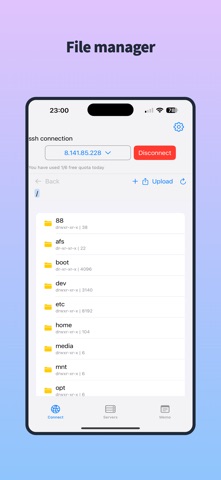
SFTP360 is a powerful and secure SFTP client designed to help you manage multiple servers effortlessly. Upload, download, delete files, and create directories with ease. Whether you're a developer, sysadmin, or a remote worker, SFTP360 is the perfect tool for your file management needs. Key Features:
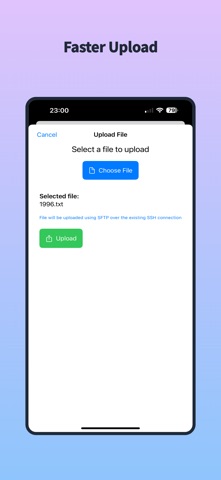
Multi-Server Management: Manage multiple SFTP servers in one place, switch seamlessly, and operate efficiently. File Upload/Download: Batch upload and download files with stable and fast transfers. File Deletion & Management: Delete files with one tap to keep your server organized. Directory & File Creation: Create new directories or files anytime to meet diverse needs. Secure & Reliable:
Uses the SFTP protocol to ensure encrypted data transfer and protect your privacy. Ideal For:
Developers, system administrators, remote workers, and anyone who needs frequent server file management. —Subscription Plans & Auto-Renewal Info Flexible Subscription Plans for Every Need! Choose the perfect plan for your goals with our diverse subscription options: * 1 Week: Short-term flexibility * 1 Month: Ideal for project-based users * 2 Months / 3 Months: Mid-term deep dive * 6 Months: Long-term savings * 1 Year: Best value for committed users * Lifetime: One-time purchase, forever access —Auto-Renewal Details: * Payment will be charged to your iTunes Account at confirmation of purchase. * Subscriptions are billed weekly, monthly, bi-monthly, quarterly, semi-annually, or annually based on your chosen plan. * Subscriptions auto-renew within 24 hours before the current period ends (except Lifetime). * Renewal charges will be processed within 24 hours before the end of the current period, with the cost depending on your selected plan. * Manage subscriptions or turn off auto-renewal anytime via your Apple ID Account Settings. —Lifetime Membership Perks: * Pay once, unlock all features forever—no renewals, no hassle! Note: * Manage subscriptions at: Settings > [Your Name] > Subscriptions
— Privacy Policy please visit:
https://docs.qq.com/doc/DREt1SXJkbG9JYUFT
* **Terms of use (EULA): * https://docs.qq.com/doc/DREdKR2ZwYUJaa1hr * **Terms of apple please visit: * https://www.apple.com/legal/internet-services/itunes/dev/stdeula/
* Questions? Contact us at: https://x.com/createeem
Each subscription will automatically renew 3 days before the expiration date for
the same time period. Subscriptions can be cancelled at any time before the renewal.