

Shared Calendar - Calenmate
Shared Calendar - Calenmate is made and published by Murat Menevse. AppBrain is an independent app data site and isn't affiliated with Murat Menevse. The app name, icon, screenshots and description belong to Murat Menevse and are shown as published on the App Store.
AppBrain's verdict
- Rating on App Store
- 5.00
- 1 ratings
- Last updated
- October 22, 2026
It doesn't have enough ratings yet to judge what users think.
Rankings
App Store top chartsApp Store Rankings for Shared Calendar - Calenmate
Competitors
Similar apps and more from Murat MenevseAlternatives to Shared Calendar - Calenmate


More from Murat Menevse

Releases
Updates seen on the App Store- Version
- 1.0.1
- Launched
- June 2026
No changelog data
User feedback
Ratings and reviews on the App StoreComments on Shared Calendar - Calenmate for iOS
We don't have enough comments to show example comments. Please check back later.
Technology
Found in the app by AppBrain- Price
- Free
- App size
- 50.3 MB
- Content rating
- Everyone
Technologies used by Shared Calendar - Calenmate
About the app and developer
About Shared Calendar - Calenmate
Shared Calendar - Calenmate is a productivity app developed by Murat Menevse.
User Ratings
Shared Calendar - Calenmate is rated 5.00 out of 5 stars. The rating is based on one rating ratings.
App Information
Shared Calendar - Calenmate is freely available from the App Store. The app size is 50.30 MB. The latest version available is 1.0.1. The last update was on October 22, 2026.
Technical Requirements
The app has a content rating of Everyone. The app has been available on the App Store since June 2026.
Developer information for Murat Menevse
Address:
Store listing
By Murat Menevse, from the App Store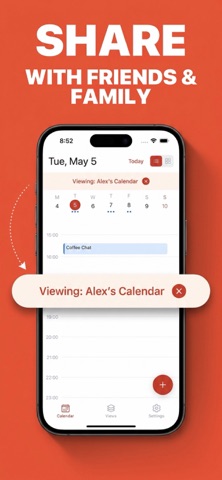


Description by Murat Menevse Written by the developer, not by AppBrain. Click to read.
Connect your Google, Apple iCloud, and Outlook calendars and finally see work, family, and friends side by side. No more switching between apps or juggling separate accounts. Just one clear, beautiful calendar you actually enjoy opening.
ONE CALENDAR FOR EVERYTHING
• Connect Google, Apple iCloud, and Outlook accounts
• See every event from every account in a single unified view
• Switch between day, week, and month layouts
• Color themes to make your schedule your own
BUILT FOR SHARING
• Create custom Views — your own mixes of calendars from any account
• Share a View with friends and family with a simple link
• Add friends and stay in sync with the people you plan with
• Keep work private and share only what you want
CREATE AND STAY ON TOP OF EVENTS
• Add and edit events in seconds
• Smart title input — type naturally and let dates and times be detected for you
• Reminders so you never miss a birthday, meeting, or plan
• Recurring events for the things that happen again and again
ORGANIZE YOUR WAY
• Group your calendars into Views like Work, Family, or Friends
• Jump between them with a tap
• See exactly what you need, when you need it
WHY YOU'LL LOVE IT
Whether you're a couple coordinating two busy lives, a family keeping everyone on the same page, or a professional managing multiple accounts, Shared Calendar keeps everything in sync and easy to read.
SHARED CALENDAR PLUS
Upgrade to Plus to unlock the full experience:
• Connect multiple calendar accounts
• Unlimited saved Views
• Recurring events
• Smart title input
• More color themes
• Cloud backup of your Views and settings
Start free and upgrade anytime.
Download Shared Calendar and bring your whole schedule — and the people in it — together.
—
Subscription details:
Shared Calendar Plus is an auto-renewing subscription available as weekly or annual plans. Payment is charged to your Apple ID account at confirmation of purchase. Your subscription automatically renews unless it is canceled at least 24 hours before the end of the current period. Your account is charged for renewal within 24 hours prior to the end of the current period. You can manage or cancel your subscription in your App Store account settings after purchase.
Terms of Use: https://obslo.com/terms
Privacy Policy: https://obslo.com/privacy