

Roomy Calendar: Simple Planner
Roomy Calendar: Simple Planner is made and published by Takeshi Tokumura. AppBrain is an independent app data site and isn't affiliated with Takeshi Tokumura. The app name, icon, screenshots and description belong to Takeshi Tokumura and are shown as published on the App Store.
AppBrain's verdict
- Rating on App Store
- 5.00
- 1 ratings
- Last updated
- October 17, 2026
It doesn't have enough ratings yet to judge what users think.
Rankings
App Store top chartsApp Store Rankings for Roomy Calendar: Simple Planner
Competitors
Similar apps and more from Takeshi TokumuraAlternatives to Roomy Calendar: Simple Planner


More from Takeshi Tokumura

Releases
Updates seen on the App Store- Version
- 2.2.0
- Launched
- June 2026
No changelog data
User feedback
Ratings and reviews on the App StoreComments on Roomy Calendar: Simple Planner for iOS
We don't have enough comments to show example comments. Please check back later.
Technology
Found in the app by AppBrain- Price
- Free
- App size
- 34.1 MB
- Content rating
- Everyone
Technologies used by Roomy Calendar: Simple Planner
About the app and developer
About Roomy Calendar: Simple Planner
Roomy Calendar: Simple Planner is a productivity app developed by Takeshi Tokumura.
User Ratings
Roomy Calendar: Simple Planner is rated 5.00 out of 5 stars. The rating is based on one rating ratings.
App Information
Roomy Calendar: Simple Planner is freely available from the App Store. The app size is 34.09 MB. The latest version available is 2.2.0. The last update was on October 17, 2026.
Technical Requirements
The app has a content rating of Everyone. The app has been available on the App Store since June 2026.
Developer information for Takeshi Tokumura
Address:
Store listing
By Takeshi Tokumura, from the App Store






Description by Takeshi Tokumura Written by the developer, not by AppBrain. Click to read.
Roomy Calendar is a simple, easy-to-read calendar app designed to make schedule and task management effortless.
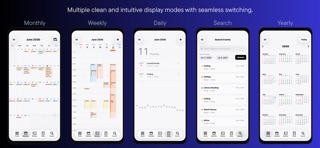
Enjoy a clean, ad-free experience with a minimalist design and spacious layout. Choose from 7 calendar views — Year, Month, 4 Weekly layouts, and Daily — to organize your schedule the way you like.
Roomy Calendar supports Apple Calendar (iCloud) and Google Calendar, allowing you to manage work, personal, and family schedules in one place. Switch between calendars easily and keep everything organized with Home Screen widgets, event search, event reuse, and flexible customization.
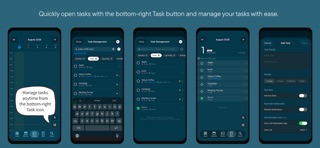
Sync with iOS Reminders to manage tasks and reminders alongside your calendar in one unified experience. Smart input features make creating events and tasks quick and intuitive. Simply enter information such as a date, time, and location, and Roomy Calendar helps organize it into a schedule.
You can also review detailed analysis reports of your schedules and tasks, helping you understand how you spend your time and make better use of it.
Personalize your calendar with custom calendar colors, calendar names, theme colors, background colors, event display options, and Light or Dark Mode. A playful cat paw animation adds a little fun to your daily planning.
## Perfect for
• Anyone looking for a simple and easy-to-read calendar
• Managing work, personal, and family schedules
• People who want to manage calendars and tasks together
• Weekly schedule planning
• Apple Calendar (iCloud) and Google Calendar users
• Home Screen widget users
• People who enjoy customizing their calendar
• Anyone who wants to better understand how they spend their time
• Anyone who prefers an ad-free calendar
## Features
■ 7 Calendar Views
• Year
• Month
• Weekly (7 Days)
• Weekly (Weekdays)
• Weekly (Next 5 Days)
• Weekly (Next 3 Days)
• Daily
■ Calendar & Schedule Management
• Multiple calendar management
• Create, delete, and rename calendars
• Change calendar colors
• Switch between calendars easily
• Apple Calendar (iCloud) support
• Google Calendar support
• Event search with AND search
• Reuse existing events
• Horizontal swipe navigation
• Notifications & app badge
■ Task Management
• Task management features
• Integration with iOS Reminders
• Create and manage tasks alongside your calendar
• Stamp animation for completed tasks
■ Smart Input
• Smart voice input
• Smart text input
• Custom text templates
• Quick and intuitive event creation
• Flexible date, time, and duration input
■ Customization
• Customize themes and backgrounds
• Light & Dark Mode
• Adjustable event ribbon opacity
• Custom display for multi-day all-day events
• Personalized calendar names and colors
■ Widgets & More
• Home Screen widgets
• View detailed analysis reports
• Japanese holidays & Rokuyo
• Japanese & English support
• Playful cat paw animations
## Your Data
Roomy Calendar does not collect personal information.
Your events are stored in Apple Calendar and synchronized with iCloud when enabled. Calendar data can also be synchronized with Google Calendar when connected.
Deleting the app does not delete your calendar data stored in your calendar accounts.
## Permissions
Calendar access is required to create, edit, and display events.
Reminders access is required to integrate tasks and reminders with Roomy Calendar.
Enable notifications if you would like to receive event reminders and task notifications.
Roomy Calendar is a simple, customizable calendar designed for clarity, flexibility, and ease of use.
Manage your schedules and tasks, understand how you spend your time, and personalize your calendar your way.
Enjoy a calendar you'll want to open every day.