Shipping Work Calculator is made and published by
Takao Ichimura.
AppBrain is an independent app data site and isn't affiliated with Takao Ichimura.
The app name, icon, screenshots and description belong to Takao Ichimura and are shown as
published on the App Store.
About Shipping Work Calculator
Shipping Work Calculator is an utilities app developed by Takao Ichimura.
What is the rating of Shipping Work Calculator?
Shipping Work Calculator has no ratings yet.
Is Shipping Work Calculator free?
Shipping Work Calculator is free. The app size is 16.39 MB. The latest version available is 1.3.0. The last update was on March 2, 2026.
What are the requirements for Shipping Work Calculator?
The app has a content rating of Everyone. The app has been available on the App Store since February 2022.
Description by Takao Ichimura(from the App Store)
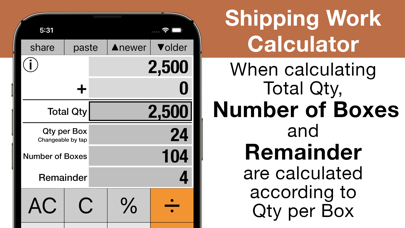
"Shipping Work Calculator" is an app that is useful for shipping work. Just calculate the total qty of products to ship, the number of boxes and the remainder will be calculated.
(How to use) 1) Check Qty per Box. The default is 24. If you would like to change it, tap the number. Then, a frame showing the changeable state will be attached to the display part, so enter a new number and tap again to erase the frame of the display part and the change is completed.
2) Enter Total Qty of products to to ship. If you enter it, Number of Boxes and Remainder are calculated at the same time.
For example, if you want to enter 2500, operate the keys [AC] [2] [5] [00] [=], (2500 + 0 = 2500). If the number of boxes is 24, the Number of Boxes is 104 and the Remainder is 4.
If you want to enter Total Qty of products shipped 250 pieces a day for 5 days, operate the keys [AC] [2] [5] [0] [x] [5] [=], (250 x 5 = 1250), to enter 1250 of Total Qty. If the number of boxes is 15, the Number of Boxes is 83 and the Remainder is 5.
(Note) - Operations such as four arithmetic calculations are the same as real general calculators (Compliant with calculator of company C). See the next page for calculation examples. - The decimal point is fixed as a point (.). - It is easy to calculate by changing one of the input values after calculation. Tap the value you want to change, enter a new value, and tap [=] key to complete the calculation. - Instead of tapping [=] key, you can tap the Total Qty display part, Number of Boxes display part, or Remainder display part. - Swipe the display while typing to clear the rightmost number. (Excluding Number of Boxes display part) - Call the calculation history with [▼ older] key. If you keep tapping, the old history will be recalled, if you go too far, you can return it with [▲ newer] key, and double tap it to return to the latest calculation history. - Share the displayed result with [share] key. - When you quit this app, all calculation history will be deleted. - The developer assumes no responsibility for any loss or claims by third parties which may arise from the use of this app.
Each subscription will automatically renew 3 days before the expiration date for
the same time period. Subscriptions can be cancelled at any time before the renewal.