

Shortwave - AI Email
Shortwave - AI Email is made and published by Shortwave Communications, Inc. AppBrain is an independent app data site and isn't affiliated with Shortwave Communications, Inc. The app name, icon, screenshots and description belong to Shortwave Communications, Inc. and are shown as published on the App Store.
AppBrain's verdict
Loved by users- Rating on App Store
- 4.75
- 746 ratings
- Last updated
- July 2, 2026
- Size
- 25.9 MB
Users love it: 4.7 stars from 746 ratings.
User feedback
Ratings and reviews on the App StoreComments on Shortwave - AI Email for iOS
We don't have enough comments to show example comments. Please check back later.
Store listing
By Shortwave Communications, Inc., from the App Store




Description by Shortwave Communications, Inc. Written by the developer, not by AppBrain. Click to read.
"The AI revolution is coming for your email" – Business Insider
"This app is like ChatGPT for your email, and it changed my life" – Digital Trends
"The Google Inbox successor I’ve been waiting for" – The Verge
YOUR AI EMAIL ASSISTANT
Supercharge your productivity with advanced AI & real-time team collaboration. Write emails, improve drafts, schedule meetings, analyze threads, translate text, and more using Shortwave’s powerful AI Assistant.
ORGANIZE YOUR INBOX WITH AI
With 1-tap, Shortwave’s AI Assistant can identify urgent emails, group threads into todos, and sweep away the remaining clutter so you can get to inbox zero with zero effort.
SHARE & DISCUSS EMAILS WITH YOUR TEAM
Get the right people involved and bring everyone up to speed fast with private team comments and live thread sharing. Assign emails to teammates to delegate next steps.
WRITE EMAILS WITH AI
Write personalized emails with AI in seconds, or use instant AI replies to get full drafts in just one tap. Shortwave learns your unique writing style and even facts about you from the emails you send.
IMPROVE AND PROOFREAD DRAFTS
Complete your drafts, adjust length and tone, translate into other languages, and more with a built-in AI editor.
SEARCH AND FIND ANSWERS
Use AI-powered search to find emails fast, or to analyze your entire team's emails & attachments for the answers you need
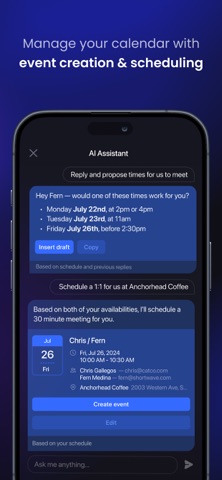
SCHEDULE MEETINGS WITH AI
Spend less time juggling calendars with AI-powered scheduling features. Create events, send AI-generated scheduling emails, accept calendar events with one click, and more.
GET ORGANIZED WITH SPLITS AND BUNDLES
Focus your time & attention by dividing your inbox into tabs for important emails, specific senders, labels & even custom queries. Use bundles for fast triage of promotions, newsletters, updates, and other automated emails.
TURN EMAILS INTO TODOS
Transform your overflowing inbox into an organized list of action items. Group, rename, prioritize, and add notes, right in your inbox.
SET DELIVERY SCHEDULES
Avoid interruptions by deferring when emails arrive in your inbox, so you only receive emails when you want them.
VIEW READ STATUSES
See when people read your emails to get the context you need to prioritize your time and write effective follow-ups. Close more deals and collaborate better with your team.
SCREEN UNWANTED SENDERS
Guard your inbox from noise with one-click block and unsubscribe.
FINE-TUNE PUSH NOTIFICATIONS
Granular push controls let you minimize distractions with personalized alerts for specific senders and types of emails.
CUSTOMIZE EVERYTHING
Customize AI prompts and automate your team’s work with AI Snippets & AI Automations. Adjust tons of details in settings, and make Shortwave yours with custom colors and beautiful light & dark modes.
MANAGE MULTIPLE ACCOUNTS
Organize all of your Gmail accounts from one app and seamlessly switch between them in a single swipe.
SYNCS WITH GMAIL
Migrate seamlessly to Shortwave from your existing Gmail or Google Workspace account with all of your labels, filters, and other settings imported.
If you have questions or want to learn more about Shortwave and best practices, you can find resources here: https://www.shortwave.com/docs/
Safety and technology
Found in the app by AppBrain- Price
- Free
- App size
- 25.9 MB
- Content rating
- Everyone
Technologies used by Shortwave - AI Email
Releases
Updates seen on the App Store- Version
- 2026.06.02
- Launched
- January 2022
No changelog data
Alternatives
Similar apps and more from Shortwave Communications, Inc.Alternatives to Shortwave - AI Email






Rankings
App Store top chartsApp Store Rankings for Shortwave - AI Email
About the app and developer
About Shortwave - AI Email
Shortwave - AI Email is a productivity app developed by Shortwave Communications, Inc.
User Ratings
Shortwave - AI Email is rated 4.75 out of 5 stars. The rating is based on 750 ratings.
App Information
Shortwave - AI Email is freely available from the App Store. The app size is 25.94 MB. The latest version available is 2026.06.02. The last update was on July 2, 2026.
Technical Requirements
The app has a content rating of Everyone. The app has been available on the App Store since January 2022.
Developer information for Shortwave Communications, Inc.
Shortwave Communications, Inc.
Address:
Frequently asked questions about Shortwave - AI Email
Is Shortwave - AI Email free?
Yes. Shortwave - AI Email is free on the App Store.
Is Shortwave - AI Email still available?
Yes. Shortwave - AI Email is on the App Store, and the last update we saw was on July 2, 2026.
How large is Shortwave - AI Email?
Shortwave - AI Email is 25.94 MB.
Is Shortwave - AI Email suitable for children?
App Store rates the content of Shortwave - AI Email as suitable for everyone.
How do people rate Shortwave - AI Email?
Shortwave - AI Email scores 4.75 out of 5 stars, from 746 ratings on the App Store.
Who made Shortwave - AI Email?
Shortwave - AI Email was developed by Shortwave Communications, Inc. It is listed in the productivity category on the App Store.
What are the best alternatives to Shortwave - AI Email?
People looking at Shortwave - AI Email also look at these productivity apps: HEY Email, Notion Calendar, Twobird, Superhuman Mail, Canary Mail – AI Email.