

Side Screen: Game Translator
Side Screen: Game Translator is made and published by ERTUGRUL GULERYUZ. AppBrain is an independent app data site and isn't affiliated with ERTUGRUL GULERYUZ. The app name, icon, screenshots and description belong to ERTUGRUL GULERYUZ and are shown as published on the App Store.
AppBrain's verdict
New- Rating on App Store
- 5.00
- 1 ratings
- Last updated
- October 21, 2026
Side Screen: Game Translator came out 82 days ago. It doesn't have enough ratings yet to judge what users think.
Rankings
App Store top chartsApp Store Rankings for Side Screen: Game Translator
Competitors
Similar apps and more from ERTUGRUL GULERYUZMore from ERTUGRUL GULERYUZ


Releases
Updates seen on the App Store- Version
- 2.0.6
- Launched
- August 2026
No changelog data
User feedback
Ratings and reviews on the App StoreComments on Side Screen: Game Translator for iOS
We don't have enough comments to show example comments. Please check back later.
Technology
Found in the app by AppBrain- Price
- Free
- App size
- 616.1 MB
- Content rating
- High
Technologies used by Side Screen: Game Translator
About the app and developer
About Side Screen: Game Translator
Side Screen: Game Translator is an utilities app developed by ERTUGRUL GULERYUZ.
User Ratings
Side Screen: Game Translator is rated 5.00 out of 5 stars. The rating is based on one rating ratings.
App Information
Side Screen: Game Translator is freely available from the App Store. The app size is 616.08 MB. The latest version available is 2.0.6. The last update was on October 21, 2026.
Technical Requirements
The app has a content rating of High Maturity. The app has been available on the App Store since August 2026.
Developer information for ERTUGRUL GULERYUZ
Address:
Frequently asked questions about Side Screen: Game Translator
Is Side Screen: Game Translator free?
Yes. Side Screen: Game Translator is free on the App Store.
Is Side Screen: Game Translator still available?
Yes. Side Screen: Game Translator is on the App Store, and the last update we saw was on October 21, 2026.
How large is Side Screen: Game Translator?
Side Screen: Game Translator is 616.08 MB.
Is Side Screen: Game Translator suitable for children?
App Store gives Side Screen: Game Translator a high maturity rating. It is meant for adults.
How do people rate Side Screen: Game Translator?
Side Screen: Game Translator has one rating of 5.00 stars on the App Store.
Who made Side Screen: Game Translator?
Side Screen: Game Translator was developed by ERTUGRUL GULERYUZ. It is listed in the utilities category on the App Store.
Store listing
By ERTUGRUL GULERYUZ, from the App Store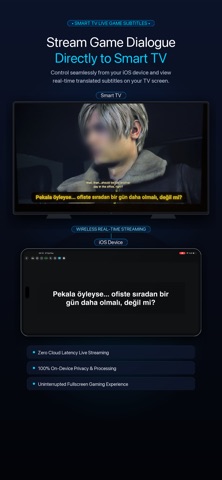


Description by ERTUGRUL GULERYUZ Written by the developer, not by AppBrain. Click to read.
IMPORTANT NOTICE: Exclusively designed as a companion for external hardware (Console PX5 / PX4, Mac, and PC). Does NOT translate native iOS mobile games. Play on your TV or PC while your iOS device translates in real time.
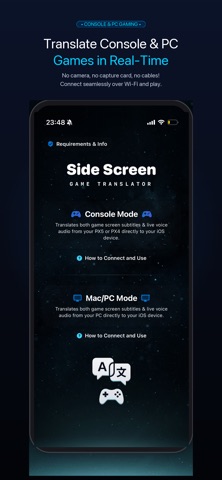
Play console and PC games in your language in real-time. Side Screen captures game visuals and audio over Wi-Fi, delivering instant subtitle translation, live AI voice dubbing, and direct Smart TV subtitle streaming without cameras, microphones, or capture cards.
Powered by Apple Neural Engine and local AI models, text, speech, and voiceovers are processed entirely on-device with zero cloud latency and complete privacy.
FREE TO USE WITH REWARDED ADS OR OPTIONAL UNLIMITED PRO ACCESS
CORE MODES:
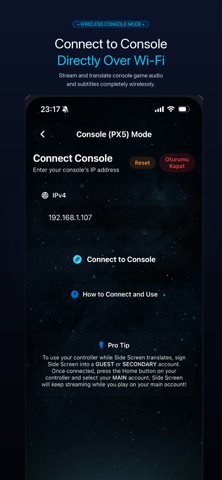
- Console Mode (Headless Remote Play)
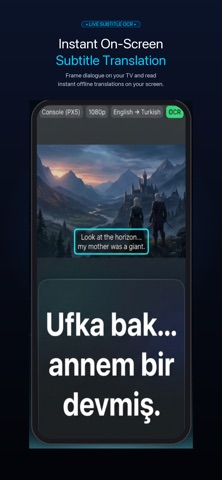
Connect via local network. Side Screen streams game data in the background. Frame subtitles for instant OCR translation, listen to digital audio for speech translation (STT), or hear live voice dubbing (TTS). Camera-free and wireless!
- External PC & Mac Mode
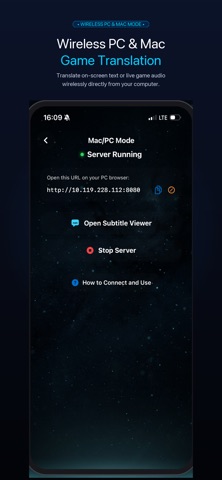
Connect your computer over Wi-Fi. Side Screen captures screen text (OCR) and audio (STT) for instant translation and voice dubbing straight to your device.
- Smart TV Companion Mode (NEW)
Cast live translated subtitles directly onto your Smart TV screen over your local network. Enjoy uninterrupted big-screen gaming while Side Screen handles real-time translation in the background.
WHY SIDE SCREEN?
- Smart TV Subtitle Streaming: Broadcast translated subtitles directly to your TV over Wi-Fi. Keep your eyes on the big screen!
- Direct Digital Capture: Video and audio captured over Wi-Fi. No cameras, lighting issues, or background noise.
- Triple-Engine Translation: Fast OCR for subtitles, STT for live dialogue, and real-time AI Voice Dubbing (TTS).
- On-Device Neural AI Dubbing: In-game dialogue spoken aloud in your language with natural on-device neural voices.
- Context-Aware Engine: Considers previous dialogue lines for accurate translations and character consistency.
- Private & On-Device: Video and audio never leave your device. All AI models run locally without external cloud servers.
- Flexible Access: Translate free by extending time with short rewarded ads, or unlock Side Screen Pro for unlimited access.
SIDE SCREEN PRO (OPTIONAL SUBSCRIPTION):
- Unlimited translation time with no limits or countdowns
- 100% ad-free experience with zero waiting periods
- Auto-renews weekly, cancel anytime in Apple ID Settings
FREQUENTLY ASKED QUESTIONS (FAQ):
Q: Can I display subtitles directly on my Smart TV?
A: Yes! Side Screen streams live translated subtitles directly to your Smart TV over Wi-Fi, letting you read dialogue on the big screen without looking down at your phone.
Q: How does real-time voice dubbing work?
A: Side Screen converts translated dialogue into natural speech using on-device neural TTS models.
Q: Do I need a camera, capture card, or HDMI splitter?
A: No. Side Screen acts as a wireless Remote Play receiver over Wi-Fi. While you play on your TV, your device displays translations and speaks dialogue aloud.
Q: Does translation run on-device?
A: Yes. All OCR, speech, translation, and dubbing run on-device via Apple Neural Engine with zero cloud lag and full privacy.
SUPPORTED LANGUAGES:
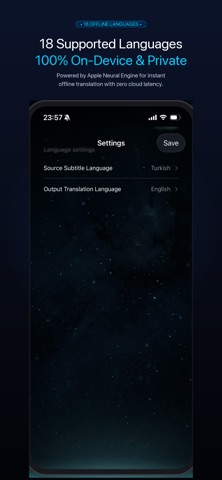
- Text & Speech (18 Languages): English, Spanish, French, German, Italian, Portuguese, Turkish, Russian, Chinese, Japanese, Korean, Arabic, Dutch, Indonesian, Polish, Thai, Ukrainian, Vietnamese.
- Live Neural Dubbing (TTS): Turkish, English, Chinese, Arabic, Polish.
Note: Requires downloaded Apple language packs for on-device translation.
LEGAL & TERMS:
- Privacy Policy: https://izlemvecikarim.blogspot.com/2026/08/privacy-policy-for-side-screen-game.html
- Terms of Use (EULA): https://www.apple.com/legal/internet-services/itunes/dev/stdeula/