

Sift: PDF Scanner & OCR
Sift: PDF Scanner & OCR is made and published by Anshul Jain. AppBrain is an independent app data site and isn't affiliated with Anshul Jain. The app name, icon, screenshots and description belong to Anshul Jain and are shown as published on the App Store.
AppBrain's verdict
- Last updated
- August 24, 2026
Rankings
App Store top chartsApp Store Rankings for Sift: PDF Scanner & OCR
Competitors
Similar apps and more from Anshul JainAlternatives to Sift: PDF Scanner & OCR


More from Anshul Jain


Releases
Updates seen on the App Store- Version
- 1.2
- Launched
- July 2026
No changelog data
User feedback
Ratings and reviews on the App StoreComments on Sift: PDF Scanner & OCR for iOS
We don't have enough comments to show example comments. Please check back later.
Technology
Found in the app by AppBrain- Price
- Free
- App size
- 2.31 MB
- Content rating
- Everyone
Technologies used by Sift: PDF Scanner & OCR
About the app and developer
About Sift: PDF Scanner & OCR
Sift: PDF Scanner & OCR is a productivity app developed by Anshul Jain.
User Ratings
The app has no ratings yet.
App Information
Sift: PDF Scanner & OCR is freely available from the App Store. The app size is 2.31 MB. The latest version available is 1.2. The last update was on August 24, 2026.
Technical Requirements
The app has a content rating of Everyone. The app has been available on the App Store since July 2026.
Developer information for Anshul Jain
Address:
Frequently asked questions about Sift: PDF Scanner & OCR
Is Sift: PDF Scanner & OCR free?
Yes. Sift: PDF Scanner & OCR is free on the App Store.
Is Sift: PDF Scanner & OCR still available?
Yes. Sift: PDF Scanner & OCR is on the App Store, and the last update we saw was on August 24, 2026.
How large is Sift: PDF Scanner & OCR?
Sift: PDF Scanner & OCR is 2.31 MB.
Is Sift: PDF Scanner & OCR suitable for children?
App Store rates the content of Sift: PDF Scanner & OCR as suitable for everyone.
Who made Sift: PDF Scanner & OCR?
Sift: PDF Scanner & OCR was developed by Anshul Jain. It is listed in the productivity category on the App Store.
What are the best alternatives to Sift: PDF Scanner & OCR?
People looking at Sift: PDF Scanner & OCR also look at these productivity apps: Mindra: App Blocker & Detox, Filament Tracker: SpoolDex, Scanbox: PDF Doc Scanner, Document Lens - OCR Scanner, Scanyra: PDF & Receipt Scanner.
Store listing
By Anshul Jain, from the App Store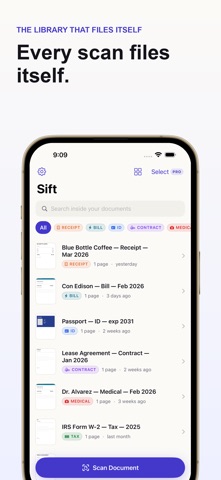

Description by Anshul Jain Written by the developer, not by AppBrain. Click to read.
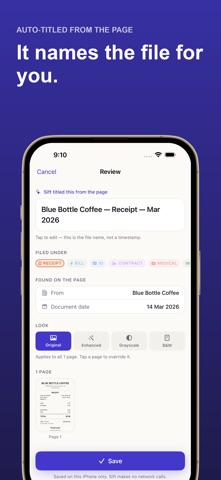
Sift uses what it just read. Scan a receipt and it saves as "Blue Bottle Coffee - Receipt - Mar 2026", already filed under Receipts. You tap Save, not Rename.
Then, weeks later, you swipe down on your Home Screen, type "lease", and there it is - because Sift indexes the text inside every scan into iOS Spotlight.
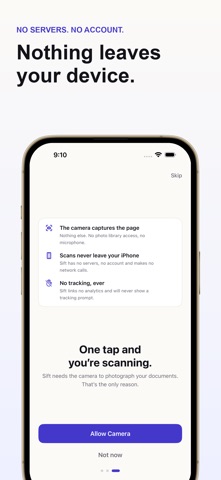
All of it happens on your iPhone. Sift has no servers, no account, and makes no network calls.
THE LIBRARY THAT FILES ITSELF
• Automatic titles - Sift finds the letterhead, the vendor, and the date, and writes the title for you
• Automatic filing - receipts, bills, IDs, contracts, medical records, tax documents, notes
• Everything editable - it's a suggestion, not a decision. Change anything before you save.
FIND ANYTHING, INSTANTLY
• Search the text inside your documents, not just their filenames
• Find scans from your Home Screen with Spotlight - no need to open Sift first
• Every result opens straight to the document
SCANS THAT WORK EVERYWHERE ELSE
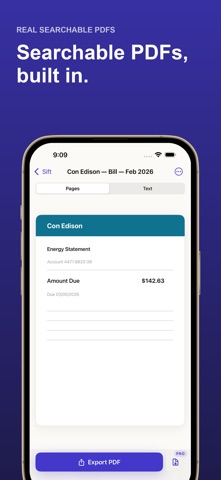
• Real searchable PDFs - Sift writes an invisible text layer into every export, so you can select and search the text in Preview, Acrobat, or Files. Not just a picture of a page.
• Clean captures with automatic edge detection and perspective correction
• Four filters - Original, Enhanced, Grayscale, Black & White - applied to every page at once, not one at a time
• Import what you already have - photos and PDFs from Photos or Files, read and filed the same way
• Sign and mark up a page with your finger - save your signature once and stamp it on any document
• Reorder, rotate, split, and drop pages; export as PDF, compressed PDF, or JPG
• Fine-tune brightness and contrast on top of the four filters
ASK YOUR DOCUMENTS (ON SUPPORTED DEVICES)
On iPhones with Apple Intelligence, ask Sift about any scan - "what's the total?", "when does this lease end?" - and get answers from that document, generated entirely on your device. If the answer isn't in the document, Sift says so instead of guessing. No cloud AI, ever.
SCAN FROM ANYWHERE
• "Hey Siri, scan with Sift"
• Add scanning to a Shortcut, your Action Button, or Control Center
PRIVATE BY CONSTRUCTION, NOT BY PROMISE
• No servers. No account. No sign-up. No network calls.
• No analytics. No ads. No third-party SDKs of any kind.
• No tracking permission prompt - because there is nothing in Sift to track you with.
• Your IDs, contracts, and medical records never leave your iPhone. They can't - there's nowhere for them to go.
• Want Sift locked? Long-press its icon and choose Require Face ID - iOS locks it system-wide
FREE FOREVER - GENUINELY
Unlimited scanning. Unlimited pages. Text recognition. Automatic titling. Automatic filing. Search. Spotlight. PDF export. No limits, no watermark, no ads.
We can give this away because it all runs on your device and costs us nothing to serve. There is no paywall in onboarding, ever, and nothing above is gated. Sift shows the price twice on its own, after it titles your first scan and after your first export. Both have a full-size Not now and block nothing.
SIFT PRO (OPTIONAL)
Adds encrypted backup & restore (pack your whole library into one password-protected file you save wherever you like), document expiry reminders, batch tools, text export, watermarked exports, and password-protected PDFs. Every plan and its true cost is shown on one screen, with the price printed on the button. Weekly or Yearly (each with a 7-day free trial you have to actually choose), or a one-time Lifetime purchase in Settings.
Subscriptions auto-renew unless cancelled at least 24 hours before the period ends, and are managed in your Apple Account settings. Lifetime is a one-time purchase and never renews.
Privacy Policy: https://ajain26.github.io/app-policies/sift/privacy-policy.html
Terms of Use: https://www.apple.com/legal/internet-services/itunes/dev/stdeula/