

Scanbox: PDF Doc Scanner
Scanbox: PDF Doc Scanner is made and published by SEONYONG LEE. AppBrain is an independent app data site and isn't affiliated with SEONYONG LEE. The app name, icon, screenshots and description belong to SEONYONG LEE and are shown as published on the App Store.
AppBrain's verdict
- Last updated
- October 26, 2026
- Size
- 69.6 MB
User feedback
Ratings and reviews on the App StoreComments on Scanbox: PDF Doc Scanner for iOS
We don't have enough comments to show example comments. Please check back later.
Store listing
By SEONYONG LEE, from the App Store


Description by SEONYONG LEE Written by the developer, not by AppBrain. Click to read.
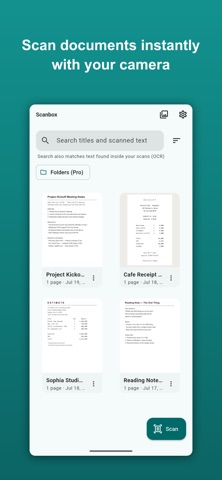
Scan any document with automatic edge detection, run OCR on-device, and export a searchable, watermark-free PDF. Your documents never leave your phone: no cloud uploads, no account.
WHY SCANBOX
• 100% on-device — capture, OCR and PDF all happen locally. Nothing is uploaded to a server.
• No watermark, ever — free exports are clean and professional.
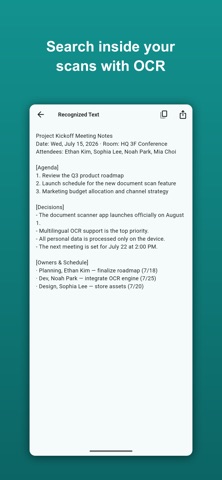
• OCR is free — extract and search the text inside your scans, no paywall.
• One-time purchase — no subscriptions, ever.
FEATURES
• Automatic edge detection and perspective correction
• Crop, rotate, reorder and enhance pages
• On-device OCR in Korean, English, Japanese and Chinese
• Full-text search across your library — even text inside scans
• Export a searchable PDF, JPEG or PNG
• Share anywhere with the system share sheet
• Clean, modern, distraction-free design
PRO — one-time lifetime unlock (no subscription)
• Remove ads
• Batch-scan pages fast
• Organize with folders
• Password-lock your PDFs
• Advanced export (quality, page size, compression)
OCR, searchable PDF and watermark-free exports are FREE forever. Pro just adds more power and convenience with a single purchase.
Great for receipts, contracts, IDs, whiteboards, notes, and any document you'd rather not upload to a cloud scanner.
Safety and technology
Found in the app by AppBrain- Price
- Free
- App size
- 69.6 MB
- Content rating
- Everyone
Technologies used by Scanbox: PDF Doc Scanner
Releases
Updates seen on the App Store- Version
- 1.0.7
- Launched
- July 2026
No changelog data
Alternatives
Similar apps and more from SEONYONG LEE


Rankings
App Store top chartsApp Store Rankings for Scanbox: PDF Doc Scanner
About the app and developer
About Scanbox: PDF Doc Scanner
Scanbox: PDF Doc Scanner is a productivity app developed by SEONYONG LEE.
User Ratings
The app has no ratings yet.
App Information
Scanbox: PDF Doc Scanner is freely available from the App Store. The app size is 69.61 MB. The latest version available is 1.0.7. The last update was on October 26, 2026.
Technical Requirements
The app has a content rating of Everyone. The app has been available on the App Store since July 2026.
Developer information for SEONYONG LEE
Address:
Frequently asked questions about Scanbox: PDF Doc Scanner
Is Scanbox: PDF Doc Scanner free?
Yes. Scanbox: PDF Doc Scanner is free on the App Store.
Is Scanbox: PDF Doc Scanner still available?
Yes. Scanbox: PDF Doc Scanner is on the App Store, and the last update we saw was on October 26, 2026.
How large is Scanbox: PDF Doc Scanner?
Scanbox: PDF Doc Scanner is 69.61 MB.
Is Scanbox: PDF Doc Scanner suitable for children?
App Store rates the content of Scanbox: PDF Doc Scanner as suitable for everyone.
Who made Scanbox: PDF Doc Scanner?
Scanbox: PDF Doc Scanner was developed by SEONYONG LEE. It is listed in the productivity category on the App Store.
What are the best alternatives to Scanbox: PDF Doc Scanner?
People looking at Scanbox: PDF Doc Scanner also look at these productivity apps: PDF Scan: Sign, OCR & Merge, Scanling – PDF Scanner & OCR, Scan to PDF: Sign & Redact, Scan Boss for Dropbox, MailAmericas Go!.