

Sign PDF: Document Signer
Sign PDF: Document Signer is made and published by RUEBEN ANSOLIWEN AKANKOBATENG. AppBrain is an independent app data site and isn't affiliated with RUEBEN ANSOLIWEN AKANKOBATENG. The app name, icon, screenshots and description belong to RUEBEN ANSOLIWEN AKANKOBATENG and are shown as published on the App Store.
AppBrain's verdict
- Last updated
- September 11, 2026
Rankings
App Store top chartsApp Store Rankings for Sign PDF: Document Signer
Competitors
Similar apps and more from RUEBEN ANSOLIWEN AKANKOBATENGAlternatives to Sign PDF: Document Signer


More from RUEBEN ANSOLIWEN AKANKOBATENG


Releases
Updates seen on the App Store- Version
- 1.0.5
- Launched
- March 2026
No changelog data
User feedback
Ratings and reviews on the App StoreComments on Sign PDF: Document Signer for iOS
We don't have enough comments to show example comments. Please check back later.
Technology
Found in the app by AppBrain- Price
- Free
- App size
- 14.6 MB
- Content rating
- Everyone
Technologies used by Sign PDF: Document Signer
About the app and developer
About Sign PDF: Document Signer
Sign PDF: Document Signer is a productivity app developed by RUEBEN ANSOLIWEN AKANKOBATENG.
What is the rating of Sign PDF: Document Signer?
Sign PDF: Document Signer has no ratings yet.
Is Sign PDF: Document Signer free?
Sign PDF: Document Signer is free. The app size is 14.63 MB. The latest version available is 1.0.5. The last update was on September 11, 2026.
What are the requirements for Sign PDF: Document Signer?
The app has a content rating of Everyone. The app has been available on the App Store since March 2026.
Developer information for RUEBEN ANSOLIWEN AKANKOBATENG
Address:
Frequently asked questions about Sign PDF: Document Signer
Is Sign PDF: Document Signer free?
Yes. Sign PDF: Document Signer is free on the App Store.
Is Sign PDF: Document Signer still available?
Yes. Sign PDF: Document Signer is on the App Store, and the last update we saw was on September 11, 2026.
How large is Sign PDF: Document Signer?
Sign PDF: Document Signer is 14.63 MB.
Is Sign PDF: Document Signer suitable for children?
App Store rates the content of Sign PDF: Document Signer as suitable for everyone.
Who made Sign PDF: Document Signer?
Sign PDF: Document Signer was developed by RUEBEN ANSOLIWEN AKANKOBATENG. It is listed in the productivity category on the App Store.
What are the best alternatives to Sign PDF: Document Signer?
People looking at Sign PDF: Document Signer also look at these productivity apps: SnapInk - Sign PDF Documents, Sign Wise: AI Contract Review, Notely - Notes & PDF app, Checked: To Do List & Tasks, 1150 18th.
Store listing
By RUEBEN ANSOLIWEN AKANKOBATENG, from the App Store

Description by RUEBEN ANSOLIWEN AKANKOBATENG Written by the developer, not by AppBrain. Click to read.
No printer. No scanner. No creating an account.
HOW IT WORKS
1. Import any PDF from Files, email, or another app
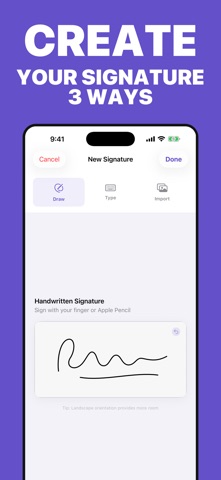
2. Create your signature draw it with your finger or Apple Pencil, type your name in an elegant script, or import a photo of your real signature
3. Drag it exactly where it belongs, resize it to fit, and add a date stamp if you need one
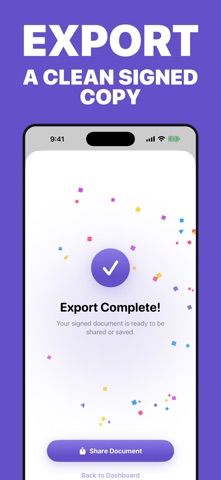
4. Export and share a clean signed copy anywhere
WHY PEOPLE CHOOSE SIGN PDF
• THREE WAYS TO SIGN Draw naturally with pressure-sensitive Apple Pencil support, type your name in a beautiful script font, or import an image of your existing signature.
• PIXEL-PERFECT PLACEMENT Drag, resize, and position your signature precisely on any page of the document. Add an automatic date stamp with one tap.
• YOUR ORIGINAL IS ALWAYS SAFE Sign PDF creates a new signed copy every time. Your source document is never modified.
• WORKS WITH MULTI-PAGE DOCUMENTS Navigate any PDF and sign exactly the pages that need it: leases, contracts, NDAs, permission slips, invoices, offer letters.
• SHARE ANYWHERE Send your signed document straight back through Mail, Messages, WhatsApp, or save it to Files and iCloud.
• PRIVATE BY DESIGN Your documents are processed on your device. No account required.
PERFECT FOR
Renters signing leases • Freelancers returning contracts • Parents signing school forms • Job seekers signing offer letters • Small business owners closing deals on the go
FREE & PREMIUM
Your first signed document is free experience the full app before you decide. Go Premium for unlimited signing and exporting.
Download Sign PDF and send that document back in the next two minutes.
• Terms of Use: https://www.apple.com/legal/internet-services/itunes/dev/stdeula/
• Privacy Policy: https://docs.google.com/document/d/1Y4Mhhyeza2RJlpv2dAGQ2yM7A4Lisr6Y8B_jnYcvg-c/edit?usp=sharing