

Sign & Seal: Batch Stamp PDFs
Sign & Seal: Batch Stamp PDFs is made and published by Tevfik Asgin. AppBrain is an independent app data site and isn't affiliated with Tevfik Asgin. The app name, icon, screenshots and description belong to Tevfik Asgin and are shown as published on the App Store.
AppBrain's verdict
- Last updated
- May 24, 2026
Rankings
App Store top chartsApp Store Rankings for Sign & Seal: Batch Stamp PDFs
Competitors
Similar apps and more from Tevfik Asgin










Releases
Updates seen on the App Store- Version
- 1.0.1
- Launched
- May 2026
No changelog data
User feedback
Ratings and reviews on the App StoreComments on Sign & Seal: Batch Stamp PDFs for iOS
We don't have enough comments to show example comments. Please check back later.
Technology
Found in the app by AppBrain- Price
- Free
- App size
- 72.1 MB
- Content rating
- Everyone
Technologies used by Sign & Seal: Batch Stamp PDFs
About the app and developer
About Sign & Seal: Batch Stamp PDFs
Sign & Seal: Batch Stamp PDFs is an utilities app developed by Tevfik Asgin.
What is the rating of Sign & Seal: Batch Stamp PDFs?
Sign & Seal: Batch Stamp PDFs has no ratings yet.
Is Sign & Seal: Batch Stamp PDFs free?
Sign & Seal: Batch Stamp PDFs is free. The app size is 72.13 MB. The latest version available is 1.0.1. The last update was on May 24, 2026.
What are the requirements for Sign & Seal: Batch Stamp PDFs?
The app has a content rating of Everyone. The app has been available on the App Store since May 2026.
Developer information for Tevfik Asgin
Address:
Frequently asked questions about Sign & Seal: Batch Stamp PDFs
Is Sign & Seal: Batch Stamp PDFs free?
Yes. Sign & Seal: Batch Stamp PDFs is free on the App Store.
Is Sign & Seal: Batch Stamp PDFs still available?
Yes. Sign & Seal: Batch Stamp PDFs is on the App Store, and the last update we saw was on May 24, 2026.
How large is Sign & Seal: Batch Stamp PDFs?
Sign & Seal: Batch Stamp PDFs is 72.13 MB.
Is Sign & Seal: Batch Stamp PDFs suitable for children?
App Store rates the content of Sign & Seal: Batch Stamp PDFs as suitable for everyone.
Who made Sign & Seal: Batch Stamp PDFs?
Sign & Seal: Batch Stamp PDFs was developed by Tevfik Asgin. It is listed in the utilities category on the App Store.
What are the best alternatives to Sign & Seal: Batch Stamp PDFs?
People looking at Sign & Seal: Batch Stamp PDFs also look at these utilities apps: Keep Trace - Driver Companion, AutoCam: Smart Dash Cam, StampDoc, OC Scanner - Scan PDF, in-cos Asia.
Store listing
By Tevfik Asgin, from the App Store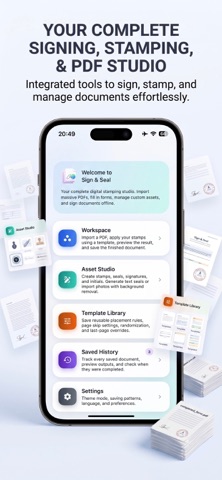



Description by Tevfik Asgin Written by the developer, not by AppBrain. Click to read.
Create custom stamps from scratch, draw or type signatures, scan real stamps from photos, and place them directly onto PDF documents. For repeated work, build reusable templates that apply stamps and signatures to the right pages automatically. For high-volume workflows, process multiple PDF files in batch and export the finished documents together.
Create stamps and seals
- Design digital stamps with text, shapes, borders, colors, and official-looking layouts.
- Create business stamps, approval stamps, document control stamps, signatures, initials, and seals.
- Keep all created assets in a reusable stamp and signature library.
Sign and stamp PDFs
- Open a PDF and place stamps or signatures on any page.
- Drag, resize, rotate, and adjust placed assets.
- Preview the final look before exporting.
- Save stamped PDFs to your device.
Templates for repeated PDF workflows
- Build stamping templates for contracts, forms, invoices, approvals, and office documents.
- Apply stamps and signatures to first pages, body pages, last pages, or every page.
- Reuse the same layout whenever you process similar documents.
Batch PDF processing
- Select multiple PDF files.
- Apply one template across the entire batch.
- Review processed documents.
- Save the batch to history or export all processed PDFs as a ZIP file.
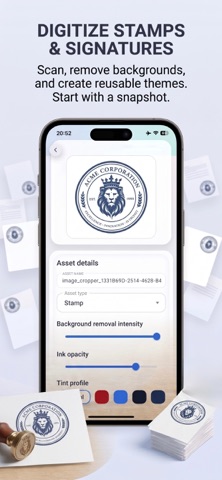
Scan stamps and signatures
- Import a photo of a physical stamp or handwritten signature.
- Extract the ink from the background.
- Turn real-world marks into reusable digital assets.
Saved history
- Keep a local history of saved documents.
- Preview completed PDFs later.
- Re-export saved PDFs when needed.
- Review batch results from a single saved history item.
Privacy-first document processing
Sign & Seal is built for sensitive document work. PDF stamping, rendering, and export happen locally on your device. Your documents are not uploaded to a cloud server by the app.
Use Sign & Seal to create, apply, save, and export polished stamped PDFs for contracts, forms, approvals, invoices, office documents, and recurring document workflows.
Terms of Use
By downloading or using this app, you agree to the Apple Standard End User License Agreement (EULA):
https://www.apple.com/legal/internet-services/itunes/dev/stdeula/