

Signhost - digital signing
Signhost - digital signing is made and published by Evidos. AppBrain is an independent app data site and isn't affiliated with Evidos. The app name, icon, screenshots and description belong to Evidos and are shown as published on the App Store.
AppBrain's verdict
Established- Rating on App Store
- 3.67
- 3 ratings
- Last updated
- May 12, 2026
It doesn't have enough ratings yet to judge what users think.
Rankings
App Store top chartsApp Store Rankings for Signhost - digital signing
Competitors
Similar apps and more from EvidosAlternatives to Signhost - digital signing



Releases
Updates seen on the App Store- Version
- 3.2.1
- Launched
- May 2021
No changelog data
User feedback
Ratings and reviews on the App StoreComments on Signhost - digital signing for iOS
We don't have enough comments to show example comments. Please check back later.
Technology
Found in the app by AppBrain- Price
- Free
- App size
- 84.8 MB
- Content rating
- Everyone
Technologies used by Signhost - digital signing
About the app and developer
About Signhost - digital signing
Signhost - digital signing is a productivity app developed by Evidos.
User Ratings
Signhost - digital signing is rated 3.67 out of 5 stars. The rating is based on 3 ratings.
App Information
Signhost - digital signing is freely available from the App Store. The app size is 84.77 MB. The latest version available is 3.2.1. The last update was on May 12, 2026.
Technical Requirements
The app has a content rating of Everyone. The app has been available on the App Store since May 2021.
Developer information for Evidos
Address:
Frequently asked questions about Signhost - digital signing
Is Signhost - digital signing free?
Yes. Signhost - digital signing is free on the App Store.
Is Signhost - digital signing still available?
Yes. Signhost - digital signing is on the App Store, and the last update we saw was on May 12, 2026.
How large is Signhost - digital signing?
Signhost - digital signing is 84.77 MB.
Is Signhost - digital signing suitable for children?
App Store rates the content of Signhost - digital signing as suitable for everyone.
How do people rate Signhost - digital signing?
Signhost - digital signing scores 3.67 out of 5 stars, from 3 ratings on the App Store.
Who made Signhost - digital signing?
Signhost - digital signing was developed by Evidos. It is listed in the productivity category on the App Store.
What are the best alternatives to Signhost - digital signing?
People looking at Signhost - digital signing also look at these productivity apps: De EV app, DocuRail, FBTO Care app, Menzis app, Dictation Pro - Voice to Text.
Store listing
By Evidos, from the App Store



Description by Evidos Written by the developer, not by AppBrain. Click to read.
Getting documents digitally signed doesn't have to be difficult. With the Signhost app you can easily sign documents or send a signing request.
Unique benefits of the Signhost app
► Digitally and legally valid signing
► Easily send or sign contracts anywhere
► Directly send the document to the signatory(s)
► Applicable for every contract
► Supported by a major Dutch player in digital signing.
How do you use the Signhost App?
Signhost is the market leader in privacy-friendly sending and signing of various documents for various industries. Signhost' clients are active in the legal profession, brokerage, SME and much more. In addition, private individuals also use the app to sign private contracts, for example. This way you can sell or lend your products or services with a safe feeling.
The advantages of the Signhost app as a sender
► Easily and directly access the document
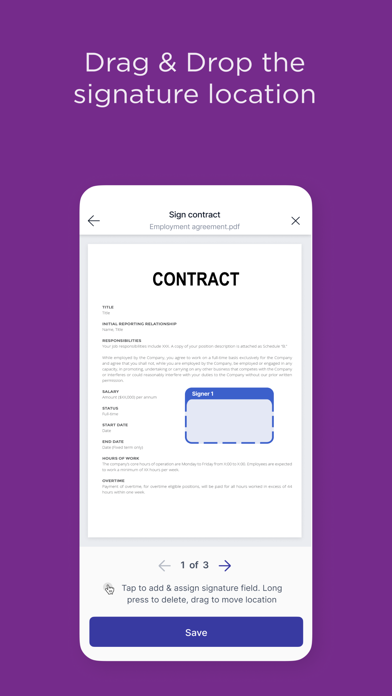
► Easily determine the location of the signature in the document
► Check the identity via iDIN, itsme and SMS
► Create a signing request quickly and easily
► Easily send your document on the go
► Recipients can sign immediately
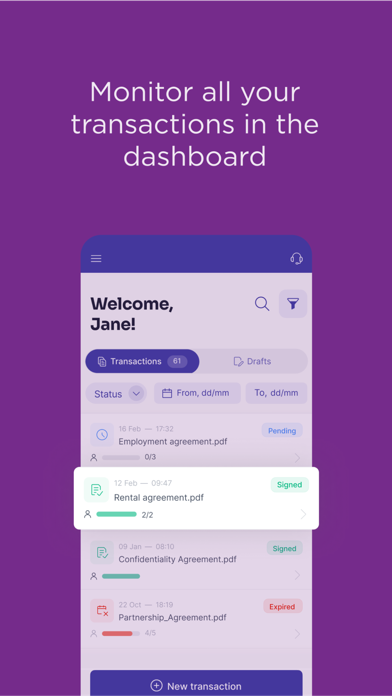
► Follow the progress of the request
► Immediate push notification when someone has signed the document
► Multiple documents and signers possible
► Easy to share via WhatsApp, mail, SMS
The benefits of the Signhost app as a receiver
► Quickly import documents from your email, Drive or Dropbox for verification
► Works for almost all documents that need to be signed
► Easily and legally signed with iDin, itsme, scribble or SMS
► Always sign wherever you are
► Easily see where you are must sign
► Ability to view the artist's verified location
Getting started with the Signhost app:
► Step 1: Download the Signhost app on an Apple device
► Step 2: Then create an account, or login to an existing account
► Step 3: Then go to Signhost.com login and verify yourself
► Step 4: Now select the documents and choose a verification method
► Step 5: Send the document to the recipient
► Step 6: Check through the progress path whether the document has been signed. You can also receive documents yourself via the app to sign.
Passport validation:
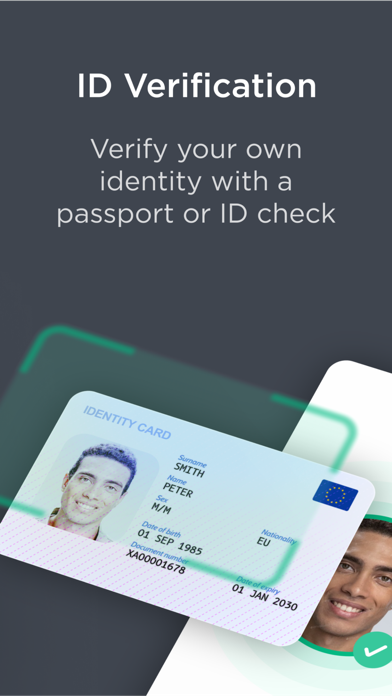
The Signhost app can now also be used for digitally validating a passport/ID. Download the app and go through the process in just a few steps.
About Signhost
Signhost provides a platform for digital evidence. In addition, Signhost is also known for signing.nl and has been the specialist for digital signing and identification for more than 20 years. Signhost is suitable for SMEs and large companies. Anyone can easily get started with our platform via the portal, API and the app. Signhost is a European provider that meets the right certifications and reliability requirements. Signhost also processes millions of transactions. Many companies and consumers digitally sign their documents every day.
Get started right away
► Download the app
► Easily create an account on Signhost.com
► With our Go account you can get started and use the app for free
https://www.signhost.com/#signup