







AppBrain's verdict
- Rating on App Store
- 4.82
- 11 ratings
- Last updated
- September 21, 2026
- Size
- 127.3 MB
It doesn't have enough ratings yet to judge what users think. Its best ranking is #70 in Top Grossing, Business in India.
User feedback
Ratings and reviews on the App StoreComments on SignScan: PDF Signer & Scanner for iOS
We don't have enough comments to show example comments. Please check back later.
Store listing
By Trendest, from the App StoreDescription by Trendest Written by the developer, not by AppBrain. Click to read.
Turn paper into clean digital files, create a reusable signature, place it exactly where it belongs, and export the finished document in just a few taps. SignScan replaces a separate scanner app and sign app with one focused signature app for the full workflow.
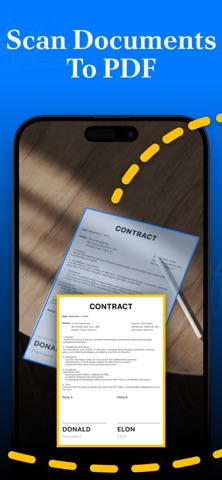
Scan documents to PDF
Use your iPhone as a camera scanner, PDF scanner, or receipt scanner whenever paperwork needs to be digitized. Automatic edge detection frames each page, while cleanup tools help reduce shadows, blemishes, and background imperfections.
• Capture receipts, agreements, forms, and notes
• Use scan to PDF to create clean, shareable files
• Convert photo to PDF or image to PDF from your camera
• Build ready-to-share files with the built-in PDF maker
• Review and organize scans before export
Create a signature your way
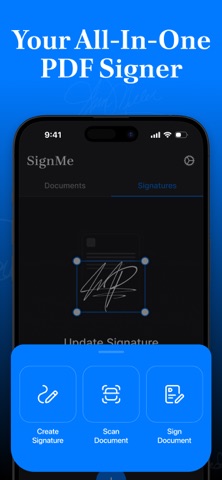
Draw a personal signature on screen with the signature creator and save it for later. The signature generator and sign maker help you create a reusable result in seconds, while the signature scanner lets you capture handwriting from paper. Background cleanup keeps the signature crisp and natural on the page.
Sign and edit PDF documents
Open a file, place your saved signature, resize it, and move it into position. The built-in PDF editor and simple document editor let you complete paperwork without a desktop.
• Add a PDF signature to agreements and forms
• Create an e signature for everyday paperwork
• Use the e sign workflow to place it precisely
• Manage multiple saved signatures
• Reuse signatures across documents
Export, share, and stay organized
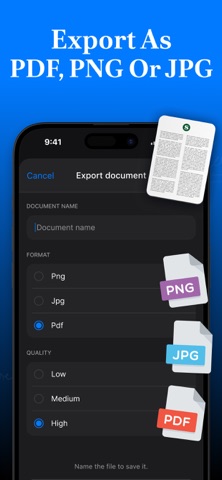
Save completed work as PDF, PNG, or JPG. Share signed files through email, messaging apps, AirDrop, or supported cloud services. Keep scans and signed documents organized in folders so they are ready whenever you need them.
Need to sign PDF free? Start with SignScan's available free tools, then choose an optional subscription only if you need full access.
24/7 technical support is available to help with questions or issues.
Subscription information
SignScan offers optional auto-renewing subscriptions for full access.
• Prices vary by region, subscription duration, and selected plan.
• Subscriptions are billed weekly, monthly, or annually.
• Payment is charged to your Apple Account when the purchase is confirmed.
• A subscription renews automatically unless auto-renew is turned off at least 24 hours before the end of the current period.
• Your account is charged for renewal within 24 hours before the end of the current period. The cost depends on the selected plan.
• You can manage your subscription and turn off auto-renewal in your Account Settings after purchase.
• Any unused portion of a free trial is forfeited when you purchase a subscription.
Privacy Policy: https://trendestinsight.com/privacy
Terms of Use: https://trendestinsight.com/tos
Questions or feedback? Contact us at sign@trendestinsight.com
Safety and technology
Found in the app by AppBrain- Price
- Free
- App size
- 127.3 MB
- Content rating
- Everyone
Technologies used by SignScan: PDF Signer & Scanner
Releases
Updates seen on the App Store- Version
- 2.0.2
- Launched
- September 2023
No changelog data
Alternatives
Similar apps and more from TrendestAlternatives to SignScan: PDF Signer & Scanner


More from Trendest



Rankings
App Store top charts- Highest rank
- #70
- Chart
- Top Grossing
- Business
- Country
- India
App Store Rankings for SignScan: PDF Signer & Scanner
Top rankings
| Rank | Country | Category | List |
|---|---|---|---|
| 70 | India | Business | Top Grossing |
Ranking history in India
About the app and developer
About SignScan: PDF Signer & Scanner
SignScan: PDF Signer & Scanner is a business app developed by Trendest.
User Ratings
SignScan: PDF Signer & Scanner is rated 4.82 out of 5 stars. The rating is based on 11 ratings.
App Information
SignScan: PDF Signer & Scanner is freely available from the App Store. The app size is 127.29 MB. The latest version available is 2.0.2. The last update was on September 21, 2026.
Technical Requirements
The app has a content rating of Everyone. The app has been available on the App Store since September 2023.
SignScan: PDF Signer & Scanner is made and published by Trendest. AppBrain is an independent app data site and isn't affiliated with Trendest. The app name, icon, screenshots and description belong to Trendest and are shown as published on the App Store.
Developer information for Trendest
Address: