SparkReceipt: Receipt Scanner
SparkReceipt: Receipt Scanner is made and published by SparkReceipt Oy. AppBrain is an independent app data site and isn't affiliated with SparkReceipt Oy. The app name, icon, screenshots and description belong to SparkReceipt Oy and are shown as published on the App Store.
AppBrain's verdict
Loved by users- Best rank
- #64
- Top Grossing, Belgium
- Rating on App Store
- 4.77
- 929 ratings
- Last updated
- October 12, 2026
Users love it: 4.8 stars from 929 ratings. Its best ranking is #64 in Top Grossing, Business in Belgium.
Rankings
App Store top charts- Highest rank
- #64
- Chart
- Top Grossing
- Business
- Country
- Belgium
Competitors
Similar apps and more from SparkReceipt OyAlternatives to SparkReceipt: Receipt Scanner
Also available on Google Play
Releases
Updates seen on the App Store- Version
- 2.3.25
- Launched
- February 2023
No changelog data
User feedback
Ratings and reviews on the App StoreComments on SparkReceipt: Receipt Scanner for iOS
We don't have enough comments to show example comments. Please check back later.
Technology
Found in the app by AppBrain- Price
- Free
- App size
- 110.0 MB
- Content rating
- Everyone
Technologies used by SparkReceipt: Receipt Scanner
About the app and developer
About SparkReceipt: Receipt Scanner
SparkReceipt: Receipt Scanner is a business app developed by SparkReceipt Oy.
User Ratings
SparkReceipt: Receipt Scanner is rated 4.77 out of 5 stars. The rating is based on 930 ratings.
App Information
SparkReceipt: Receipt Scanner is freely available from the App Store. The app size is 110.03 MB. The latest version available is 2.3.25. The last update was on October 12, 2026.
Technical Requirements
The app has a content rating of Everyone. The app has been available on the App Store since February 2023.
Developer information for SparkReceipt Oy
Address:
Store listing
By SparkReceipt Oy, from the App StoreDescription by SparkReceipt Oy Written by the developer, not by AppBrain. Click to read.
EMAIL INBOX AUTO-SCANNING
Connect Gmail or Outlook and SparkReceipt automatically finds and imports email receipts as they arrive. You stay in control: review, approve, and exclude senders any time.
EMAIL RECEIPT FORWARDING
Prefer to file receipts manually? Forward eReceipts to your personal SparkReceipt address and the AI files them for you.
AI RECEIPT SCANNING (OCR)
The OCR receipt scanner reads paper receipts, PDF invoices, and forwarded email receipts in any language and currency. Smart categorization is based on the products on the receipt, not just the merchant name, so business expenses end up in the right account.
INCOME, EXPENSES, AND PROFIT/LOSS TRACKING
Track income alongside expenses for real-time profit and loss across your business. Tag expenses by client, project, or trip. Convert any currency at accurate historical daily rates for clean tax reporting.
MILEAGE TRACKER
Log business trips and claim every mile at tax time. Start a GPS-tracked drive with one tap or add trips by hand, assign each to a vehicle, client, or project, and SparkReceipt works out the reimbursement. Group trips into a trip report or export your mileage log with your receipts for deduction-ready records.
ACCOUNTING INTEGRATIONS
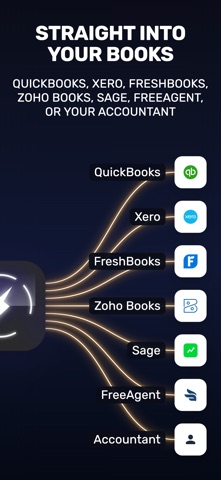
Push categorized receipts straight into QuickBooks Online, Xero, or Zoho Books, or export reports as PDF, Excel, or CSV when your accountant asks. FreshBooks is in early access. Webhooks and a public API are included.
BANK FEEDS
Connect your bank account and SparkReceipt imports transactions and matches them to your receipts, so missing ones stand out before tax time. Bank feeds are in beta and currently available for US banks. PDF bank statements can be uploaded too.
SHARE WITH YOUR ACCOUNTANT
Invite your accountant directly into SparkReceipt or share a secure link. No more emailing receipts as attachments. Set time limits to auto-hide shared receipts after tax season.
TEAM COLLABORATION
Invite teammates and keep everyone's receipts and expenses organized in one secure place. Sort by category, tag, or user, and approve expense reports together.
CLOUD STORAGE THAT WORKS EVERYWHERE
Documents are encrypted and backed up in the cloud. Access them from iPhone, iPad, or any browser via the SparkReceipt web app at no extra cost.
SPARKAGENT AI ASSISTANT
Ask SparkAgent about your spending, or have it categorize new expenses and tag last month's travel receipts. It asks before anything that can't be undone.
KEY FEATURES
- AI receipt scanner with automatic data extraction (OCR)
- Email inbox auto-scanning for Gmail, Outlook and IMAP
- Smart categorization based on products on the receipt
- Income and expense tracking in any currency
- Real-time profit and loss reports
- GPS mileage tracker with automatic reimbursement
- QuickBooks Online, Xero, and Zoho Books integrations
- SparkAgent AI assistant for questions and bulk edits
- Search by merchant, amount, tag, or text inside the image
- PDF, Excel, and CSV exports for accountants
- Bank feeds (beta) for US banks with automatic receipt matching
- No ads
- Bank-level security and encryption
WHO USES SPARKRECEIPT
Freelancers tracking project expenses. Self-employed consultants managing multiple income streams. Real estate investors tracking property costs. Small business owners preparing for tax season. Accountants who want their clients to send tidy, categorized receipts instead of shoeboxes.
Every receipt is captured the day you get it and ready for your accountant in one export.
Terms of Use: https://www.apple.com/legal/internet-services/itunes/dev/stdeula/
Privacy Policy: https://www.sparkreceipt.com/privacy-policy