Download Android Apps and Games
AppBrain
  • Apps
  • Apps being viewed right now Trending apps today Most popular apps All-time most downloaded apps Top rated apps
  • Intelligence ▾
    Intelligence overview → Track any Android app or your whole market
    Track & analyze
    Keyword Tracker & OptimizerTrack & improve Play rankings App Performance ReportOne-off PDF for any app StatisticsFree Android & Play market stats
    Promote your app
    Featured Apps App Links
  • Intelligence
  • Pricing
  • Dashboard
  • Sign up
  • Log in
Last updated on: 2026-07-11
App Store Apps > Lifestyle > Simple Week Routine
Simple Week Routine icon

Simple Week Routine

1.2
Ebey Tech LLC
0.00
0 reviews
$1.99

Simple Week Routine Screenshot 1 of 6
Simple Week Routine Screenshot 2 of 6
Simple Week Routine Screenshot 3 of 6
Simple Week Routine Screenshot 4 of 6
Simple Week Routine Screenshot 5 of 6
Simple Week Routine Screenshot 6 of 6
Download from the App Store

About Simple Week Routine

Simple Week Routine is an overall app developed by Ebey Tech LLC.

How many times has Simple Week Routine been downloaded?

What is the rating of Simple Week Routine?

Simple Week Routine has no ratings yet.

Is Simple Week Routine free?

Simple Week Routine costs $1.99 to download. The APK download size is 1.53 MB. The latest version available is 1.2. The last update was on September 4, 2024.

What are the requirements for Simple Week Routine?

The app has a content rating of Everyone. The app has been available on Google Play October 2023.

Description
Wakeup and accomplish more with Simple Week Routine. An app designed specifically to quickly track your "Routine" progress throughout the week. Simple Week Routine allows for fast creation of routines and powerful tools for accomplishing your routine goals.

Sign-in to iCloud account for data to store to iCloud.

Instructions for App Operation:
1.) Click the + at the top of navigation to add a new Group.
2.) Enter in a Group Item Name.
3.) Select a color. The furthest left color (white/black) is the system primary color. Depending on light/dark mode, this color may appear different.
4.) Click Add button to create the new Group.
5.) Click the newly created Group. The main view will load with days of the week.
6.) In the Toolbar, toggle the S, M, etc… buttons to hide/show days of the week. This can be useful for focusing on specific days of the week. For iPhone, rotate to landscape to see buttons.
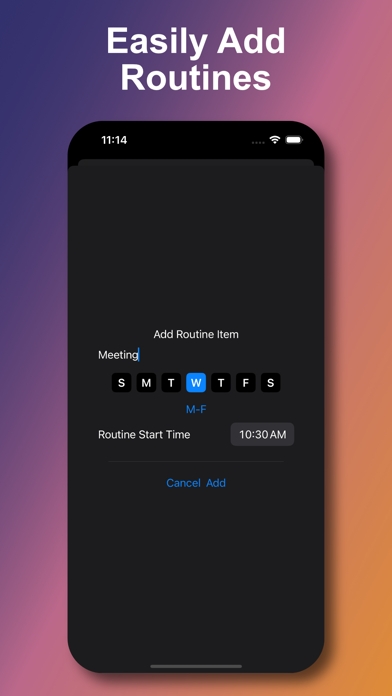
7.) Click the + button in the main view’s toolbar to add a new Routine.
8.) Enter in a Routine Item Name.
9.) Toggle the S, M, etc… days of the week toggle buttons. When creating a new Routine, it’ll be listed under whatever days of the week are toggle active (blue).
10.) Use the M-F link button to automatically activate the Monday-Friday toggle buttons.
11.) Set an appropriate Routine Start Time for when your Routine is to be accomplished.
12.) Click Add button to create the new Routine.
13.) New Routines are added to the main view’s days of the week.
14.) To mark a Routine as complete, check the Routine’s checkbox (square).
15.) To edit Routines, double-tap any Routine. This will load the editor, which is similar to the Add Routine prompt. For example if Tuesday was toggled on, toggling it again will turn it off and remove the Routine from that day of the week in the main view.
16.) Clicking the Delete Routine button in the editor will remove the Routine from all days of the week and from the app.
17.) In the main view toolbar, clicking the Clear Checkboxes button will uncheck all Routine’s checkboxes. This can be useful when starting a new week and you want to clear previous week’s progress.
18.) In the main view, swiping downward will reveal the Search field. Type in desired text content to filter the days of the week for Routines matching similar text by Routine Name.
19.) In the main view, double-tap a day of the week to toggle a UI focus on that day’s Routines. This can be helpful to further focus on content. Double-tap it again to return UI to normal.
20.) Tap-hold (force-touch) a day of the week’s name to see additional functions. Check All will check all Routines for that day of the week. Uncheck All works the same. Delete All Routines will remove Routines for that day of the week.
21.) Tap-hold (force-touch) options for a day of the week when using “All Groups” work a bit differently. The Check All function will apply to all Groups for that day of the week. Same for Uncheck All. Additionally when using All Groups and performing Tap-hold (force-touch) option Delete All Routines, it will remove all Routines for all Groups on that day of the week. Care should be taken when using these global functions as they can impact multiple items in one operation.
22.) Tap-hold (force-touch) a Group to Edit or Delete the Group. Editing allows for name and color change. Deleting a Group will also delete all of it’s Routines, so care should be taken when using.
Show more Show less

More data about Simple Week Routine

Price $1.99
Rating No ratings
Ranking Not ranked
Version 1.2
App download size 1.53 MB
Suitable for Everyone

More from Ebey Tech LLC

ThatList icon ThatList
Ebey Tech LLC
5.0
$1.99
1 ratings
That Checklist icon That Checklist
Ebey Tech LLC
5.0
$2.99
1 ratings
2 Point Scaler icon 2 Point Scaler
Ebey Tech LLC
0.0
$0.99
Simple Week icon Simple Week
Ebey Tech LLC
0.0
$0.99
Simple Week Checklist icon Simple Week Checklist
Ebey Tech LLC
0.0
$1.99
Safe Swipe icon Safe Swipe
Ebey Tech LLC
0.0
$0.99
Compare 2 Text icon Compare 2 Text
Ebey Tech LLC
0.0
$4.99
That Text icon That Text
Ebey Tech LLC
0.0
$2.99

Changelog of Simple Week Routine

No changelog data

Developer information for Ebey Tech LLC

Ebey Tech LLC

Address:

Share Simple Week Routine

Comments on Simple Week Routine for iOS

We don't have enough comments to show example comments. Please check back later.

App Store Rankings for Simple Week Routine

This app is not ranked

Technologies used by Simple Week Routine

More hot apps 🔥

Back to top
AppBrain Intelligence premium content

Subscribe now to get full and unlimited access to AppBrain Intelligence. You'll have access to:

  • App Intelligence dashboard (performance timeline, competitor comparison, country rankings, insight cards)
  • Detailed ranking data per app
  • Full timeline per developer
  • Device market shares data per country
  • Unlimited keyword tracking
1 Month

$75/mo
(billed every month)

SAVE 0%
Subscribe
3 Months

$65/mo
($195 billed every 3 months)

SAVE 13%
Subscribe
1 Year

$57.50/mo
($690 billed every year)

SAVE 23%
Subscribe
Each subscription will automatically renew 3 days before the expiration date for the same time period. Subscriptions can be cancelled at any time before the renewal.

AppBrain is a directory focused on discovering great apps and games. We give statistics, rankings and search options that Google Play and the App Store don't have. All trademarks are owned by their respective owners. AppBrain doesn't offer APKs or binaries, and always lets users install the official version from Google Play or the App Store.

More apps

  • Top Android apps being viewed
  • HuraWatch: - Movies and Series
  • Connections Unlimited
  • TLV ToolBox

Android Statistics

  • Android statistics
  • Google Play Developer stats
  • Trending Android Apps
  • Top popular Apps
  • Buy the best Android phone

About AppBrain

  • Contact
  • Privacy
  • Documentation
  • DMCA takedowns
  • Articles
  • Blog
  • Android Interstitial Ads: Best practices to optimize your app's earnings
© 2010-2026 - AppBrain