

Compare 2 Text
Compare 2 Text is made and published by Ebey Tech LLC. AppBrain is an independent app data site and isn't affiliated with Ebey Tech LLC. The app name, icon, screenshots and description belong to Ebey Tech LLC and are shown as published on the App Store.
AppBrain's verdict
- Last updated
- October 1, 2023
Rankings
App Store top chartsApp Store Rankings for Compare 2 Text
Competitors
Similar apps and more from Ebey Tech LLCAlternatives to Compare 2 Text







More from Ebey Tech LLC




Releases
Updates seen on the App Store- Version
- 1.3
- Launched
- October 2022
No changelog data
User feedback
Ratings and reviews on the App StoreComments on Compare 2 Text for iOS
We don't have enough comments to show example comments. Please check back later.
Technology
Found in the app by AppBrain- Price
- $3.99
- App size
- 422.0 KB
- Content rating
- Everyone
Technologies used by Compare 2 Text
About the app and developer
About Compare 2 Text
Compare 2 Text is an utilities app developed by Ebey Tech LLC.
User Ratings
The app has no ratings yet.
App Information
Compare 2 Text costs $3.99. The app size is 422.00 kB. The latest version available is 1.3. The last update was on October 1, 2023.
Technical Requirements
The app has a content rating of Everyone. The app has been available on the App Store since October 2022.
Developer information for Ebey Tech LLC
Address:
Frequently asked questions about Compare 2 Text
Is Compare 2 Text free?
No. Compare 2 Text costs $3.99 on the App Store.
Is Compare 2 Text still available?
Yes. Compare 2 Text is on the App Store, and the last update we saw was on October 1, 2023.
How large is Compare 2 Text?
Compare 2 Text is 422.00 kB.
Is Compare 2 Text suitable for children?
App Store rates the content of Compare 2 Text as suitable for everyone.
Who made Compare 2 Text?
Compare 2 Text was developed by Ebey Tech LLC. It is listed in the utilities category on the App Store.
What are the best alternatives to Compare 2 Text?
People looking at Compare 2 Text also look at these utilities apps: NetAdmin - Network Scanner, Paranoia Text Encryption PRO, Text Scanner OCR + Translate, Focus Dashcam Organizer, Leitz Icon Software.
Store listing
By Ebey Tech LLC, from the App Store




Description by Ebey Tech LLC Written by the developer, not by AppBrain. Click to read.
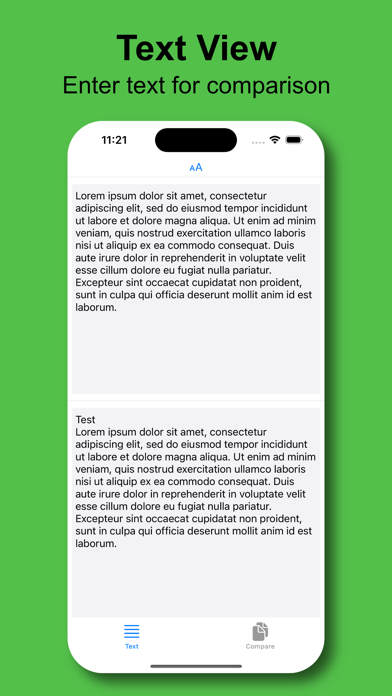
1.) Start up app.
2.) Enter text into the top or left Text pane (depending on rotation).
3.) Enter text into the bottom or right Text pane (depending on rotation).
4.) Click "Compare" to see text comparison results, separated by selected Split Type in a List View format.
5.) Click to select a list item row for selection.
6.) Select appropriate Split Type. Carriage Return works ideal for most text comparison.
7.) Change text font size by selecting "Font Size" in the toolbar and selecting preferred value.
8.) Filtering of list can be achieved by changing the "Filter" option in the toolbar.
9.) Force-touch has options for list items to "Copy" text or to "Speak" the selected text.
10.) Click Export button, then browse to appropriate location to export compared text content. Export option will export filtered content. So if filtering, not all content will be exported, just the displayed results.