
sir Sampleton is made and published by Paul Slocum. AppBrain is an independent app data site and isn't affiliated with Paul Slocum. The app name, icon, screenshots and description belong to Paul Slocum and are shown as published on the App Store.
AppBrain's verdict
Established- Rating on App Store
- 3.29
- 48 ratings
- Last updated
- March 5, 2020
- Size
- 21.2 MB
It doesn't have enough ratings yet to judge what users think.
User feedback
Ratings and reviews on the App StoreComments on sir Sampleton for iOS
We don't have enough comments to show example comments. Please check back later.
Store listing
By Paul Slocum, from the App Store

Description by Paul Slocum Written by the developer, not by AppBrain. Click to read.
used by DJ/producer Zedd! // supports Audiobus, MIDI, iOS13
Sir Sampleton is a sampling musical keyboard inspired by Casio and Yamaha samplers from the 80s. The app allows you to record sounds through the microphone and then play them on dual piano keyboards accompanied by a rhythm machine. You'll be surprised at the lush, complex musical sounds that can be created with samples of your voice, musical instruments, and other noises. Samples can be looped, customized, saved, and emailed, and we offer free samples for download on our website.
Supports Audiobus, Inter-app Audio, CoreMIDI, MIDI Mobilizer 1 and 2. Works as a virtual instrument for apps like Cubasis, Beatmaker 2, and Genome sequencer. Capable of sampling other apps and effects through Audiobus.
Sampleton applies a subtle stereo effects process to the audio giving it a fuller, warmer sound that you'd typically get from sampling a monaural microphone.
If you like my apps please leave ratings or reviews! For support email sirsampleton@gmail.com
FEATURES:
• Sample from the microphone and immediately play your sounds on dual keyboards
• Save and email sample packs to friends, or to yourself for backup/transfer
• Download free samples from our website
• Built-in beats and computer beat generator
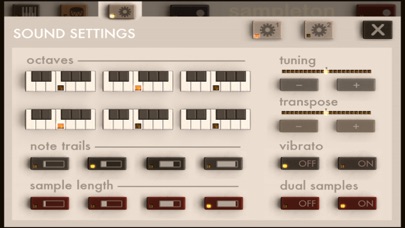
• Adjust tuning, release, vibrato, sample time, and much more
• Record, add effects, and sample from other apps (requires Audiobus app)
• Put a different sample on each keyboard in dual-sample mode
• Multitouch with 18 voices for rich sound
• Automatic smart microphone level adjustment
• Supports all CoreMIDI devices, Line6 MIDI Mobilizer 1 and 2
• Virtual MIDI for compatibility with Cubasis, Beatmaker 2, and Genome
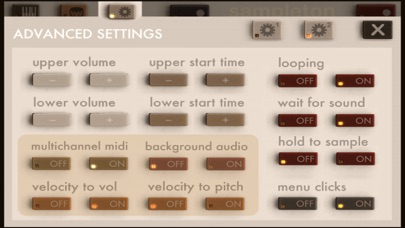
• Multichannel MIDI mode places different samples on each MIDI channel, up to 24 samples
• Supports iRig external audio input adapter and iRig microphone
• Low latency
• Coming soon: Audio copy/paste, additional sample banks, and more!
INSTRUCTIONS:
TO SAMPLE: press the red button and speak into the microphone. It will sample for about 3 seconds.
TO PLAY A DRUM BEAT: press the drum icon button in the upper left to open the Rhythm Menu, and then select the beat you want to play. To change the tempo or beat volume, use the buttons on the right. Press the X to return to the keyboard.
TO GENERATE A RANDOM BEAT: press the drum icon button to open the Rhythm Menu, and then press the RANDOM button. To generate a new random beat, press the button again.
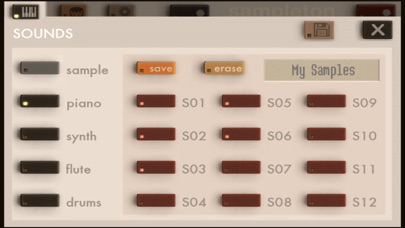
TO SAVE A SAMPLE: press the keyboard icon button in the upper left to open the Sounds Menu. Press SAVE and then choose one of the flashing numbered buttons. Your sample is then saved on that button. Press the X to return to the keyboard.
TO LOAD A SAMPLE: press the keyboard icon button in the upper left to open the Sounds Menu. Press the numbered button where you saved the sample. Press the X to return to the keyboard.
TO PREVIEW A SAVED SAMPLE: press and hold the numbered button in the Sounds Menu.
TO SAVE CHANGES TO A SAMPLE'S SOUND SETTINGS: press and hold the 'save' button in the Sounds Menu.
Safety and technology
Found in the app by AppBrain- Price
- $0.99
- App size
- 21.2 MB
- Content rating
- Everyone
Technologies used by sir Sampleton
Releases
Updates seen on the App Store- Version
- 3.3.8
- Launched
- November 2010
No changelog data
Alternatives
Similar apps and more from Paul SlocumAlternatives to sir Sampleton






More from Paul Slocum

Rankings
App Store top chartsApp Store Rankings for sir Sampleton
About the app and developer
About sir Sampleton
sir Sampleton is a music app developed by Paul Slocum.
What is the rating of sir Sampleton?
sir Sampleton is rated 3.29 out of 5 stars, based on 48 ratings.
Is sir Sampleton free?
sir Sampleton costs $0.99. The app size is 21.23 MB. The latest version available is 3.3.8. The last update was on March 5, 2020.
What are the requirements for sir Sampleton?
The app has a content rating of Everyone. The app has been available on the App Store since November 2010.
Developer information for Paul Slocum
Address: