




AppBrain's verdict
Established- Rating on App Store
- 2.00
- 4 ratings
- Last updated
- April 14, 2026
- Size
- 8.60 MB
It doesn't have enough ratings yet to judge what users think.
User feedback
Ratings and reviews on the App StoreComments on ME MIDI Sampler for iOS
We don't have enough comments to show example comments. Please check back later.
Store listing
By Gianluca Natalini, from the App StoreDescription by Gianluca Natalini Written by the developer, not by AppBrain. Click to read.
Will be able to:
- Create a polyphonic keyboard with 84 voices and a maximum of 84 different sound effects on the same keyboard (you can assign any key on the keyboard to a different audio sample)
- Save the configuration of the keyboard + audio special effects in infinite sound banks (BANKS) loadable and usable in real time (each bank can hold up to a maximum of 84 different audio samples)
- Have infinite keyboards for special effects (each saved on a BANK)
- Receive MIDI messages from an external MIDI keyboard or MIDI sequencer and play the corresponding audio special effects (manually or automatically)
- Turn any MIDI keyboard (MIDI keyboard controller) in one or more banks of special audio effects
The application is simple and immediate...
You can:
- Immediately play the default bank containing 39 special audio effects that come with the application itself
- Import audio samples from the device’s music library and assign them to the desired keys on your MIDI keyboard
- Create Your own banks using a standard wave editor (such as Audacity)
- Download new banks and assign them to MIDI keyboard
To create a new keyboard sound effects (BANK):
1) record the audio special effects (using the record button of "ME MIDI Sampler") or create it using any wave editor for Mac or PC (such as Audacity).
Audio sample formats supported by "ME MIDI Sampler":
- AIFF
- AAC
- MP3
- Apple Lossless (M4A)
- WAV
- Core Audio Format (CAF)
2) import the audio samples recorded or created on your device:
- Through synchronization (using the iTunes software for Mac or PC)
- Using "iTunes File Sharing"
3 ) import audio samples using the "IMPORT" button and assign them to the 84-key MIDI keyboard by pressing the "WAVEFORM" button of each key on the MIDI keyboard (You can assign a different audio sample for every key on the MIDI keyboard).
At this point you can play live your special effects (polyphonic keyboard up to a maximum of 84 voices, 84 special effects for each BANK). You can adjust the sample start time, volume, pitch bender, sustain pedal, etc... for each audio sample that You have assigned to the keys of your MIDI keyboard.
You can also use together the virtual MIDI keyboard displayed on the screen of the device (MULTITOUCH) and/or any external MIDI sequencer or MIDI keyboard connected to your device using:
- IRig MIDI adapter
- A camera connection kit + MIDI to USB adapter (Apple compatible - generally used to connect an external MIDI keyboard to a Mac or PC)
- MIDI adapters compatible with Apple devices
They are also compatible
- iRig KEYS
- External MIDI keyboards over Bluetooth/Wi-Fi
- Standard MIDI keyboards
BANKS:
The configuration of the multiple special effects created and assigned to the MIDI keyboard can be saved in a new BANK, in the archive of the BANKS of "ME MIDI Sampler" (infinite BANKS can be saved in the database, until the end of the physical memory of the device). The BANKS previously saved can be loaded and used in real time during live performances.
With "ME MIDI Sampler" You will have:
ME: Multiple Effects
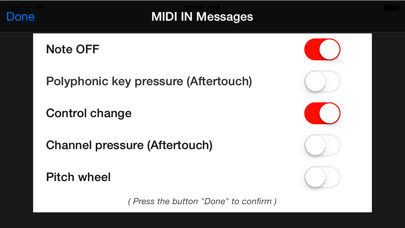
MIDI: a MIDI expander for special effects capable of receiving MIDI signals from external devices and turn them into sounds (the application is also able to filter out unwanted MIDI IN messages)
Sampler: an audio sampler to create, edit and play Your audio samples in real-time
UNIVERSAL APP:
- You pay only once and run on all your devices
Safety and technology
Found in the app by AppBrain- Price
- $1.99
- App size
- 8.60 MB
- Content rating
- Everyone
Technologies used by ME MIDI Sampler
Releases
Updates seen on the App Store- Version
- 1.4
- Launched
- November 2013
No changelog data
Alternatives
Similar apps and more from Gianluca NataliniAlternatives to ME MIDI Sampler






More from Gianluca Natalini





Rankings
App Store top chartsApp Store Rankings for ME MIDI Sampler
About the app and developer
About ME MIDI Sampler
ME MIDI Sampler is a music app developed by Gianluca Natalini.
What is the rating of ME MIDI Sampler?
ME MIDI Sampler is rated 2.00 out of 5 stars, based on 4 ratings.
Is ME MIDI Sampler free?
ME MIDI Sampler costs $1.99. The app size is 8.60 MB. The latest version available is 1.4. The last update was on April 14, 2026.
What are the requirements for ME MIDI Sampler?
The app has a content rating of Everyone. The app has been available on the App Store since November 2013.
ME MIDI Sampler is made and published by Gianluca Natalini. AppBrain is an independent app data site and isn't affiliated with Gianluca Natalini. The app name, icon, screenshots and description belong to Gianluca Natalini and are shown as published on the App Store.
Developer information for Gianluca Natalini
Address:
Frequently asked questions about ME MIDI Sampler
Is ME MIDI Sampler free?
No. ME MIDI Sampler costs $1.99 on the App Store.
Is ME MIDI Sampler still available?
Yes. ME MIDI Sampler is on the App Store, and the last update we saw was on April 14, 2026.
How large is ME MIDI Sampler?
ME MIDI Sampler is 8.60 MB.
Is ME MIDI Sampler suitable for children?
App Store rates the content of ME MIDI Sampler as suitable for everyone.
How do people rate ME MIDI Sampler?
ME MIDI Sampler scores 2.00 out of 5 stars, from 4 ratings on the App Store.
Who made ME MIDI Sampler?
ME MIDI Sampler was developed by Gianluca Natalini. It is listed in the music category on the App Store.
What are the best alternatives to ME MIDI Sampler?
People looking at ME MIDI Sampler also look at these music apps: Piano, Muser Audio - Loop Music, Pocket MIDI Mobile, WiDI - MIDI Studio, sir Sampleton.