Download Android Apps and Games
AppBrain
  • Apps
  • Apps being viewed right now Trending apps today Most popular apps All-time most downloaded apps Top rated apps
  • Intelligence ▾
    Intelligence overview → Track any Android app or your whole market
    Track & analyze
    Keyword Tracker & OptimizerTrack & improve Play rankings App Performance ReportOne-off PDF for any app StatisticsFree Android & Play market stats
    Promote your app
    Featured Apps App Links
  • Intelligence
  • Pricing
  • Dashboard
  • Sign up
  • Log in
Last updated on: 2026-06-05
App Store Apps > Productivity > iWord PRO
iWord PRO icon

iWord PRO

2.1
Gianluca Natalini
2.75
4 reviews
$1.99

Not recently updated — last update was on 2024-03-27. This app may no longer be actively maintained.
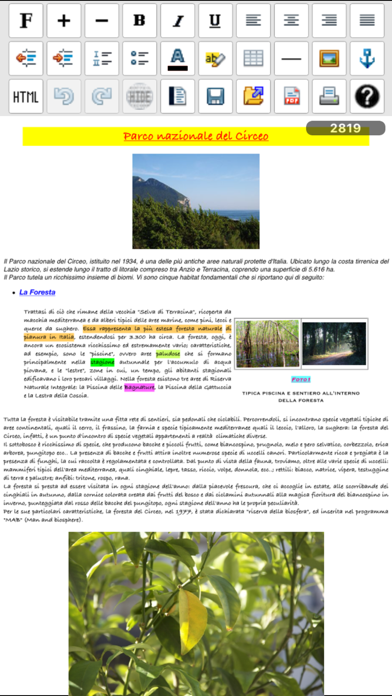
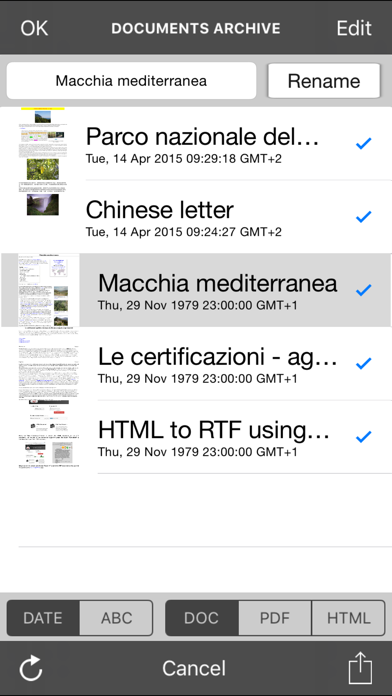
iWord PRO Screenshot 1 of 6
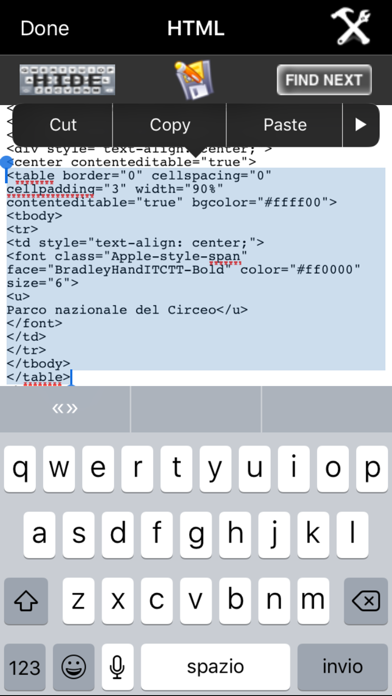
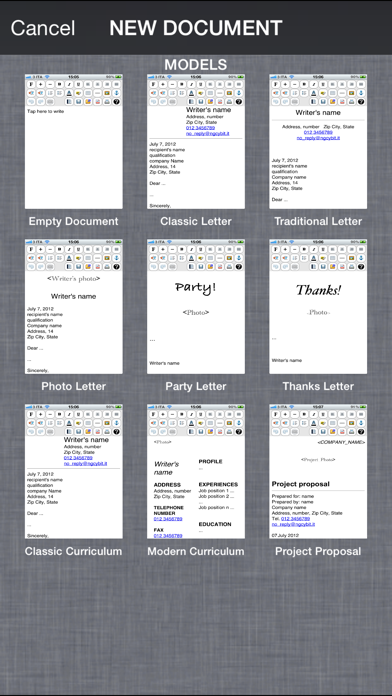
iWord PRO Screenshot 2 of 6
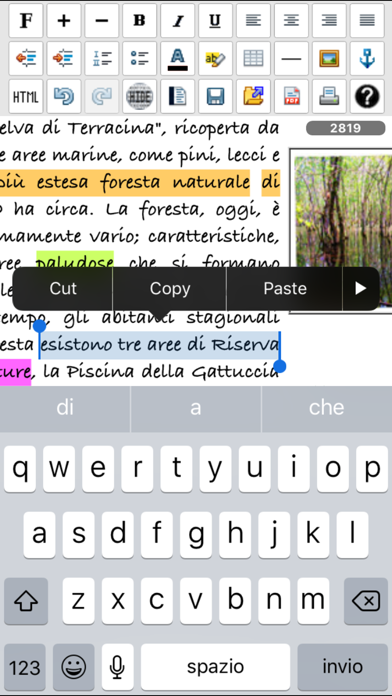
iWord PRO Screenshot 3 of 6
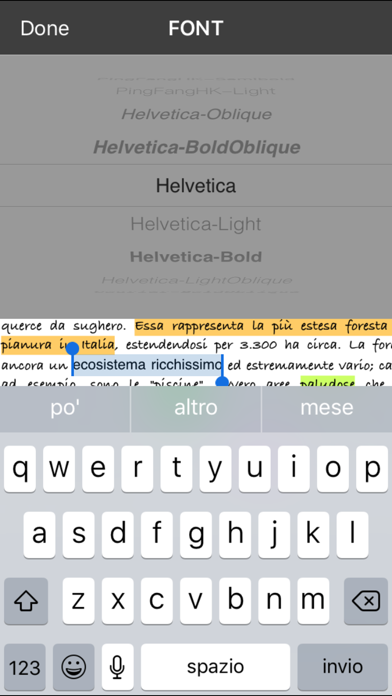
iWord PRO Screenshot 4 of 6
iWord PRO Screenshot 5 of 6
iWord PRO Screenshot 6 of 6
Download from the App Store

About iWord PRO

iWord PRO is an overall app developed by Gianluca Natalini.

How many times has iWord PRO been downloaded?

What is the rating of iWord PRO?

iWord PRO is rated 2.75 out of 5 stars, based on 4 ratings.

Is iWord PRO free?

iWord PRO costs $1.99 to download. The APK download size is 6.00 MB. The latest version available is 2.1. The last update was on March 27, 2024.

What are the requirements for iWord PRO?

The app has a content rating of Everyone. The app has been available on Google Play September 2012.

Description
iWord PRO is a powerful word processor ("rich text editor") that will transform your device in a professional typewriter.
iWord is designed to replace the traditional word processors for personal computers and to enhance the versatility and ease of use.
Useful for journalists, students, writers, office work, for reports, etc…
iWord is also an HTML editor: you can then use the HTML language to edit the written documents and / or to create your own web pages.
iWord can export the written documents in PDF or HTML file formats and can share them using remote storage and sharing systems (e.g. cloud).
Using the “export to HTML” you can also use iWord to create your own web pages and/or ebook.
Also, by pressing the "Speech to Text" button on the keyboard you can dictate text to be written... "Speech to Text" (using Siri) will insert for you the dictated text in the document, at the position where the cursor is displayed.
Turn your device in a typewriter that can be used sitting on the couch at home, at work or during a trip.

Features:
- "IWord" + "Speech to Text": dictate the text to be written and "Speech to Text" will write automatically for You the dictated text in the document
- "Text To Speech" to read the written text
- "documents models" window
- Intuitive interface: start the program and in a few seconds you are already writing
- HTML EDITOR
- Automatic Indentation
- Automatic formatting lists
- Versatile structure to create any type of document
- Tables with or without borders
- Ability to color the table cells (infinite numbers of colors)
- Text Highlighting (infinite numbers of colors)
- Ability to color the text (infinite numbers of colors)
- Indentation of the text: left, center, right, justified
- Many fonts available (all fonts supported by the device)
- Bold, Italic, Underline
- Adjustable font size
- Ability to insert multiple images
- Load images from the photo album of the device with the ability to scale the imported images
- Inserting images in the table or in any position of the document, etc.
- Page separator
- Abilty to Insert web links
- Undo and redo
- Export, share the written document using PDF and HTML formats (write Your own web pages using iWord) and send it via email
- Sharing files between iPad and iPhone
- Remote sharing of documents with friends: share your written documents with colleagues or friends far away from You
- Compress (zip) and automatic extraction during import (unzip) of the documents (for the remote sharing or to send the written documents with an email)
- Characters counter
- PDF preview
- Retina resolution

Management for the documents stored in the "iWord Archive":
- Archiving and document management: save, read, edit, duplicate, delete, archive, share, etc.. an infinite number of documents
- Import documents via file sharing, copy/paste, Open In, email attachments, etc.

COPY / PASTE:
- Select and copy web pages (or parts of them) and paste into iWord

Import RTF, TXT, MS Office and iWork documents:
Using "Open In" and/or “iFolders Safe” and the copy/paste feature of iWord PRO You can import the RTF, MS Office and iWork documents or parts of the documents in the iWord PRO rich text area, modify and save them or export them in the HTML file format

Sharing documents (IN/OUT) with:
- Dropbox (remote storage systems, cloud), iCloud Drive
- Open In
- iTunes File Sharing
- email attachment

Display:
- Retina display supported

"Speech to Text":
- Write speaking, without using the keyboard

"Text To Speech":
- Read the written text

Supported device orientations:
- Portrait and Landscape (iPad)

Print:
- AirPrint

App type:
- UNIVERSAL APP (you pay only once and runs on all the devices)

E-book compatible:
- "iWord PRO html doc" to "e-book" is very simple using "calibre"
Show more Show less

More data about iWord PRO

Price $1.99
Rating 2.75 based on 4 ratings
Ranking Not ranked
Version 2.1
App download size 6.00 MB
Suitable for Everyone

Alternative downloads for the iWord PRO app

Text To Speech + ai icon Text To Speech + ai
Mehmet Demir
2.0
Free
4 ratings
Incentive$ icon Incentive$
10KLakes, LLC
5.0
Free
3 ratings
Southern Quality Propane icon Southern Quality Propane
Blue Cow Software, Inc.
3.0
Free
1 ratings
Road Trip HD icon Road Trip HD
Darren Stone
4.8
$4.99
34 ratings
EE ToolKit PRO for iPad icon EE ToolKit PRO for iPad
Thomas Gruber
4.8
$7.99
80 ratings
Stage Manager icon Stage Manager
Fuse Technical Group, LLC
2.1
Free
7 ratings
Typetrigger icon Typetrigger
national pen pal hotline, llc
5.0
Free
6 ratings
Smart Goal Tracker icon Smart Goal Tracker
iGeniusDev Technology
3.0
Free
6 ratings

More from Gianluca Natalini
Basal Body Temperature Calc. icon Basal Body Temperature Calc.
Gianluca Natalini
1.3
$0.99
18 ratings
midi Sampler icon midi Sampler
Gianluca Natalini
2.6
$1.99
5 ratings
iTuningFork - Tone Generator icon iTuningFork - Tone Generator
Gianluca Natalini
1.6
$1.99
5 ratings
djTurntables icon djTurntables
Gianluca Natalini
1.4
$0.99
5 ratings
FingerCAD icon FingerCAD
Gianluca Natalini
1.0
$2.99
4 ratings
ME MIDI Sampler icon ME MIDI Sampler
Gianluca Natalini
2.0
$1.99
4 ratings
ArcadeBox icon ArcadeBox
Gianluca Natalini
4.5
$0.99
4 ratings
Stroboscope Alarm Clock icon Stroboscope Alarm Clock
Gianluca Natalini
1.3
$0.99
3 ratings

Changelog of iWord PRO

No changelog data

Developer information for Gianluca Natalini

Gianluca Natalini

N/A

Share iWord PRO

Comments on iWord PRO for iOS

We don't have enough comments to show example comments. Please check back later.

App Store Rankings for iWord PRO

This app is not ranked

Technologies used by iWord PRO

Apps on sale Apps other people are watching Popular Overall Today's trending apps Top new apps
Text To Speech + ai icon Text To Speech + ai
Incentive$ icon Incentive$
Southern Quality Propane icon Southern Quality Propane
Road Trip HD icon Road Trip HD
EE ToolKit PRO for iPad icon EE ToolKit PRO for iPad
Stage Manager icon Stage Manager
Typetrigger icon Typetrigger
Smart Goal Tracker icon Smart Goal Tracker

Back to top
AppBrain Intelligence premium content

Subscribe now to get full and unlimited access to AppBrain Intelligence. You'll have access to:

  • App Intelligence dashboard (performance timeline, competitor comparison, country rankings, insight cards)
  • Detailed ranking data per app
  • Full timeline per developer
  • Device market shares data per country
1 Month

$75/mo
(billed every month)

SAVE 0%
Subscribe
3 Months

$65/mo
($195 billed every 3 months)

SAVE 13%
Subscribe
1 Year

$57.50/mo
($690 billed every year)

SAVE 23%
Subscribe
Each subscription will automatically renew 3 days before the expiration date for the same time period. Subscriptions can be cancelled at any time before the renewal.

AppBrain is a directory focused on discovering great apps and games. We give statistics, rankings and search options that Google Play and the App Store don't have. All trademarks are owned by their respective owners. AppBrain doesn't offer APKs or binaries, and always lets users install the official version from Google Play or the App Store.

More apps

  • Top Android apps being viewed
  • Super Goldbet stats
  • View Fineasy
  • Instrumentals & Beats Download

Android Statistics

  • Android statistics
  • Google Play Developer stats
  • Trending Android Apps
  • Top popular Apps
  • Buy the best Android phone

About AppBrain

  • Contact
  • Privacy
  • Documentation
  • DMCA takedowns
  • Articles
  • Blog
  • Free webpage for your Android app
© 2010-2026 - AppBrain