SketchPath: Learn to Draw is an education app developed by 城林 吴.
What is the rating of SketchPath: Learn to Draw?
SketchPath: Learn to Draw has no ratings yet.
Is SketchPath: Learn to Draw free?
SketchPath: Learn to Draw is free. The app size is 34.95 MB. The latest version available is 1.0. The last update was on June 28, 2026.
What are the requirements for SketchPath: Learn to Draw?
The app has a content rating of Everyone. The app has been available on the App Store since June 2026.
Description by 城林 吴(from the App Store)
Anyone can learn to draw. SketchPath shows you how, one short lesson at a time.
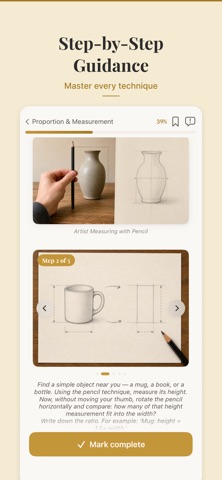
Built for absolute beginners — not for artists who already know what to practice. Every lesson is a guided, roughly ten-minute path: read the concept, follow the demonstration, try the exercise, save the result.
HOW IT FEELS DIFFERENT
• Bite-sized — most lessons run about ten minutes. Fits into a lunch break. • Structured — every lesson builds on the last. No guessing what to study next. • Encouraging — written for people who said "I can't draw a straight line." • Yours — your sketches stay on your device. No social feed, no likes.
DAILY PRACTICE, BUILT IN
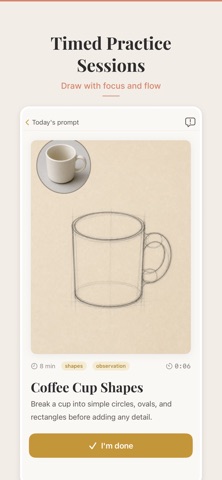
A new prompt every day in the Practice tab — quick gesture warm-ups, free-draw sessions, or copy-from-reference exercises. Set an optional reminder for the time you'd actually pick up a pencil.
YOUR PORTFOLIO
Snap a photo of every drawing and watch your skill grow week by week. Delete, share, or keep them private — everything stays on your device.
THOUGHTFULLY DESIGNED
• Full Dark Mode • Dynamic Type — readable at any text size • Built natively for iPhone • No account required to start
FREE TO START
Begin learning with free foundational lessons. When you're ready for more, unlock the full curriculum with a subscription — monthly, annual, or a one-time lifetime purchase. The price for your region is shown in the app before you buy.
Subscriptions auto-renew unless cancelled at least 24 hours before the end of the current period. Payment is charged to your Apple Account at confirmation of purchase. Manage or cancel anytime in Settings → Apple Account → Subscriptions.
Privacy Policy: https://sketchpath.app/privacy Terms of Use: https://sketchpath.app/terms
Each subscription will automatically renew 3 days before the expiration date for
the same time period. Subscriptions can be cancelled at any time before the renewal.