AppBrain
AppBrain
  • Apps
  • Apps being viewed right now Trending apps today Most popular apps All-time most installed apps Top rated apps iPhone and iPad apps
  • Intelligence ▾
    Intelligence overview → Track any Android app or your whole market
    Track & analyze
    Keyword Tracker & OptimizerTrack & improve Play rankings App Performance ReportOne-off PDF for any app StatisticsFree Android & Play market stats
    Promote your app
    Featured Apps App Links
  • Intelligence
  • Pricing
  • Dashboard
  • Sign up
  • Log in
App Store Apps > Productivity > Skratch — Paper Notes
Skratch — Paper Notes icon

Skratch — Paper Notes

by Justin Marshall · Productivity · Free
On the App Store since June 2026 · Data updated 2026-11-02

Skratch — Paper Notes is made and published by Justin Marshall. AppBrain is an independent app data site and isn't affiliated with Justin Marshall. The app name, icon, screenshots and description belong to Justin Marshall and are shown as published on the App Store.

AppBrain's verdict

Last updated
June 16, 2026
Size
79.1 MB
Official page on the App Store

User feedback

Ratings and reviews on the App Store

Comments on Skratch — Paper Notes for iOS

We don't have enough comments to show example comments. Please check back later.

Store listing

By Justin Marshall, from the App Store
Skratch — Paper Notes Screenshot 1 of 5
Skratch — Paper Notes Screenshot 2 of 5
Skratch — Paper Notes Screenshot 3 of 5
Skratch — Paper Notes Screenshot 4 of 5
Skratch — Paper Notes Screenshot 5 of 5
Screenshots by Justin Marshall, from the the App Store listing
Description by Justin Marshall Written by the developer, not by AppBrain. Click to read.
Skratch is a calm, paper-inspired notebook for longform writing and fleeting thoughts. Five cream pages, a warm wax-seal palette, and a typeface that feels like ink on paper — nothing to set up, nothing to distract.

• Five notebook pages, always a swipe away
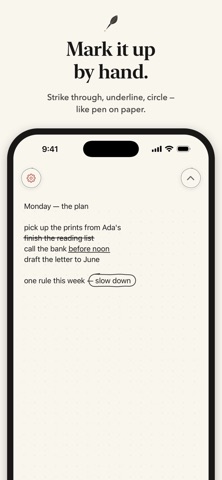
• Mark up your words with a hand-drawn pen feel: underline, strike through, circle
• Moon-phase page dots that keep your place
• Choose your paper: blank, dotted, ruled, or squared
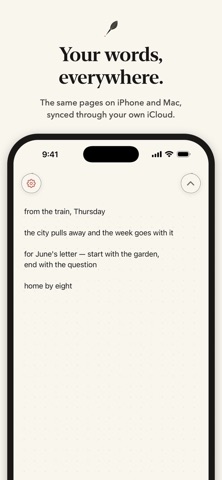
• Syncs privately through your own iCloud — across iPhone and Mac
• No accounts, no ads, no tracking. Your words stay yours.

Skratch keeps out of the way so you can just write.
Official page on the App Store

Safety and technology

Found in the app by AppBrain
Price
Free
App size
79.1 MB
Content rating
Everyone

Technologies used by Skratch — Paper Notes

Releases

Updates seen on the App Store
Version
1.0
Launched
June 2026

No changelog data

Alternatives

Similar apps and more from Justin Marshall

Alternatives to Skratch — Paper Notes

F·NOTES icon F·NOTES
Nathan Fast
0.0
Free
Focus City: Productivity Timer icon Focus City: Productivity Timer
Thomas Timmerman
0.0
Free
Bunny - Note Taking icon Bunny - Note Taking
Sude CIVAN
0.0
Free
Papyrus - notes, PDF icon Papyrus - notes, PDF
waraku kobayashi
0.0
Free
Better Notes: Handwriting icon Better Notes: Handwriting
Luke Mclaughlin
0.0
Free
Memo Wallet icon Memo Wallet
Rohmiapps Inc.
5.0
Free
1 ratings
AI Notes: Smart Writing icon AI Notes: Smart Writing
Thu Bui Thi Minh
0.0
Free
PaperUno - Grid & Graph Maker icon PaperUno - Grid & Graph Maker
炯炯 胡
0.0
Free

Rankings

App Store top charts

App Store Rankings for Skratch — Paper Notes

This app is not ranked

About the app and developer

About Skratch — Paper Notes

Skratch — Paper Notes is a productivity app developed by Justin Marshall.

User Ratings

The app has no ratings yet.

App Information

Skratch — Paper Notes is freely available from the App Store. The app size is 79.08 MB. The latest version available is 1.0. The last update was on June 16, 2026.

Technical Requirements

The app has a content rating of Everyone. The app has been available on the App Store since June 2026.

Developer information for Justin Marshall

Justin Marshall

Address:

Share Skratch — Paper Notes

Today's trending apps Price drops on Google Play Popular Productivity Apps Apps other people are watching Top new apps
F·NOTES icon F·NOTES
Focus City: Productivity Timer icon Focus City: Productivity Timer
Bunny - Note Taking icon Bunny - Note Taking
Papyrus - notes, PDF icon Papyrus - notes, PDF
Better Notes: Handwriting icon Better Notes: Handwriting
Memo Wallet icon Memo Wallet
AI Notes: Smart Writing icon AI Notes: Smart Writing
PaperUno - Grid & Graph Maker icon PaperUno - Grid & Graph Maker
Overview Alternatives Reviews Rankings Technology
AppBrain Intelligence premium content

Subscribe now to get full and unlimited access to AppBrain Intelligence. You'll have access to:

  • App Intelligence dashboard (performance timeline, competitor comparison, country rankings, insight cards)
  • Detailed ranking data per app
  • Full timeline per developer
  • Device market shares data per country
  • Unlimited keyword tracking
1 Month

$75/mo
(billed every month)

SAVE 0%
Subscribe
3 Months

$65/mo
($195 billed every 3 months)

SAVE 13%
Subscribe
1 Year

$57.50/mo
($690 billed every year)

SAVE 23%
Subscribe
Each subscription will automatically renew 3 days before the expiration date for the same time period. Subscriptions can be cancelled at any time before the renewal.

AppBrain is an app data site, we track rankings, ratings, installs for all apps and games on Google Play and the App Store. AppBrain doesn't host app files or APKs, all install links go directly to the official store. All trademarks are owned by their respective owners.

More apps

  • Top Android apps being viewed
  • Juwa-777: Casino Slots
  • Juwa 2.0 Casino 777 Slots
  • Sortara

App statistics

  • Android statistics
  • Google Play Developer stats
  • Trending Android Apps
  • Trending iOS apps
  • Top popular Apps
  • Buy the best Android phone
  • Buy & sell app businesses

About AppBrain

  • Contact
  • Privacy
  • Documentation
  • DMCA takedowns
  • Blog
  • Monetization tips: Understanding your eCPM
© 2010-2026 - AppBrain