
AppBrain
AppBrain
  • Apps
  • Apps being viewed right now Trending apps today Most popular apps All-time most installed apps Top rated apps iPhone and iPad apps
  • Intelligence ▾
    Intelligence overview → Track any Android app or your whole market
    Track & analyze
    Keyword Tracker & OptimizerTrack & improve Play rankings App Performance ReportOne-off PDF for any app StatisticsFree Android & Play market stats
    Promote your app
    Featured Apps App Links
  • Intelligence
  • Pricing
  • Dashboard
  • Sign up
  • Log in
App Store Apps > Photo & Video > Slideshow Maker・SlideFlow
App profile & analytics · Photo & Video · Data updated 2026-10-04
Slideshow Maker・SlideFlow icon

Slideshow Maker・SlideFlow

by VeprIT · Free · Version 4.0
Availability On the App Store since January 2018 ↗
Rating on App Store
4.38/5
196 ratings
Rating
4.38
196 reviews
Best rank
–
not in the top lists
Last updated
September 28, 2026
4.0
AppBrain's verdict EstablishedWell rated

Users rate it well: 4.4 stars from 196 ratings.

Slideshow Maker・SlideFlow is made and published by VeprIT. AppBrain is an independent app data site and isn't affiliated with VeprIT. The app name, icon, screenshots and description belong to VeprIT and are shown as published on the App Store.

About Slideshow Maker・SlideFlow

Slideshow Maker・SlideFlow is a photo & video app developed by VeprIT.

What is the rating of Slideshow Maker・SlideFlow?

Slideshow Maker・SlideFlow is rated 4.38 out of 5 stars, based on 200 ratings.

Is Slideshow Maker・SlideFlow free?

Slideshow Maker・SlideFlow is free. The app size is 117.66 MB. The latest version available is 4.0. The last update was on September 28, 2026.

What are the requirements for Slideshow Maker・SlideFlow?

The app has a content rating of Everyone. The app has been available on the App Store since January 2018.

Description by VeprIT (from the App Store)
Enjoy Your Photos and Videos Like Never Before!
With SlideFlow, turn your favorite moments into beautiful, animated slideshows — on your iPhone, iPad, Mac, or TV. Create and play slideshows in seconds, customize them if you wish, and share them as videos with family and friends.

Instant Slideshow Playback
No rendering, no waiting: SlideFlow generates slideshows on the fly, so playback starts almost immediately.

A Different Slideshow Every Time
Turn on shuffle to vary the order, transitions, filters, and music every time you press play — and again with every loop. Leave a slideshow running on your TV at a family gathering, and it keeps changing. SlideFlow can apply a different filter on every playback, so you enjoy your photos and videos in a new way every time — without creating multiple versions in different styles.

Customize Your Slideshow
• Add music from a wide selection of built-in tracks across various genres, or add your own. Your tracks join your personal music library, synced via iCloud and ready for any slideshow. Music fades smoothly and steps aside while videos play their own sound.
• Choose from 33 transitions — dissolves, wipes, slides, whip pans, glitches, and more — plus an ending transition for a graceful finish.
• Bring photos to life with smart animations: zoom in on faces or subjects, or start close and zoom out to reveal the full scene.
• Apply stylish filters such as Monochrome, Sepia, Chrome, and Noir.
• Add text or image overlays for titles, captions, logos, and more.
• Mix photos and videos freely in the same slideshow.
• Shuffle, loop, and fine-tune settings for the whole slideshow or individual photos and videos. Set your favorite defaults once, and every new slideshow uses them.

Watch on Your TV
Cast slideshows or individual photos and videos to your TV. Connect your iPhone, iPad, or Mac to the same Wi-Fi or Ethernet network — nothing to install on the TV. Works with many DLNA-compatible TVs.

Export and Share as Video
Export your slideshows in horizontal, vertical, or square format for YouTube, Instagram, TikTok, and more. Choose 720p, 1080p, or 4K resolution, with H.264 or HEVC encoding to balance quality and file size.

Create Slideshows Automatically
Pick a date range, and SlideFlow groups your photos and videos into Moments — temporary slideshows named after their dates and places, made for exploring your memories. Save the ones worth keeping with a single tap.
You can also create saved slideshows directly from a date range, a Photos album, or a smart album, with filters such as favorites only, photos only, and skip screenshots.

Photos, Files, and Folders
Build slideshows from your Photos library, individual image and video files, or whole folders. Drop in a folder containing photos, videos, and music, and get a finished slideshow.
Choose whether files are copied into SlideFlow or referenced in place to save space — ideal for large collections stored on external drives.

Sync Across Devices
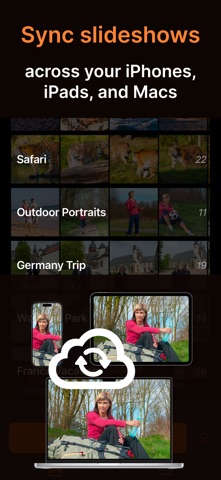
With iCloud sync enabled, your slideshows are synced across your iPhones, iPads, and Macs. Photos and videos from your Photos library must be synced with iCloud Photos.

Free to Download
Try SlideFlow for as long as you like. In unlimited free trial mode, generated slideshows include app promotions. Full access is available through subscriptions or a one-time lifetime purchase. Your purchase unlocks all features on iPhone, iPad, and Mac, and can be shared with your family through Apple Family Sharing.


Terms of Use: https://veprit.com/eula.html
Privacy Policy: https://veprit.com/VeprIT-PrivacyPolicy.pdf
Show more Show less

More data about Slideshow Maker・SlideFlow

Price Free
Rating 4.38 based on 200 ratings
Ranking Not ranked
Version 4.0
App size 117.7 MB
Suitable for Everyone

Screenshots

Slideshow Maker・SlideFlow Screenshot 1 of 10
Slideshow Maker・SlideFlow Screenshot 2 of 10
Slideshow Maker・SlideFlow Screenshot 3 of 10
Slideshow Maker・SlideFlow Screenshot 4 of 10
Slideshow Maker・SlideFlow Screenshot 5 of 10
Slideshow Maker・SlideFlow Screenshot 6 of 10
Slideshow Maker・SlideFlow Screenshot 7 of 10
Slideshow Maker・SlideFlow Screenshot 8 of 10
Slideshow Maker・SlideFlow Screenshot 9 of 10
Slideshow Maker・SlideFlow Screenshot 10 of 10
Screenshots by VeprIT, from the the App Store listing
Official page on the App Store

Alternatives to Slideshow Maker・SlideFlow

Slideshow maker PhotoMeister icon Slideshow maker PhotoMeister
MeisterApps BV
4.2
Free
433 ratings
Slide Maker - Photo SlideShow icon Slide Maker - Photo SlideShow
Hiren Merja
1.0
Free
1 ratings
Random Gallery icon Random Gallery
Thomas Olip
3.0
Free
8 ratings
Slideshow Video Maker for Pics icon Slideshow Video Maker for Pics
Aman Kumar
1.9
Free
16 ratings
SlideShow Maker & Video Editor icon SlideShow Maker & Video Editor
Dhruvalkumar Patel
2.5
Free
4 ratings
Slideshow Video Maker Songs icon Slideshow Video Maker Songs
Mobisoft Labs
3.3
Free
6 ratings
Live_Photos_Player icon Live_Photos_Player
Seung-Un Ham
5.0
Free
1 ratings
Slideshow Video Maker Music icon Slideshow Video Maker Music
Suneel Gupta
2.3
Free
7 ratings

More from VeprIT

Image resizer, converter iSize icon Image resizer, converter iSize
VeprIT
4.6
Free
133 ratings
Photo Cleaner iPick icon Photo Cleaner iPick
VeprIT
0.0
Free
Photo Sense: Editor & Manager icon Photo Sense: Editor & Manager
VeprIT
0.0
Free

Changelog of Slideshow Maker・SlideFlow

No changelog data

Developer information for VeprIT

VeprIT

Address:

Share Slideshow Maker・SlideFlow

Comments on Slideshow Maker・SlideFlow for iOS

We don't have enough comments to show example comments. Please check back later.

App Store Rankings for Slideshow Maker・SlideFlow

This app is not ranked

Technologies used by Slideshow Maker・SlideFlow

Frequently asked questions about Slideshow Maker・SlideFlow

Is Slideshow Maker・SlideFlow free?

Yes. Slideshow Maker・SlideFlow is free on the App Store.

Is Slideshow Maker・SlideFlow still available?

Yes. Slideshow Maker・SlideFlow is on the App Store, and the last update we saw was on September 28, 2026.

How large is Slideshow Maker・SlideFlow?

Slideshow Maker・SlideFlow is 117.66 MB.

Is Slideshow Maker・SlideFlow suitable for children?

App Store rates the content of Slideshow Maker・SlideFlow as suitable for everyone.

How do people rate Slideshow Maker・SlideFlow?

Slideshow Maker・SlideFlow scores 4.38 out of 5 stars, from 196 ratings on the App Store.

Who made Slideshow Maker・SlideFlow?

Slideshow Maker・SlideFlow was developed by VeprIT. It is listed in the photo & video category on the App Store.

What are the best alternatives to Slideshow Maker・SlideFlow?

People looking at Slideshow Maker・SlideFlow also look at these photo & video apps: Slideshow maker PhotoMeister, Slide Maker - Photo SlideShow, Random Gallery, Slideshow Video Maker for Pics, SlideShow Maker & Video Editor.

Apps other people are watching Popular Photo & Video Apps Price drops on Google Play Today's trending apps Top new apps
Slideshow maker PhotoMeister icon Slideshow maker PhotoMeister
Slide Maker - Photo SlideShow icon Slide Maker - Photo SlideShow
Random Gallery icon Random Gallery
Slideshow Video Maker for Pics icon Slideshow Video Maker for Pics
SlideShow Maker & Video Editor icon SlideShow Maker & Video Editor
Slideshow Video Maker Songs icon Slideshow Video Maker Songs
Live_Photos_Player icon Live_Photos_Player
Slideshow Video Maker Music icon Slideshow Video Maker Music
Overview Alternatives Reviews Rankings Technology
AppBrain Intelligence premium content

Subscribe now to get full and unlimited access to AppBrain Intelligence. You'll have access to:

  • App Intelligence dashboard (performance timeline, competitor comparison, country rankings, insight cards)
  • Detailed ranking data per app
  • Full timeline per developer
  • Device market shares data per country
  • Unlimited keyword tracking
1 Month

$75/mo
(billed every month)

SAVE 0%
Subscribe
3 Months

$65/mo
($195 billed every 3 months)

SAVE 13%
Subscribe
1 Year

$57.50/mo
($690 billed every year)

SAVE 23%
Subscribe
Each subscription will automatically renew 3 days before the expiration date for the same time period. Subscriptions can be cancelled at any time before the renewal.

AppBrain is an app data site, we track rankings, ratings, installs for all apps and games on Google Play and the App Store. AppBrain doesn't host app files or APKs, all install links go directly to the official store. All trademarks are owned by their respective owners.

More apps

  • Top Android apps being viewed
  • View Moss Slots
  • okexpert: experts and more
  • Fyrmns for Android

App statistics

  • Android statistics
  • Google Play Developer stats
  • Trending Android Apps
  • Trending iOS apps
  • Top popular Apps
  • Buy the best Android phone
  • Buy & sell app businesses

About AppBrain

  • Contact
  • Privacy
  • Documentation
  • DMCA takedowns
  • Articles
  • Blog
  • Free webpage for your Android app
© 2010-2026 - AppBrain