AppBrain
AppBrain
  • Apps
  • Apps being viewed right now Trending apps today Most popular apps All-time most installed apps Top rated apps iPhone and iPad apps
  • Intelligence ▾
    Intelligence overview → Track any Android app or your whole market
    Track & analyze
    Keyword Tracker & OptimizerTrack & improve Play rankings App Performance ReportOne-off PDF for any app StatisticsFree Android & Play market stats
    Promote your app
    Featured Apps App Links
  • Intelligence
  • Pricing
  • Dashboard
  • Sign up
  • Log in
App Store Apps > Photo & Video > Slow Motion: Video Speed Edit
Slow Motion: Video Speed Edit icon

Slow Motion: Video Speed Edit

by Phuc Pham · Photo & Video · Free
On the App Store since June 2026 · Data updated 2026-10-08
App Store

Slow Motion: Video Speed Edit is made and published by Phuc Pham. AppBrain is an independent app data site and isn't affiliated with Phuc Pham. The app name, icon, screenshots and description belong to Phuc Pham and are shown as published on the App Store.

AppBrain's verdict

Last updated
August 19, 2026

Rankings

App Store top charts

App Store Rankings for Slow Motion: Video Speed Edit

This app is not ranked

Competitors

Similar apps and more from Phuc Pham

Alternatives to Slow Motion: Video Speed Edit

Slow Fast Video Speed Editor icon Slow Fast Video Speed Editor
Shehroz Sheikh
0.0
Free
Speedro: Slow Mo & Fast Video icon Speedro: Slow Mo & Fast Video
RICHX
5.0
Free
1 ratings
ClipPace: Video Speed Editor icon ClipPace: Video Speed Editor
Codepaint Inc.
5.0
Free
1 ratings
Slow Motion Video Slomo Editor icon Slow Motion Video Slomo Editor
Swarna Lata Biswal
5.0
Free
1 ratings
ElasticClip – Video Speed icon ElasticClip – Video Speed
Asgami
4.0
Free
2 ratings
Video Speed Editor & Changer icon Video Speed Editor & Changer
MNB DIGITAL LLC
5.0
Free
5 ratings
VideoSpeed: Video Speed Editor icon VideoSpeed: Video Speed Editor
seohyeon yoon
5.0
Free
4 ratings
Video Speed • Slow Mo Editor icon Video Speed • Slow Mo Editor
Muhammad Mujahid Khan
0.0
Free

More from Phuc Pham

J2ME Emulator icon J2ME Emulator
Phuc Pham
2.3
Free
6 ratings
How to Tie Knots: Rope Guide icon How to Tie Knots: Rope Guide
Phuc Pham
1.0
Free
2 ratings
Time Blocking: Day Planner icon Time Blocking: Day Planner
Phuc Pham
1.0
Free
2 ratings
DroneTone: Drone Note icon DroneTone: Drone Note
Phuc Pham
1.0
Free
1 ratings
Periodic Table & Chemistry icon Periodic Table & Chemistry
Phuc Pham
1.0
Free
1 ratings
Cool Text Fancy Font Symbols icon Cool Text Fancy Font Symbols
Phuc Pham
1.0
Free
1 ratings
Status Bar Screenshot Maker icon Status Bar Screenshot Maker
Phuc Pham
1.0
Free
1 ratings
Hash Calculator MD5 SHA256 icon Hash Calculator MD5 SHA256
Phuc Pham
1.0
Free
1 ratings

Releases

Updates seen on the App Store
Version
1.1.1
Launched
June 2026

No changelog data

User feedback

Ratings and reviews on the App Store

Comments on Slow Motion: Video Speed Edit for iOS

We don't have enough comments to show example comments. Please check back later.

Technology

Found in the app by AppBrain
Price
Free
App size
2.58 MB
Content rating
Everyone

Technologies used by Slow Motion: Video Speed Edit

About the app and developer

About Slow Motion: Video Speed Edit

Slow Motion: Video Speed Edit is a photo & video app developed by Phuc Pham.

User Ratings

The app has no ratings yet.

App Information

Slow Motion: Video Speed Edit is freely available from the App Store. The app size is 2.58 MB. The latest version available is 1.1.1. The last update was on August 19, 2026.

Technical Requirements

The app has a content rating of Everyone. The app has been available on the App Store since June 2026.

Developer information for Phuc Pham

Phuc Pham

Address:

Frequently asked questions about Slow Motion: Video Speed Edit

Is Slow Motion: Video Speed Edit free?

Yes. Slow Motion: Video Speed Edit is free on the App Store.

Is Slow Motion: Video Speed Edit still available?

Yes. Slow Motion: Video Speed Edit is on the App Store, and the last update we saw was on August 19, 2026.

How large is Slow Motion: Video Speed Edit?

Slow Motion: Video Speed Edit is 2.58 MB.

Is Slow Motion: Video Speed Edit suitable for children?

App Store rates the content of Slow Motion: Video Speed Edit as suitable for everyone.

Who made Slow Motion: Video Speed Edit?

Slow Motion: Video Speed Edit was developed by Phuc Pham. It is listed in the photo & video category on the App Store.

What are the best alternatives to Slow Motion: Video Speed Edit?

People looking at Slow Motion: Video Speed Edit also look at these photo & video apps: Slow Fast Video Speed Editor, Speedro: Slow Mo & Fast Video, ClipPace: Video Speed Editor, Slow Motion Video Slomo Editor, ElasticClip – Video Speed.

Share Slow Motion: Video Speed Edit

Store listing

By Phuc Pham, from the App Store
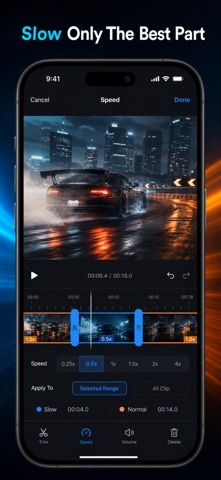
Slow Motion: Video Speed Edit Screenshot 1 of 10
Slow Motion: Video Speed Edit Screenshot 2 of 10
Slow Motion: Video Speed Edit Screenshot 3 of 10
Slow Motion: Video Speed Edit Screenshot 4 of 10
Slow Motion: Video Speed Edit Screenshot 5 of 10
Slow Motion: Video Speed Edit Screenshot 6 of 10
Slow Motion: Video Speed Edit Screenshot 7 of 10
Slow Motion: Video Speed Edit Screenshot 8 of 10
Slow Motion: Video Speed Edit Screenshot 9 of 10
Slow Motion: Video Speed Edit Screenshot 10 of 10
Screenshots by Phuc Pham, from the the App Store listing
Description by Phuc Pham Written by the developer, not by AppBrain. Click to read.
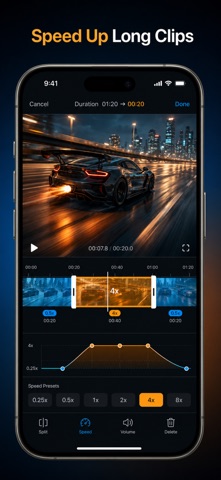
Turn any clip from your camera roll into true slow motion — or a racing timelapse — with one slider. Pick the moment, drag the speed, watch it change instantly, save to Photos.

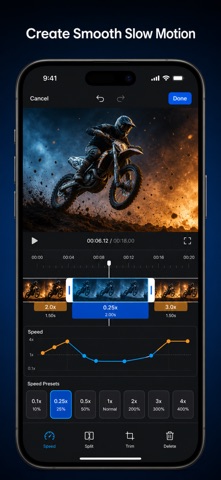
Most speed apps make you slow the WHOLE video. This one edits by section. Mark an in and out point, drop that span to 0.1x, leave the rest at full speed, then add a second fast section further down the same clip. That is a real speed ramp — the move that makes a jump, a kick, a splash or a skate trick look cinematic instead of just slow. Six one-tap ramp presets (Bullet Time, Smooth Ramp, Highlight, Hyperlapse, Timelapse, Build and Drop) place the sections for you if you would rather not do it by hand.

WHAT YOU GET
- Any speed from a 0.1x crawl to an 8x timelapse, set on a live preview you can scrub
- Multiple speed sections in one clip, so slow and fast live in the same video
- One-tap ramp presets that build the whole ramp on whatever clip is loaded
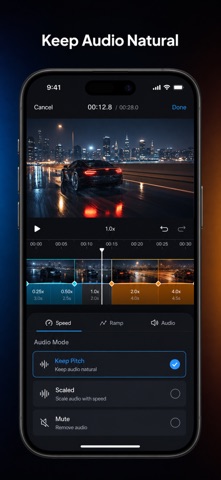
- Audio that keeps its natural pitch instead of turning into chipmunk voice, or mutes
- Export the way you need it: original / 1080p / 720p / 480p at 24, 30 or 60 fps
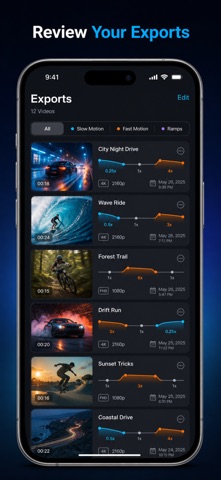
- Every finished clip kept in an in-app Gallery you can replay, share or delete

PERFECT FOR
- Sports and action footage where the payoff lasts half a second
- Skate, dance, gym and martial arts clips that need a slow-motion beat
- Travel and street footage compressed into a fast 4x-8x hyperlapse
- Reels, shorts and vlogs that need a speed change to hold attention

WHY NOT JUST USE THE PHOTOS APP?
The built-in editor only re-slows footage you already shot in slo-mo mode, and only in one continuous stretch. This works on any video in your library — clips you filmed normally, clips you were sent, clips you saved — and lets you put as many different speeds on one timeline as the edit needs.

PRIVACY
Every frame is processed on your iPhone. Nothing is uploaded, no account is required, and no video ever leaves your device.

FULL ACCESS
The free version exports 3 videos, capped at 15 seconds of output and marked with a small watermark. Full Access removes all three limits: unlimited exports, no watermark, no length cap, full-resolution output and keep-pitch audio. Choose a weekly plan, a yearly plan, or a one-time lifetime unlock — whichever fits how often you edit.

Import a clip, drag the slider to 0.25x, and finally see the moment you actually wanted.

Terms of Use (EULA): https://web-levi.web.app/terms
Privacy Policy: https://web-levi.web.app/privacy-policy
Questions? tphuc.work@gmail.com
Official page on the App Store
Popular Photo & Video Apps Apps other people are watching Today's trending apps Price drops on Google Play Top new apps
Slow Fast Video Speed Editor icon Slow Fast Video Speed Editor
Speedro: Slow Mo & Fast Video icon Speedro: Slow Mo & Fast Video
ClipPace: Video Speed Editor icon ClipPace: Video Speed Editor
Slow Motion Video Slomo Editor icon Slow Motion Video Slomo Editor
ElasticClip – Video Speed icon ElasticClip – Video Speed
Video Speed Editor & Changer icon Video Speed Editor & Changer
VideoSpeed: Video Speed Editor icon VideoSpeed: Video Speed Editor
Video Speed • Slow Mo Editor icon Video Speed • Slow Mo Editor
Overview Alternatives Reviews Rankings Technology
AppBrain Intelligence premium content

Subscribe now to get full and unlimited access to AppBrain Intelligence. You'll have access to:

  • App Intelligence dashboard (performance timeline, competitor comparison, country rankings, insight cards)
  • Detailed ranking data per app
  • Full timeline per developer
  • Device market shares data per country
  • Unlimited keyword tracking
1 Month

$75/mo
(billed every month)

SAVE 0%
Subscribe
3 Months

$65/mo
($195 billed every 3 months)

SAVE 13%
Subscribe
1 Year

$57.50/mo
($690 billed every year)

SAVE 23%
Subscribe
Each subscription will automatically renew 3 days before the expiration date for the same time period. Subscriptions can be cancelled at any time before the renewal.

AppBrain is an app data site, we track rankings, ratings, installs for all apps and games on Google Play and the App Store. AppBrain doesn't host app files or APKs, all install links go directly to the official store. All trademarks are owned by their respective owners.

More apps

  • Top Android apps being viewed
  • Class24 : Exam Preparation App
  • XIM MATRIX Manager
  • Canara e-Passbook

App statistics

  • Android statistics
  • Google Play Developer stats
  • Trending Android Apps
  • Trending iOS apps
  • Top popular Apps
  • Buy the best Android phone
  • Buy & sell app businesses

About AppBrain

  • Contact
  • Privacy
  • Documentation
  • DMCA takedowns
  • Articles
  • Blog
  • Free webpage for your Android app
© 2010-2026 - AppBrain