

Smart Alarm Clock - Waking Up
Smart Alarm Clock - Waking Up is made and published by Appenvision Ltd. AppBrain is an independent app data site and isn't affiliated with Appenvision Ltd. The app name, icon, screenshots and description belong to Appenvision Ltd and are shown as published on the App Store.
AppBrain's verdict
Well rated- Rating on App Store
- 4.01
- 8,745 ratings
- Last updated
- October 6, 2026
Users rate it well: 4.0 stars from 8,745 ratings.
Rankings
App Store top chartsApp Store Rankings for Smart Alarm Clock - Waking Up
Competitors
Similar apps and more from Appenvision LtdAlternatives to Smart Alarm Clock - Waking Up



More from Appenvision Ltd



Releases
Updates seen on the App Store- Version
- 2.3
- Launched
- March 2022
No changelog data
User feedback
Ratings and reviews on the App StoreComments on Smart Alarm Clock - Waking Up for iOS
We don't have enough comments to show example comments. Please check back later.
Technology
Found in the app by AppBrain- Price
- Free
- App size
- 220.7 MB
- Content rating
- Everyone
Technologies used by Smart Alarm Clock - Waking Up
About the app and developer
About Smart Alarm Clock - Waking Up
Smart Alarm Clock - Waking Up is an utilities app developed by Appenvision Ltd.
What is the rating of Smart Alarm Clock - Waking Up?
Smart Alarm Clock - Waking Up is rated 4.01 out of 5 stars, based on 8.7 thousand ratings.
Is Smart Alarm Clock - Waking Up free?
Smart Alarm Clock - Waking Up is free. The app size is 220.66 MB. The latest version available is 2.3. The last update was on October 6, 2026.
What are the requirements for Smart Alarm Clock - Waking Up?
The app has a content rating of Everyone. The app has been available on the App Store since March 2022.
Developer information for Appenvision Ltd
Address:
Frequently asked questions about Smart Alarm Clock - Waking Up
Is Smart Alarm Clock - Waking Up free?
Yes. Smart Alarm Clock - Waking Up is free on the App Store.
Is Smart Alarm Clock - Waking Up still available?
Yes. Smart Alarm Clock - Waking Up is on the App Store, and the last update we saw was on October 6, 2026.
How large is Smart Alarm Clock - Waking Up?
Smart Alarm Clock - Waking Up is 220.66 MB.
Is Smart Alarm Clock - Waking Up suitable for children?
App Store rates the content of Smart Alarm Clock - Waking Up as suitable for everyone.
How do people rate Smart Alarm Clock - Waking Up?
Smart Alarm Clock - Waking Up scores 4.01 out of 5 stars, from 8,745 ratings on the App Store.
Who made Smart Alarm Clock - Waking Up?
Smart Alarm Clock - Waking Up was developed by Appenvision Ltd. It is listed in the utilities category on the App Store.
What are the best alternatives to Smart Alarm Clock - Waking Up?
People looking at Smart Alarm Clock - Waking Up also look at these utilities apps: Alarm Clock App: myAlarm Clock, One Touch Alarm Clock, Alarm Clock HD, Alarm Clock - Wake up Music, Loud Alarm Clock – the LOUDEST.
Store listing
By Appenvision Ltd, from the App Store


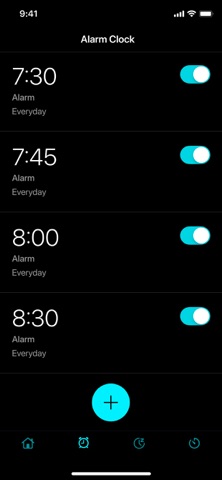


Description by Appenvision Ltd Written by the developer, not by AppBrain. Click to read.
Set alarms for important events, choose how you wake up, and access useful clock features whenever you need them.
~~~ FEATURES ~~~
~ Use your favorite ringtones and melodies
Wake up to music and sounds you enjoy for a more pleasant start to the day.
~ Solve math problems to wake up your brain
Start with a quick mental challenge. Choose a difficulty level, solve the problem, and dismiss the alarm.
~ Train your memory with patterns and colors
Dismiss the alarm with a memory game. Repeat the pattern or color sequence shown on the screen for a more active start to the day.
~ Sleep mode
Relax at bedtime with soothing melodies. Set the sleep timer, and the audio will turn off automatically when the timer ends.
~ Countdown timer
Set a timer for cooking, studying, workouts, or any other activity. An alert will let you know when time is up.
~ Talking clock
Use the app as a bedside clock and have the current time announced whenever you need it.
~ Flashlight
Turn on the flashlight with a single tap whenever you need extra light.
All your essential clock tools come together in one easy-to-use app designed to work without excessive battery drain. Choose ringtones for different alarms, check the weather, and plan your schedule with ease.
IMPORTANT INFORMATION:
- The app must remain running in the background for alarm alerts to appear.
- Location access is required to update the weather forecast.
- Notifications must be enabled to receive alerts.
SUBSCRIPTION
Subscribe now to get:
1. Dial customization
2. Additional methods to turn off the alarm
3. Unlimited sleep timer
4. Talking clock
5. No ads
Premium subscription details:
- Start with a free three-day trial. When the trial ends, a paid weekly subscription will begin automatically.
- Subscriptions are available in weekly, monthly, and annual plans.
- A weekly subscription costs $5.99, a monthly subscription costs $19.99, and an annual subscription costs $49.99.
- Payment will be charged to your Apple ID account upon confirmation of purchase.
- You can cancel your subscription or free trial at any time. To prevent automatic renewal, cancel at least 24 hours before the end of the current billing period.
- Your account will be charged for renewal within 24 hours before the end of the current billing period.
- You can manage your subscription and turn off auto-renewal in your Account Settings after purchase.
- Any unused portion of the free trial will be forfeited when you purchase a subscription.
- Read our Privacy Policy and Terms of Use:
https://appenvisions.com/privacy.html
https://appenvisions.com/eula.html