

Smart Head Track for OpenTrack
Smart Head Track for OpenTrack is made and published by TINAC Inc. AppBrain is an independent app data site and isn't affiliated with TINAC Inc. The app name, icon, screenshots and description belong to TINAC Inc. and are shown as published on the App Store.
AppBrain's verdict
Established- Rating on App Store
- 3.23
- 39 ratings
- Last updated
- April 2, 2026
It doesn't have enough ratings yet to judge what users think.
Rankings
App Store top chartsApp Store Rankings for Smart Head Track for OpenTrack
Competitors
Similar apps and more from TINAC Inc.Alternatives to Smart Head Track for OpenTrack







More from TINAC Inc.








Releases
Updates seen on the App Store- Version
- 2.1.3
- Launched
- September 2020
No changelog data
User feedback
Ratings and reviews on the App StoreComments on Smart Head Track for OpenTrack for iOS
We don't have enough comments to show example comments. Please check back later.
Technology
Found in the app by AppBrain- Price
- Free
- App size
- 103.2 MB
- Content rating
- Everyone
Technologies used by Smart Head Track for OpenTrack
About the app and developer
About Smart Head Track for OpenTrack
Smart Head Track for OpenTrack is a games app developed by TINAC Inc.
User Ratings
Smart Head Track for OpenTrack is rated 3.23 out of 5 stars. The rating is based on 39 ratings.
App Information
Smart Head Track for OpenTrack is freely available from the App Store. The app size is 103.24 MB. The latest version available is 2.1.3. The last update was on April 2, 2026.
Technical Requirements
The app has a content rating of Everyone. The app has been available on the App Store since September 2020.
Developer information for TINAC Inc.
Address:
Frequently asked questions about Smart Head Track for OpenTrack
Is Smart Head Track for OpenTrack free?
Yes. Smart Head Track for OpenTrack is free on the App Store.
Is Smart Head Track for OpenTrack still available?
Yes. Smart Head Track for OpenTrack is on the App Store, and the last update we saw was on April 2, 2026.
How large is Smart Head Track for OpenTrack?
Smart Head Track for OpenTrack is 103.24 MB.
Is Smart Head Track for OpenTrack suitable for children?
App Store rates the content of Smart Head Track for OpenTrack as suitable for everyone.
How do people rate Smart Head Track for OpenTrack?
Smart Head Track for OpenTrack scores 3.23 out of 5 stars, from 39 ratings on the App Store.
Who made Smart Head Track for OpenTrack?
Smart Head Track for OpenTrack was developed by TINAC Inc. It is listed in the games category on the App Store.
What are the best alternatives to Smart Head Track for OpenTrack?
People looking at Smart Head Track for OpenTrack also look at these games apps: SmoothTrack: Head Tracker, 6D Tracker, FA18 HORNET FIGHTER JET, Moonlight Game Streaming, SteerEST.
Store listing
By TINAC Inc., from the App Store


Description by TINAC Inc. Written by the developer, not by AppBrain. Click to read.
Turn your iPhone or iPad into a head tracker. Move your head to control your in-game camera in flight sims, racing games, truck simulators, and more — replacing expensive hardware like TrackIR with your phone's front camera and ARKit.
WORKS WITH YOUR FAVORITE GAMES
Compatible with any PC game supporting FreeTrack or TrackIR protocol:
• Microsoft Flight Simulator
• Digital Combat Simulator (DCS)
• Euro Truck Simulator 2 / American Truck Simulator
• IL-2 Sturmovik
• Star Citizen
• Assetto Corsa
• …and hundreds more
EASY SETUP
Connect to OpenTrack (free, open-source) on your PC via WiFi or USB. Enter your PC's IP address, tap Calibrate, and start tracking in under a minute.
On Your PC:
1. Download and install OpenTrack: https://git.io/JUs2U
2. Set Input to "UDP over network"
3. Set Output to "freetrack 2.0 Enhanced"
4. Ensure port 4242 is open on your firewall
On Your Phone:
1. Launch Smart Head Track and enter your PC's IP address
2. Align your face and tap Calibrate
3. Press Start on both the app and OpenTrack
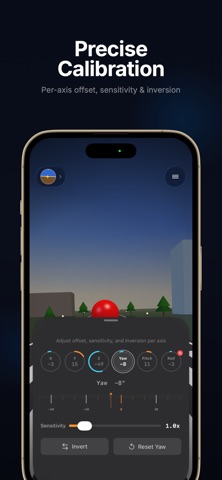
PRECISE CALIBRATION
Adjust each of the 6 axes (X, Y, Z, Yaw, Pitch, Roll) independently. Per-axis sensitivity, inversion, and offset controls let you dial in exactly the feel you want.
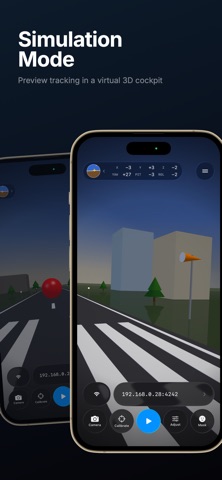
SIMULATION MODE
Preview your tracking in a virtual 3D cockpit before connecting to your PC — perfect for testing your calibration settings.
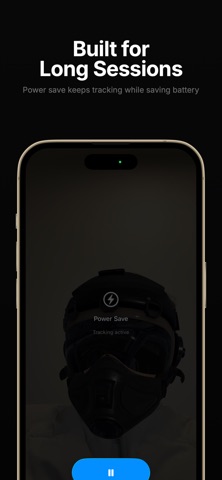
BUILT FOR LONG SESSIONS
• Power Save — Dim the camera view, hide overlays, or switch to minimal UI while tracking continues
• Connection Monitor — Get notified if the link to OpenTrack drops so you can troubleshoot quickly
AR FACE OVERLAYS
Pilot helmets, sunglasses, combat gear, and more — add fun overlays to your camera feed while tracking.
FREE & PRO
The core tracking experience is free with a daily time limit. Unlock unlimited tracking and all face overlays with a one-time Pro purchase.
CONNECTIVITY
• WiFi: UDP over your local network (default port 4242)
• USB: Direct cable connection via companion desktop app
• iPad: Full landscape orientation support
Privacy Policy: https://www.tinacinc.com/SmartHeadTrack/privacy_policy.html