

Smart PDF Document Scanner
Smart PDF Document Scanner is made and published by Qrayon, LLC. AppBrain is an independent app data site and isn't affiliated with Qrayon, LLC. The app name, icon, screenshots and description belong to Qrayon, LLC and are shown as published on the App Store.
AppBrain's verdict
Established- Rating on App Store
- 4.40
- 10 ratings
- Last updated
- October 10, 2026
- Size
- 11.2 MB
It doesn't have enough ratings yet to judge what users think.
User feedback
Ratings and reviews on the App StoreComments on Smart PDF Document Scanner for iOS
We don't have enough comments to show example comments. Please check back later.
Store listing
By Qrayon, LLC, from the App Store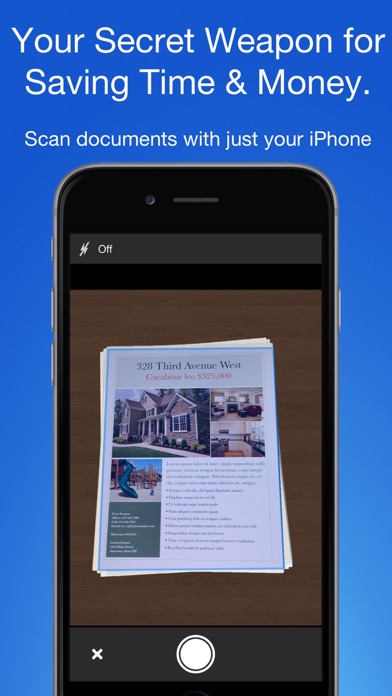


Description by Qrayon, LLC Written by the developer, not by AppBrain. Click to read.
TACK SHARP SCANS
That processor in your phone is quite a little monster. Smart Scanner uses it fully to make the best possible scans. Even full-page articles come out tack-sharp and easy to read.
It automatically detects the page edges and corrects for perspective. Pick full-color scans, grayscale, or black-and-white for maximum legibility. FlashAssist can take perfect scans even in poor lighting conditions. You can even change the correction and enhancement settings after the fact.
POWERFUL COLOR-CODED ORGANIZATION
Scanning is just half the problem. You need a good way to keep all your documents organized, and easy to find later. Smart Scanner uses a simple tagging system that is much easier and more powerful than the regular folder system. File documents under custom color-coded categories with just a couple taps. Browse and sort files by category with a couple more.
It's the way filing should work.
FOR ALL YOUR SCANNING NEEDS
+ Quickly scan and send contracts and forms
+ Keep scans of important documents in your pocket, separate form the Photo Library
+ Scan all your travel receipts for easy expense reports
+ Keep digital copies of your notes and sketches
+ Scan articles to read later
+ And more!
TIPS AND TRICKS
Here are a few tips to get the best scans:
+ Place your document on a darker surface to improve the edge auto-detection.
+ You can drag the corners of the blue rectangle to fine tune it after taking a photo.
+ Make sure there is adequate lighting. Use the flash in low-light conditions.
+ You can tap on a page to edit its scan settings (including edges) after the fact.
Safety and technology
Found in the app by AppBrain- Price
- Free
- App size
- 11.2 MB
- Content rating
- Everyone
Technologies used by Smart PDF Document Scanner
Releases
Updates seen on the App Store- Version
- 2.6
- Launched
- December 2016
No changelog data
Alternatives
Similar apps and more from Qrayon, LLCAlternatives to Smart PDF Document Scanner





More from Qrayon, LLC





Rankings
App Store top chartsApp Store Rankings for Smart PDF Document Scanner
About the app and developer
About Smart PDF Document Scanner
Smart PDF Document Scanner is a business app developed by Qrayon, LLC.
User Ratings
Smart PDF Document Scanner is rated 4.40 out of 5 stars. The rating is based on 10 ratings.
App Information
Smart PDF Document Scanner is freely available from the App Store. The app size is 11.22 MB. The latest version available is 2.6. The last update was on October 10, 2026.
Technical Requirements
The app has a content rating of Everyone. The app has been available on the App Store since December 2016.
Developer information for Qrayon, LLC
Address: