

Smart Printer | Scanner App
Smart Printer | Scanner App is made and published by Amir Bilal. AppBrain is an independent app data site and isn't affiliated with Amir Bilal. The app name, icon, screenshots and description belong to Amir Bilal and are shown as published on the App Store.
AppBrain's verdict
- Rating on App Store
- 2.00
- 1 ratings
- Last updated
- December 23, 2025
It doesn't have enough ratings yet to judge what users think.
Rankings
App Store top chartsApp Store Rankings for Smart Printer | Scanner App
Competitors
Similar apps and more from Amir BilalMore from Amir Bilal


Releases
Updates seen on the App Store- Version
- 1.3
- Launched
- October 2025
No changelog data
User feedback
Ratings and reviews on the App StoreComments on Smart Printer | Scanner App for iOS
We don't have enough comments to show example comments. Please check back later.
Technology
Found in the app by AppBrain- Price
- Free
- App size
- 5.56 MB
- Content rating
- Everyone
Technologies used by Smart Printer | Scanner App
About the app and developer
About Smart Printer | Scanner App
Smart Printer | Scanner App is a business app developed by Amir Bilal.
User Ratings
Smart Printer | Scanner App is rated 2.00 out of 5 stars. The rating is based on one rating ratings.
App Information
Smart Printer | Scanner App is freely available from the App Store. The app size is 5.56 MB. The latest version available is 1.3. The last update was on December 23, 2025.
Technical Requirements
The app has a content rating of Everyone. The app has been available on the App Store since October 2025.
Developer information for Amir Bilal
Address:
Store listing
By Amir Bilal, from the App Store



Description by Amir Bilal Written by the developer, not by AppBrain. Click to read.
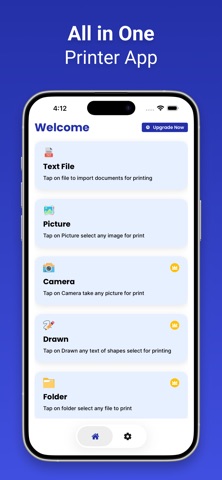
Smart Printer is the ultimate wireless printing solution designed specifically for macOS. Whether you’re working from home, the office, or anywhere in between, PrintEasy helps you connect and print with ease – no complicated setup required.
Key Features:
Effortless Wireless Printing
Connect to any AirPrint-enabled or network printer with just a few clicks. Supports Wi-Fi, LAN, and USB connections.
Print All File Types
Easily print PDFs, Word documents, Excel spreadsheets, images (JPG, PNG), emails, and web pages directly from your Mac.
Access from Anywhere
Print files from your local storage, external drives, or directly from cloud services like iCloud Drive, Google Drive, Dropbox, and OneDrive.
Compatible with Major Printer Brands
Supports HP, Epson, Canon, Brother, Samsung, Xerox, and more.
Advanced Print Settings
Customize page range, paper size, orientation, quality, duplex printing, and more.
Perfect for:
Professionals needing fast, reliable document printing
Students printing assignments and study material
Anyone who wants a hassle-free Mac printing experience
Note:
Payment will be charged to your iTunes account at confirmation of purchase. Your subscription will automatically renew unless auto-renew is turned off at least 24 hours before the end of the current subscription period. Your account will be charged for renewal within 24 hours before the end of the current subscription period. Automatic renewals will cost the same price you were originally charged for the subscription. You can manage your subscriptions and turn off auto-renewal by going to your Account Settings on the App Store after purchase. Read our terms of service and Privacy Policy for more information.No matter what direction you're converting, the app delivers fast and accurate results with minimal effort.
https://bilaldevelopers.blogspot.com/2025/09/privacy-policy.html
https://bilaldevelopers.blogspot.com/2025/09/term-of-use.html