

Smart Printer App: eSign PDF
Smart Printer App: eSign PDF is made and published by 满 李. AppBrain is an independent app data site and isn't affiliated with 满 李. The app name, icon, screenshots and description belong to 满 李 and are shown as published on the App Store.
AppBrain's verdict
- Last updated
- November 24, 2025
Rankings
App Store top chartsApp Store Rankings for Smart Printer App: eSign PDF
Competitors
Similar apps and more from 满 李More from 满 李


Releases
Updates seen on the App Store- Version
- 1.7.7
- Launched
- March 2025
No changelog data
User feedback
Ratings and reviews on the App StoreComments on Smart Printer App: eSign PDF for iOS
We don't have enough comments to show example comments. Please check back later.
Technology
Found in the app by AppBrain- Price
- Free
- App size
- 16.5 MB
- Content rating
- Everyone
Technologies used by Smart Printer App: eSign PDF
About the app and developer
About Smart Printer App: eSign PDF
Smart Printer App: eSign PDF is a business app developed by 满 李.
User Ratings
The app has no ratings yet.
App Information
Smart Printer App: eSign PDF is freely available from the App Store. The app size is 16.46 MB. The latest version available is 1.7.7. The last update was on November 24, 2025.
Technical Requirements
The app has a content rating of Everyone. The app has been available on the App Store since March 2025.
Developer information for 满 李
Address:
Frequently asked questions about Smart Printer App: eSign PDF
Is Smart Printer App: eSign PDF free?
Yes. Smart Printer App: eSign PDF is free on the App Store.
Is Smart Printer App: eSign PDF still available?
Yes. Smart Printer App: eSign PDF is on the App Store, and the last update we saw was on November 24, 2025.
How large is Smart Printer App: eSign PDF?
Smart Printer App: eSign PDF is 16.46 MB.
Is Smart Printer App: eSign PDF suitable for children?
App Store rates the content of Smart Printer App: eSign PDF as suitable for everyone.
Who made Smart Printer App: eSign PDF?
Smart Printer App: eSign PDF was developed by 满 李. It is listed in the business category on the App Store.
Store listing
By 满 李, from the App Store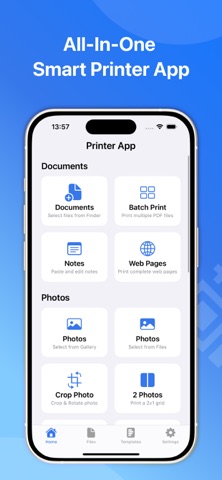


Description by 满 李 Written by the developer, not by AppBrain. Click to read.
Print Anything, Anytime - Effortlessly handle photos, PDFs, notes, and web pages with AirPrint compatibility. Perfect for home and office use.
Key Features:
• Electronic Signatures & Stamps
- Handwritten signing: Draw your signature directly
- Professional stamps: Use built-in seals like "Approved" or "Confidential"
- Text & image stamps: Add dates, labels or custom graphics
• Photo Printing Perfection
- Multiple layouts: 2-up, 4-up, 9-up grid printing
- Built-in editor: Crop, rotate & enhance images
- Flexible sources: Import from Photos app or Files
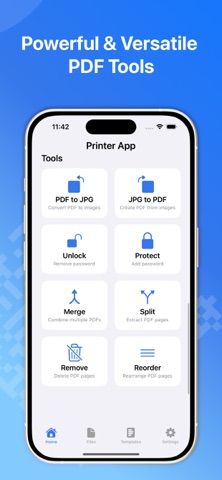
• Professional PDF Tools
- Batch print multiple PDFs
- Merge/split/remove/reorder pages
- Password protection & unlocking
- Convert PDF↔JPG formats
• Smart Note Printing
- Customizable text formatting
- Choose fonts/colors/sizes
- Save & edit draft notes
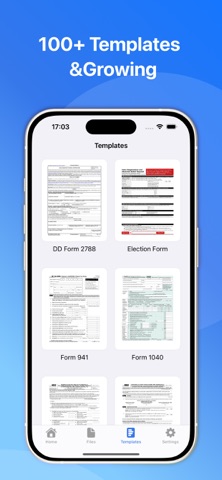
• 100+ Global Templates (and growing)
- United States: Form 1040, I-9 Employment, Passport Renewal
- United Kingdom: Self-Assessment Tax, Power of Attorney
- Canada: Citizenship Application, T4 Tax Slip
- Australia: Medicare Claims, TFN Declaration
- Business: Employment Contracts, NDAs
- Real Estate: Lease Agreements, Mortgage Applications
- Health: Medical History Forms, Vaccination Records
Why Choose Us:
- Pay once, unlock all features on iPhone, iPad, and Mac
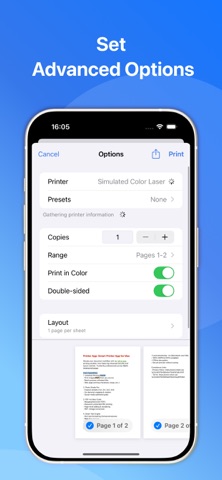
- AirPrint compatible with 10,000+ printers
- 100% Local Processing for enhanced privacy
- Multi-country document support
- Regular template updates
Download now and transform your Mac into a powerful printing hub. Handle all your document needs in one secure app - from quick photo prints to complex PDF tasks.
Privacy Policy: https://www.notion.so/1a32cb8376c680a5a113db1b7a9c5181
Terms of Use: https://www.notion.so/1a32cb8376c6809e9150efc0a48f52bd