

Smart Printer App- PDF Scanner
Smart Printer App- PDF Scanner is made and published by Muhammad Awais. AppBrain is an independent app data site and isn't affiliated with Muhammad Awais. The app name, icon, screenshots and description belong to Muhammad Awais and are shown as published on the App Store.
AppBrain's verdict
- Rating on App Store
- 5.00
- 1 ratings
- Last updated
- April 15, 2026
It doesn't have enough ratings yet to judge what users think.
Rankings
App Store top chartsApp Store Rankings for Smart Printer App- PDF Scanner
Competitors
Similar apps and more from Muhammad AwaisAlternatives to Smart Printer App- PDF Scanner


More from Muhammad Awais




Releases
Updates seen on the App Store- Version
- 1.3
- Launched
- December 2025
No changelog data
User feedback
Ratings and reviews on the App StoreComments on Smart Printer App- PDF Scanner for iOS
We don't have enough comments to show example comments. Please check back later.
Technology
Found in the app by AppBrain- Price
- Free
- App size
- 5.36 MB
- Content rating
- Everyone
Technologies used by Smart Printer App- PDF Scanner
About the app and developer
About Smart Printer App- PDF Scanner
Smart Printer App- PDF Scanner is a business app developed by Muhammad Awais.
User Ratings
Smart Printer App- PDF Scanner is rated 5.00 out of 5 stars. The rating is based on one rating ratings.
App Information
Smart Printer App- PDF Scanner is freely available from the App Store. The app size is 5.36 MB. The latest version available is 1.3. The last update was on April 15, 2026.
Technical Requirements
The app has a content rating of Everyone. The app has been available on the App Store since December 2025.
Developer information for Muhammad Awais
Address:
Frequently asked questions about Smart Printer App- PDF Scanner
Is Smart Printer App- PDF Scanner free?
Yes. Smart Printer App- PDF Scanner is free on the App Store.
Is Smart Printer App- PDF Scanner still available?
Yes. Smart Printer App- PDF Scanner is on the App Store, and the last update we saw was on April 15, 2026.
How large is Smart Printer App- PDF Scanner?
Smart Printer App- PDF Scanner is 5.36 MB.
Is Smart Printer App- PDF Scanner suitable for children?
App Store rates the content of Smart Printer App- PDF Scanner as suitable for everyone.
How do people rate Smart Printer App- PDF Scanner?
Smart Printer App- PDF Scanner has one rating of 5.00 stars on the App Store.
Who made Smart Printer App- PDF Scanner?
Smart Printer App- PDF Scanner was developed by Muhammad Awais. It is listed in the business category on the App Store.
What are the best alternatives to Smart Printer App- PDF Scanner?
People looking at Smart Printer App- PDF Scanner also look at these business apps: Smart Printer | Scanner App, زينة أعمال, Smart Printer App・Scan & Print, Storage Cleaner_ Phone Cleanup, Venzoraa.
Store listing
By Muhammad Awais, from the App Store


Description by Muhammad Awais Written by the developer, not by AppBrain. Click to read.
This app is a practical workspace for scanning, organizing, and printing documents, photos, and everyday paperwork. It combines essential document tools with printing features in a single, easy-to-use experience designed for work, school, and home use.
The interface remains simple and distraction-free, helping you move from scanned or digital content to printed pages efficiently.
Smart Printing Made Easy
The app supports a wide range of printable content, allowing you to handle different document types in one place:
• Print scanned documents
• Print photos with clean layouts
• Print PDFs and files
• Print notes and text-based documents
• Print contacts in readable formats
• Print webpages for offline use
Each item is formatted with attention to layout and spacing to reduce wasted paper and improve print quality.
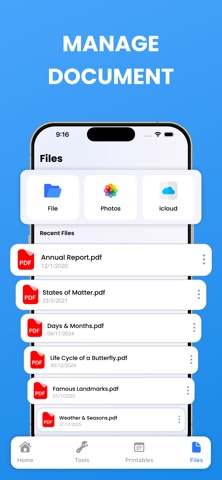
Scan, Import & File Management
Easily bring content into the app and keep everything organized:
• Scan documents using your device camera
• Import files from your device or cloud storage
• Store scanned and converted files for later use
• Quickly access recent and frequently used documents
This helps you manage documents without re-scanning or re-importing files repeatedly.
Document Tools & Conversions
The app includes essential tools to prepare documents before printing:
• Combine multiple PDF files into a single document
• Reorder and join pages
• Convert supported files into print-ready formats
• Prepare documents for consistent output
These tools help keep documents clean, structured, and ready for sharing or printing.
Templates & Custom Labels
Along with your own documents, the app offers ready-to-use printable content:
• Pre-made templates for common document needs
• Custom labels for home, office, and school organization
Templates save time and help maintain consistency for repetitive printing tasks.
This app keeps scanning, document management, and printing simple, organized, and reliable—without unnecessary complexity.
Note: A subscription is required to unlock all premium features.
Subscription Plans
• Weekly Plan – $4.99
• Monthly Plan – $7.99
• Yearly Plan – $19.99
Terms & Privacy Policy
https://sites.google.com/view/applicationterms
https://sites.google.com/view/creative-studio-privacypolicy