

Smart Remote Controller TV
Smart Remote Controller TV is made and published by Cuong Kieu Van. AppBrain is an independent app data site and isn't affiliated with Cuong Kieu Van. The app name, icon, screenshots and description belong to Cuong Kieu Van and are shown as published on the App Store.
AppBrain's verdict
- Rating on App Store
- 5.00
- 3 ratings
- Last updated
- October 23, 2026
It doesn't have enough ratings yet to judge what users think.
Rankings
App Store top chartsApp Store Rankings for Smart Remote Controller TV
Competitors
Similar apps and more from Cuong Kieu VanAlternatives to Smart Remote Controller TV


More from Cuong Kieu Van


Releases
Updates seen on the App Store- Version
- 1.0.7
- Launched
- March 2026
No changelog data
User feedback
Ratings and reviews on the App StoreComments on Smart Remote Controller TV for iOS
We don't have enough comments to show example comments. Please check back later.
Technology
Found in the app by AppBrain- Price
- Free
- App size
- 44.4 MB
- Content rating
- Everyone
Technologies used by Smart Remote Controller TV
About the app and developer
About Smart Remote Controller TV
Smart Remote Controller TV is an utilities app developed by Cuong Kieu Van.
What is the rating of Smart Remote Controller TV?
Smart Remote Controller TV is rated 5.00 out of 5 stars, based on 3 ratings.
Is Smart Remote Controller TV free?
Smart Remote Controller TV is free. The app size is 44.36 MB. The latest version available is 1.0.7. The last update was on October 23, 2026.
What are the requirements for Smart Remote Controller TV?
The app has a content rating of Everyone. The app has been available on the App Store since March 2026.
Developer information for Cuong Kieu Van
Address:
Store listing
By Cuong Kieu Van, from the App Store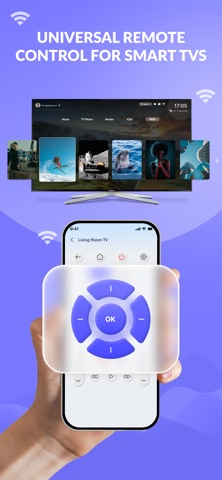


Description by Cuong Kieu Van Written by the developer, not by AppBrain. Click to read.
SMART TV REMOTE CONTROL
• Control your Smart TV over WiFi
• Volume and channel adjustment
• Power on / off (supported models)
• Touchpad navigation for easy browsing
• Quick connection to TV on the same network
• Smooth, responsive control experience
• Simple and clean interface
Supported brands: LG webOS, Samsung, Sony, Amazon Fire TV, Android TV, and more.
IPTV — LIVE TV STREAMING
• Load any M3U/M3U8 playlist URL to browse live TV channels
• Choose from built-in free playlists by category (News, Sports, Movies, Music, Kids, Entertainment, Documentary) or by country (Vietnam, USA, UK, Korea, Japan, and 30+ more)
• Watch live channels directly on your phone
• Cast live TV channels to your connected Smart TV via DLNA or ADB
• Search and filter channels by name or group
• Save favorite channels for quick access
• Recent channels history
Note: IPTV playlists are provided by the open-source iptv-org community project. Channel availability depends on the playlist source and is not guaranteed. This app does not host or own any streaming content.
EASY SETUP
1. Connect your phone and Smart TV to the same WiFi network
2. Select your TV from the device list
3. Start controlling your TV — or browse IPTV channels
No complicated setup required.
IMPORTANT NOTES
• WiFi connection required (IR/infrared is not supported)
• Your phone and TV must be on the same network for remote control
• IPTV feature: free users can watch up to 3 channels; unlimited access available with Premium subscription
• IPTV content is sourced from user-provided or public M3U playlists
WHY CHOOSE SMART REMOTE CONTROLLER TV?
• All-in-one: TV remote + IPTV player in one app
• Fast WiFi connection with stable performance
• User-friendly design for all ages
• Compatible with most Smart TVs
• Premium subscription for unlimited IPTV + ad-free experience
Download Smart Remote Controller TV and enjoy a smarter way to manage your TV and watch live channels — all from your phone.
Terms of Use (EULA):
https://www.apple.com/legal/internet-services/itunes/dev/stdeula/