

Smart Tools Pro - SmartTools
Smart Tools Pro - SmartTools is made and published by Shajir Kalady. AppBrain is an independent app data site and isn't affiliated with Shajir Kalady. The app name, icon, screenshots and description belong to Shajir Kalady and are shown as published on the App Store.
AppBrain's verdict
Established- Rating on App Store
- 3.25
- 8 ratings
- Last updated
- February 2, 2026
It doesn't have enough ratings yet to judge what users think.
Rankings
App Store top chartsApp Store Rankings for Smart Tools Pro - SmartTools
Competitors
Similar apps and more from Shajir KaladyAlternatives to Smart Tools Pro - SmartTools






More from Shajir Kalady

Releases
Updates seen on the App Store- Version
- 10.2
- Launched
- November 2013
No changelog data
User feedback
Ratings and reviews on the App StoreComments on Smart Tools Pro - SmartTools for iOS
We don't have enough comments to show example comments. Please check back later.
Technology
Found in the app by AppBrain- Price
- $0.99
- App size
- 11.0 MB
- Content rating
- Everyone
Technologies used by Smart Tools Pro - SmartTools
About the app and developer
About Smart Tools Pro - SmartTools
Smart Tools Pro - SmartTools is an utilities app developed by Shajir Kalady.
What is the rating of Smart Tools Pro - SmartTools?
Smart Tools Pro - SmartTools is rated 3.25 out of 5 stars, based on 8 ratings.
Is Smart Tools Pro - SmartTools free?
Smart Tools Pro - SmartTools costs $0.99. The app size is 11.03 MB. The latest version available is 10.2. The last update was on February 2, 2026.
What are the requirements for Smart Tools Pro - SmartTools?
The app has a content rating of Everyone. The app has been available on the App Store since November 2013.
Developer information for Shajir Kalady
Address:
Frequently asked questions about Smart Tools Pro - SmartTools
Is Smart Tools Pro - SmartTools free?
No. Smart Tools Pro - SmartTools costs $0.99 on the App Store.
Is Smart Tools Pro - SmartTools still available?
Yes. Smart Tools Pro - SmartTools is on the App Store, and the last update we saw was on February 2, 2026.
How large is Smart Tools Pro - SmartTools?
Smart Tools Pro - SmartTools is 11.03 MB.
Is Smart Tools Pro - SmartTools suitable for children?
App Store rates the content of Smart Tools Pro - SmartTools as suitable for everyone.
How do people rate Smart Tools Pro - SmartTools?
Smart Tools Pro - SmartTools scores 3.25 out of 5 stars, from 8 ratings on the App Store.
Who made Smart Tools Pro - SmartTools?
Smart Tools Pro - SmartTools was developed by Shajir Kalady. It is listed in the utilities category on the App Store.
What are the best alternatives to Smart Tools Pro - SmartTools?
People looking at Smart Tools Pro - SmartTools also look at these utilities apps: Electronic Circuits Calc Pro, Vision Smarts, StopTheFonts, Boson Subnet Calculator, Toro Tempus.
Store listing
By Shajir Kalady, from the App Store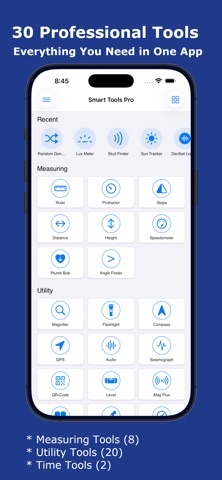


Description by Shajir Kalady Written by the developer, not by AppBrain. Click to read.
Transform your iPhone into a professional measurement and utility toolkit with Smart Tools Pro. Whether you're a DIY enthusiast, professional contractor, photographer, or just need quick access to essential tools, Smart Tools Pro has everything you need in one beautifully designed app - 30 powerful tools at your fingertips!
MEASURING TOOLS (8)
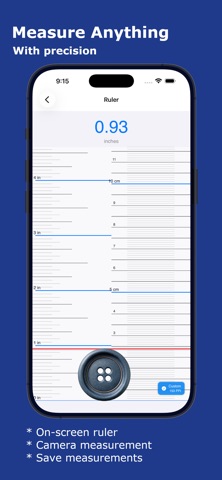
* Ruler - Measure objects with precision using your screen or camera. Perfect for quick measurements when you don't have a physical ruler.
* Protractor - Measure angles accurately for DIY projects, construction, or educational purposes. Real-time angle display with degree precision.
* Slope - Calculate slope angles and percentages. Essential for construction, landscaping, and accessibility compliance.
* Distance - Measure distances using AR technology. Point your camera and get instant distance measurements for room planning.
* Height - Measure heights of objects using your phone's sensors and AR. Perfect for measuring buildings, trees, or furniture.
* Speedometer - Track your speed in real-time with GPS. HUD mode for windshield reflection. Max speed and distance tracking.
* Plumb Bob - Check vertical alignment with a virtual plumb bob. Essential for construction and hanging fixtures.
* Angle Finder - Measure angles using camera-based angle detection. Draw and compare multiple angles.
UTILITY TOOLS (20)
* Magnifier - Magnify small text or objects with zoom control and flash support. Perfect for reading fine print and inspecting details.
* Flashlight - Powerful LED flashlight with adjustable brightness and strobe modes. Never be in the dark again.
* Compass - Navigate with confidence using the built-in digital compass. Shows direction, coordinates, altitude, and magnetic field strength.
* GPS - Track your location with precision. View latitude, longitude, altitude, speed, and accuracy. Save favorite locations.
* Audio - Advanced audio analyzer with frequency spectrum, waveform visualization, and real-time audio monitoring.
* Seismograph - Detect and monitor vibrations and movements. Track seismic activity and record shake events.
* QR-Code - Scan and generate QR codes. Create custom QR codes for URLs, text, contacts, and more.
* Level - Turn your iPhone into a professional spirit level with bubble display. Surface and edge modes with calibration.
* Mag Flux - Measure magnetic field strength in microteslas. Detect magnetic objects and monitor field variations.
* Reader - Text-to-speech reader for PDFs and images. OCR technology extracts text from photos. Adjustable reading speed.
* Color Picker - Pick colors from your camera in real-time. Save color palettes with hex, RGB, and HSB values.
* Barometer - Monitor atmospheric pressure. Track weather changes with pressure trends and altitude compensation.
* Random Generator - Generate random numbers, flip coins, roll dice, and create secure passwords. Perfect for games and decisions.
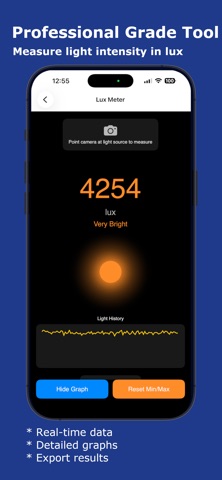
* Lux Meter - Measure light intensity in lux. Professional light measurement for photography and workspace optimization.
* Stud Finder - Detect metal studs and magnetic objects in walls using your phone's magnetometer. Essential for hanging fixtures.
* Sun Tracker - Track sun position throughout the day. Plan photography sessions and solar panel installations with sunrise/sunset times.
* Decibel Logger - Measure and log sound levels. Monitor noise pollution and track daily noise exposure with detailed history.
* Frequency Analyzer - Analyze audio frequencies in real-time. Spectrum analyzer with harmonic detection for musicians and audio professionals.
TIME TOOLS (2)
* Stop Watch - Precision stopwatch with volume button control for races and workouts. Record multiple laps with highest/lowest indicators.
* Timer - Countdown timer with volume button control for hands-free operation.
Download Smart Tools Pro today and discover 30 professional tools in one beautifully designed app!