

Trace & Sketch - Easy Drawing
Trace & Sketch - Easy Drawing is made and published by Shajir Kalady. AppBrain is an independent app data site and isn't affiliated with Shajir Kalady. The app name, icon, screenshots and description belong to Shajir Kalady and are shown as published on the App Store.
AppBrain's verdict
EstablishedWell rated- Rating on App Store
- 4.28
- 159 ratings
- Last updated
- September 9, 2026
Users rate it well: 4.3 stars from 159 ratings.
Rankings
App Store top chartsApp Store Rankings for Trace & Sketch - Easy Drawing
Competitors
Similar apps and more from Shajir Kalady






Releases
Updates seen on the App Store- Version
- 5.4
- Launched
- October 2015
No changelog data
User feedback
Ratings and reviews on the App StoreComments on Trace & Sketch - Easy Drawing for iOS
We don't have enough comments to show example comments. Please check back later.
Technology
Found in the app by AppBrain- Price
- Free
- App size
- 24.1 MB
- Content rating
- Everyone
Technologies used by Trace & Sketch - Easy Drawing
About the app and developer
About Trace & Sketch - Easy Drawing
Trace & Sketch - Easy Drawing is a graphics & design app developed by Shajir Kalady.
User Ratings
Trace & Sketch - Easy Drawing is rated 4.28 out of 5 stars. The rating is based on 160 ratings.
App Information
Trace & Sketch - Easy Drawing is freely available from the App Store. The app size is 24.13 MB. The latest version available is 5.4. The last update was on September 9, 2026.
Technical Requirements
The app has a content rating of Everyone. The app has been available on the App Store since October 2015.
Developer information for Shajir Kalady
Address:
Store listing
By Shajir Kalady, from the App Store




Description by Shajir Kalady Written by the developer, not by AppBrain. Click to read.
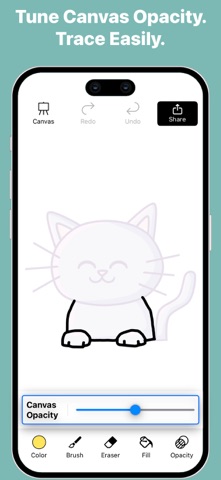
Your screen becomes a digital tracing paper — select an image, adjust the transparency, and start drawing directly with your finger or stylus. Simple, smooth, and perfect for beginners, hobby artists, and anyone who wants to practice drawing.
How it works:
Pick an image from your gallery or camera.
Adjust the transparency to see your image clearly under the tracing layer.
Draw freely on the screen — all strokes are saved automatically.
Choose a canvas or plain background to finish your artwork.
Export your drawing in multiple formats, with or without background.
Features:
Adjustable Transparency – Control how much of the base image is visible.
Natural Drawing Tools – Brush with adjustable stroke size, opacity, and pattern styles.
Eraser & Undo/Redo – Erase strokes with adjustable width and fix mistakes using undo and redo.
Color Picker – Choose colors easily or pick colors directly from your image or drawing.
Fill Tool (Pot Fill) – Tap a closed area to fill it instantly with the selected color.
Zoom, Drag, Rotate – Zoom, drag, and rotate the canvas for precise tracing.
Multiple Canvases – Use built-in canvases or create a plain colored background.
Automatic Save – Every stroke is saved instantly.
Gallery Management – View all your sketches, open them for editing, export them, duplicate sketches, or delete sketches you no longer need.
Export Drawing Options-
Export Without Canvas – Save the pure drawing with no background; perfect for stickers, collages, and overlays.
Export With Base Image – Save your drawing directly on the original photo for photo-based artwork.
Export With Canvas – Save your artwork as a drawing on a selected canvas.
Select Dimensions – Choose from multiple image resolution options before exporting.
Quick Share – Use the iOS share sheet to save or send your artwork anywhere.
Export Video (Time-Lapse)-
Time-Lapse Replay – Export a replay video that shows the entire drawing process from start to finish.
Multiple Video Resolutions – Choose the video quality before exporting.
Whether you’re tracing portraits, practicing outlines, creating digital art, or simply sketching for fun, Trace and Sketch makes it easy and enjoyable — no paper, no setup, no AR required.