

SmartFinder by Evermade
SmartFinder by Evermade is made and published by MYUNG HOON KIM. AppBrain is an independent app data site and isn't affiliated with MYUNG HOON KIM. The app name, icon, screenshots and description belong to MYUNG HOON KIM and are shown as published on the App Store.
AppBrain's verdict
- Last updated
- October 24, 2022
Rankings
App Store top chartsApp Store Rankings for SmartFinder by Evermade
Competitors
Similar apps and more from MYUNG HOON KIMAlternatives to SmartFinder by Evermade





Releases
Updates seen on the App Store- Version
- 1.2.3
- Launched
- October 2021
No changelog data
User feedback
Ratings and reviews on the App StoreComments on SmartFinder by Evermade for iOS
We don't have enough comments to show example comments. Please check back later.
Technology
Found in the app by AppBrain- Price
- Free
- App size
- 37.9 MB
- Content rating
- Everyone
Technologies used by SmartFinder by Evermade
About the app and developer
About SmartFinder by Evermade
SmartFinder by Evermade is a photo & video app developed by MYUNG HOON KIM.
What is the rating of SmartFinder by Evermade?
SmartFinder by Evermade has no ratings yet.
Is SmartFinder by Evermade free?
SmartFinder by Evermade is free. The app size is 37.85 MB. The latest version available is 1.2.3. The last update was on October 24, 2022.
What are the requirements for SmartFinder by Evermade?
The app has a content rating of Everyone. The app has been available on the App Store since October 2021.
Developer information for MYUNG HOON KIM
Address:
Frequently asked questions about SmartFinder by Evermade
Is SmartFinder by Evermade free?
Yes. SmartFinder by Evermade is free on the App Store.
Is SmartFinder by Evermade still available?
Yes. SmartFinder by Evermade is on the App Store, and the last update we saw was on October 24, 2022.
How large is SmartFinder by Evermade?
SmartFinder by Evermade is 37.85 MB.
Is SmartFinder by Evermade suitable for children?
App Store rates the content of SmartFinder by Evermade as suitable for everyone.
Who made SmartFinder by Evermade?
SmartFinder by Evermade was developed by MYUNG HOON KIM. It is listed in the photo & video category on the App Store.
What are the best alternatives to SmartFinder by Evermade?
People looking at SmartFinder by Evermade also look at these photo & video apps: ZIUM : Photo Organizer, Object Eraser - Photo Retouch, Triggertrap Mobile, Dr.EXIF - Know your photos, Dub Video: Voice Over Maker.
Store listing
By MYUNG HOON KIM, from the App Store



Description by MYUNG HOON KIM Written by the developer, not by AppBrain. Click to read.
Acquired a patent for "Goods Management Method".
We are surrounded by many items that are similar in color and shape and it is too complicated to sort them out in text.
When you can’t find what you’re looking for and can’t remember where you put it, take a picture of them in advance.
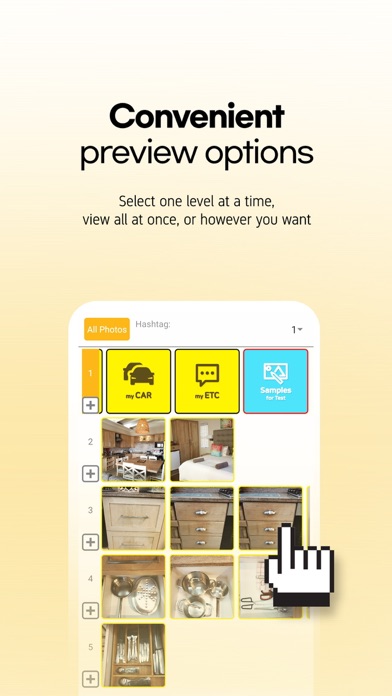
Create your own hierarchy and organize it with photos so you can instantly find what you're looking for with just a click of a picture without any text!
It is an innovative way to save and find the things you need by creating the relationships of pictures linking up, down, left, and right.
* SmartFinder function list (PNG Image File)
https://drive.google.com/file/d/1WI2JgWl-YDj8C16KjqRDHKroQcJxb9vz/view?usp=sharing
* “SmartFinder” on YouTube.
- Speed Comparing
https://youtu.be/3QfyQgUK4dE
- Key Features
https://youtu.be/N58ggQ9ZM9w
- Backup and Clouding
https://youtu.be/PI3rO8UCnnM
[ SmartFinder’s Advantages ]
1. No limit on the number of photos being registered.
2. You can freely create your own hierarchy with photos and configure them as you like in certain number of steps.
3. When moving houses, rooms or furniture, easily apply changes using the menus of the Replacement, Move Hierarchy, Copy Hierarchy.
4. Sticker attaching function is applied.
5. Able to change the order of photos easily.
6. View the entire hierarchical structure at a glance in the Hierarchical menu.
7. In the Hierarchical menu, classify the top and bottom relationships between pictures by border color.
8. This application has multilingual support. (Korean, English, Chinese, German, French, Spanish, Russian, Japanese.)
9. Applicated for patent and design registration.
10. US international patent pending.
11. Can be used for general photo management, screenshot management, product coupon management, and membership barcode management.
[ Main function ]
1. Set the hierarchy freely as you want.
2. Double tap to move to gallery view or hierarchical view immediately.
3. Provides the function to look at the connected photos all at once.
4. Change the order of photos as you want.
5. Search function is provided for each storage item or storage location.
6. Provides a variety of search options.
7. Converts the entered text into an image and applies it.
8. Reminder push alarm function.
9. Turn bookmarks on and off on important photos
10. Provides automatic hash code recommendation function that the user entered before.
11. Photo sharing function.
12. Provides backup and restoration of photos.
13. Hierarchy menu
* All Photos mode
* Select Photos mode
14. Gallery
* Manage the current status of things by attaching and deleting stickers
* Instant lookup with QR code.
[ Premium(Paid) member subscription service ]
1. The following functions are additionally provided to Premium(Paid) members.
* Remove Bottom Ads
* It is possible to save the original photo without changing the photo resolution and size
* Notification on the date the photo was registered as a reminder
2. Payment will be processed on the log-in account of the App Store.
3. Refund and recurring payment of the subscription is processed based on the App Store's payment policy.
4. Go to [Settings > Account (Apple ID) > Subscriptions > SmartFinder] to manage or cancel your subscription.
5. Unless cancelled 24 hours before the expiration date, subsctiption will be automatically renewed.
6. If you signed up for a free or discounted trial subscription and you don't want to renew it, cancel it at least 24 hours before the trial ends.
7. If you cancel during a free trial period, you might lose access to the subscription immediately.
[ App Support ]
Customer Support : sfinder4u@gmail.com
Terms of Service : https://www.sfinder4u.biz/bbs/board.php?bo_table=en_page2
Privacy Policy : https://www.sfinder4u.biz/bbs/board.php?bo_table=en_page3