

Smartsheet: Projects & Teams
Smartsheet: Projects & Teams is made and published by Smartsheet Inc. AppBrain is an independent app data site and isn't affiliated with Smartsheet Inc. The app name, icon, screenshots and description belong to Smartsheet Inc. and are shown as published on the App Store.
AppBrain's verdict
EstablishedLoved by users- Rating on App Store
- 4.85
- 120,334 ratings
- Last updated
- October 20, 2026
- Size
- 137.7 MB
Users love it: 4.8 stars from 120,334 ratings.
User feedback
Ratings and reviews on the App StoreComments on Smartsheet: Projects & Teams for iOS
We don't have enough comments to show example comments. Please check back later.
Store listing
By Smartsheet Inc., from the App Store




Description by Smartsheet Inc. Written by the developer, not by AppBrain. Click to read.
Use Smartsheet, a dynamic workspace that empowers teams to manage projects, automate workflows, and rapidly build new solutions—using no-code tools they love, and backed by the security IT needs. Smartsheet is trusted by companies of all sizes, across 190 countries — including over 90% of Fortune 100 companies, and over 80% of Fortune 500 companies.
Manage projects and tasks, automate workflows, collaborate with your team, and maximize productivity, anytime, anywhere!
With Smartsheet you can:
COLLABORATE WITH YOUR TEAM
• Seamlessly create, share, and collaborate with your team on projects, wherever you are, from your Mac, iPad, or iPhone.
• Access your projects, tasks, workflows, and sheets anytime.
• Get business collaboration tools on your mobile device.
• Review and edit documents and sheets that your team is working on.
ORGANIZE PROJECTS & TASKS
• Use sheets to oversee tasks and workflows, plan projects, and maximize the productivity of your team.
• Add assignees, due dates, followers, checklists, predecessors, and files to your tasks and follow the progress of your projects.
• Choose how to visualize tasks switching between grid, card, Gantt, and calendar views with the same data.
• Keep everyone on the same page. Attach files from Google Drive, OneDrive, Dropbox, and more.
AUTOMATE WORKFLOWS
• Implement simple and powerful automated workflows in minutes.
• Send automated update and approval requests to streamline work and reduce the need for meetings.
• Automate repetitive processes by sending alerts, setting reminders, automatically moving, copying, or locking rows, and assigning work based on sheet changes and preset times.
• Use card view to create kanban boards to manage your agile work.
WORK IN ONE PLACE
• See work alongside key conversations, decisions, and rationale in one place—improve project visibility across your organization.
• Share spreadsheets with others to view, edit, or add comments, and collaborate anywhere.
COLLECT INFORMATION WITH FORMS
• Collect data from the field with forms, capture and upload images, or scan barcodes with your mobile device.
• Easily collect and act on error-free, consistent data from internal and external stakeholders.
• Quickly create forms that automatically map to the columns in your sheets.
• Ask the right people the right questions with conditional logic in forms.
• Provide easy access by embedding forms on dashboards and websites, or by sharing a unique link.
VIEW WORK STATUS IN REAL TIME
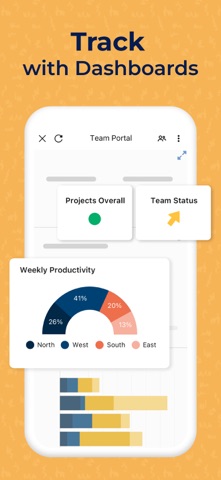
• Easily view and manage your dashboards, sheets, and more in real-time from your phone, so you always know the status of work.
• Get notifications to your Inbox or through push notifications about the projects, and tasks you’re following.
• Rapidly adapt to changing conditions and identify trends with easy-to-use widgets that display live data, charts, and key metrics.
• Easily customize Smartsheet to show and share what matters with an easy-to-use drag-and-drop UI in dashboards.
WORK SEAMLESSLY WITH YOUR FAVORITE APPS
• Smartsheet's out-of-the-box integrations enable real-time synchronization and visibility with many of your favorite apps from Google, Microsoft, Salesforce, and more, so you can easily track tasks, compile data in spreadsheets, and collaborate with your team, all in one place.
• Seamlessly connect your enterprise ecosystem of apps like Slack, Jira, DocuSign, Microsoft Teams, Gmail, Box, and more with Smartsheet.
BUILD PURPOSE BUILT APPS WITHOUT CODING
Smartsheet is the leading platform for dynamic work, built for the enterprise, empowering teams like IT, Marketing, and Operations with a no-code tool for project management, workflow automation, and solution creation.
Safety and technology
Found in the app by AppBrain- Price
- Free
- App size
- 137.7 MB
- Content rating
- Everyone
Technologies used by Smartsheet: Projects & Teams
Releases
Updates seen on the App Store- Version
- 26.19
- Launched
- October 2012
No changelog data
Alternatives
Similar apps and more from Smartsheet Inc.Alternatives to Smartsheet: Projects & Teams


Rankings
App Store top chartsApp Store Rankings for Smartsheet: Projects & Teams
About the app and developer
About Smartsheet: Projects & Teams
Smartsheet: Projects & Teams is a business app developed by Smartsheet Inc.
User Ratings
Smartsheet: Projects & Teams is rated 4.85 out of 5 stars. The rating is based on 120 thousand ratings.
App Information
Smartsheet: Projects & Teams is freely available from the App Store. The app size is 137.69 MB. The latest version available is 26.19. The last update was on October 20, 2026.
Technical Requirements
The app has a content rating of Everyone. The app has been available on the App Store since October 2012.
Developer information for Smartsheet Inc.
Address:
Frequently asked questions about Smartsheet: Projects & Teams
Is Smartsheet: Projects & Teams free?
Yes. Smartsheet: Projects & Teams is free on the App Store.
Is Smartsheet: Projects & Teams still available?
Yes. Smartsheet: Projects & Teams is on the App Store, and the last update we saw was on October 20, 2026.
How large is Smartsheet: Projects & Teams?
Smartsheet: Projects & Teams is 137.69 MB.
Is Smartsheet: Projects & Teams suitable for children?
App Store rates the content of Smartsheet: Projects & Teams as suitable for everyone.
How do people rate Smartsheet: Projects & Teams?
Smartsheet: Projects & Teams scores 4.85 out of 5 stars, from 120,334 ratings on the App Store.
Who made Smartsheet: Projects & Teams?
Smartsheet: Projects & Teams was developed by Smartsheet Inc. It is listed in the business category on the App Store.
What are the best alternatives to Smartsheet: Projects & Teams?
People looking at Smartsheet: Projects & Teams also look at these business apps: Procore, Confluence Cloud, Microsoft Planner, monday.com - AI Work Platform, Microsoft SharePoint.