

Smile Code - Vibe Coding
Smile Code - Vibe Coding is made and published by 建良 肖. AppBrain is an independent app data site and isn't affiliated with 建良 肖. The app name, icon, screenshots and description belong to 建良 肖 and are shown as published on the App Store.
AppBrain's verdict
- Last updated
- October 1, 2026
Rankings
App Store top chartsApp Store Rankings for Smile Code - Vibe Coding
Competitors
Similar apps and more from 建良 肖Alternatives to Smile Code - Vibe Coding


More from 建良 肖


Releases
Updates seen on the App Store- Version
- 1.1.0
- Launched
- September 2026
No changelog data
User feedback
Ratings and reviews on the App StoreComments on Smile Code - Vibe Coding for iOS
We don't have enough comments to show example comments. Please check back later.
Technology
Found in the app by AppBrain- Price
- Free
- App size
- 55.4 MB
- Content rating
- Everyone
Technologies used by Smile Code - Vibe Coding
About the app and developer
About Smile Code - Vibe Coding
Smile Code - Vibe Coding is an overall app developed by 建良 肖.
User Ratings
The app has no ratings yet.
App Information
Smile Code - Vibe Coding is freely available from the App Store. The app size is 55.42 MB. The latest version available is 1.1.0. The last update was on October 1, 2026.
Technical Requirements
The app has a content rating of Everyone. The app has been available on the App Store since September 2026.
Developer information for 建良 肖
Address:
Store listing
By 建良 肖, from the App Store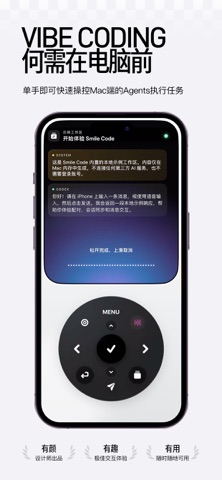



Description by 建良 肖 Written by the developer, not by AppBrain. Click to read.
——·——————
An Agent is still working on a task.
You have just thought of a change and want to tell it now.
Several projects are running, and you keep searching for the right conversation.
Smile Code is made for these moments.
Connect to your own Mac. Check and reply on iPhone, or use the full workspace on iPad.
Keep talking to Agents on your Mac, even when your mobile device is on another network.
——·——————
▸ A design you will want to open every day
Smile Code's developer is a designer first.
A black background. The feel of aluminum.
Like holding a familiar little device, rather than opening another chat window.
Turn the wheel to browse conversations.
Press to enter a task.
Subtle sound and haptics respond to every step.
Even checking progress and switching conversations can be fun.
▸ Say what comes to mind
“Give this a little more space.”
“Make the button bigger.”
“Fix this issue first.”
You do not have to type a long message on your phone.
Speak your idea, turn it into text, review it, then send.
A personal vocabulary and editable vocabulary packs help with technical terms that are hard to recognize.
You can also download local speech models or configure your own AI text-polishing service to suit the way you work.
Less typing when inspiration strikes.
▸ All connected conversations, together
No need to remember which Agent has the task.
Open Agents to see conversations from your connected tools in one place.
Want to focus on one Agent? Apply a filter.
Ready for another task? Turn the wheel, select it, and open it.
You can switch to keypad controls, too.
Let the tool fit your habits.
▸ Check your computer without going back to your desk
Open the live Mac preview to see the screen.
Use your phone for pointer and scrolling controls when needed.
Check whether the interface looks right or see how a task is progressing.
One less trip to your desk. One less interruption.
▸ Make room for ideas on iPad
The same app now includes an iPad workspace. Control a paired Mac with a trackpad, shortcuts, and voice input. Arrange the app dock and keys to suit your workflow.
▸ A user first, a developer second
That is the idea behind Smile Code.
Its developer is also an avid Vibe Coding user.
We know the urge to check on an Agent while it works.
We know a change that takes one sentence to explain can be awkward to type.
And we know a useful, thoughtfully designed tool makes you want to keep creating.
That is why Smile Code pays attention to everyday use.
From spacing on the screen to the feel of the wheel.
From editing vocabulary to switching conversations.
We hope you will think:
“Yes. This is what I needed.”
Let your Mac keep working.
Pick up your iPhone or iPad and keep your next idea moving.
Before you start:
• Requires iOS 18 or later and an Apple silicon or Intel Mac running macOS 14 or later.
• Install the Mac companion and keep the Mac awake, online, and running it. Remote chat requires version 1.1.0 or later on both devices.
• Scan the Mac QR code for secure pairing. Remote chat uses an encrypted message relay; desktop previews remain on the same local network.
• Remote chat has capacity and usage limits. Notifications may not arrive while the app is in the background or the phone is locked.
• Install, sign in to, and authorize third-party Agents yourself. Features and fees depend on each service.
• AI text polishing is off by default. When enabled, transcribed text and selected vocabulary are sent to the provider you configure.