SMS client is made and published by
MacMedia.
AppBrain is an independent app data site and isn't affiliated with MacMedia.
The app name, icon, screenshots and description belong to MacMedia and are shown as
published on the App Store.
About SMS client
SMS client is an utilities app developed by MacMedia.
User Ratings
SMS client is rated 2.00 out of 5 stars. The rating is based on 2 ratings.
App Information
SMS client is freely available from the App Store. The app size is 1.07 MB. The latest version available is 1.7.1. The last update was on January 24, 2021.
Technical Requirements
The app has a content rating of Everyone. The app has been available on the App Store since June 2010.
Description by MacMedia(from the App Store)
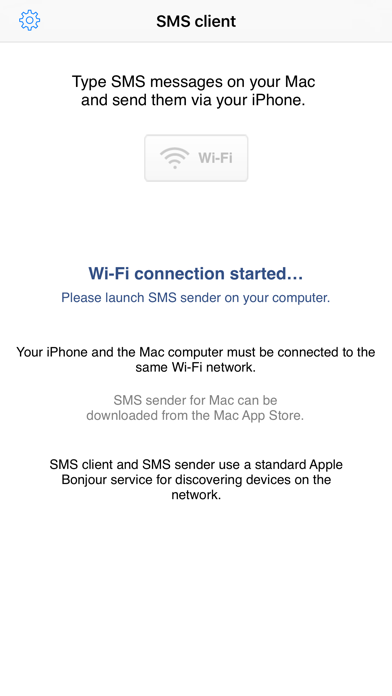
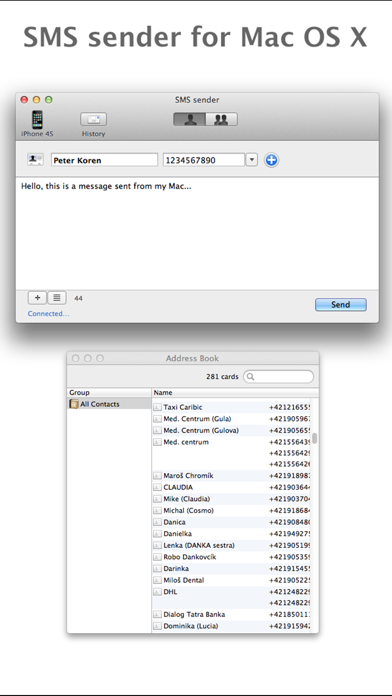
Type SMS messages on your Mac computer and send them via your iPhone. This iPhone client application requires Mac version of SMS sender, which can be downloaded from the App Store. Your iPhone and the Mac computer must be on the same network.
Other features of SMS client and SMS sender: - auto connecting to iPhone SMS client - reading recipients directly from Apple Contacts - sending messages to an individual recipient or to a group - import a group from a csv file - creating message templates - history of sending - recent recipients list
Sending the SMS message must be confirmed on the iPhone due to security reasons - this confirmation is a feature of the Apple developing environment, in which the "SMS client" application is written. It is not possible to send a message without such a confirmation.
!!! Important connection information !!! Both your Mac and your iPhone must be on the same Wi-Fi network. SMS sender and SMS client use a standard Apple Bonjour service for discovering devices on the network, applications use an arbitrary port number between 49152 and 65535 (as any other third-party application). If SMS sender is not able to find your iPhone on the network, it seems that ports 49152-65535 are blocked in your computer or in the router. Then, restart the router, the computer and relaunch the application on your iPhone.
Each subscription will automatically renew 3 days before the expiration date for
the same time period. Subscriptions can be cancelled at any time before the renewal.