

SMS2PDF is made and published by Shai Spetgang. AppBrain is an independent app data site and isn't affiliated with Shai Spetgang. The app name, icon, screenshots and description belong to Shai Spetgang and are shown as published on the App Store.
AppBrain's verdict
- Last updated
- July 10, 2026
- Size
- 55.2 MB
User feedback
Ratings and reviews on the App StoreComments on SMS2PDF for iOS
We don't have enough comments to show example comments. Please check back later.
Store listing
By Shai Spetgang, from the App Store


Description by Shai Spetgang Written by the developer, not by AppBrain. Click to read.
First month free.
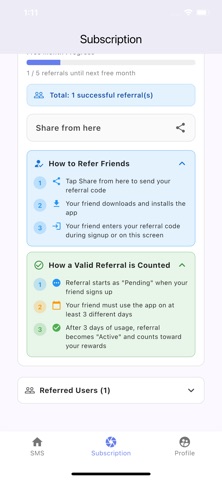
Get another free month when 5 new users use SMS2PDF.
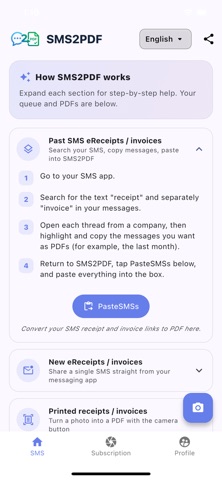
When you receive an eReceipt SMSs from retailers, SMS2PDF makes it easy to convert them into PDFs and organize them by month and year in your iCloud or Google Drive and easily send them to your accounting software, instead of clicking multiple times to download the individual eReceipts. Find them in your iCloud or Google Drive instead of scrolling through your SMS inbox when you need to find an eReceipt. Just share the message from your Messages app into SMS2PDF — no SMS access needed.
KEY FEATURES
* Convert SMS eReceipts into PDF — Turn selected messages into readable PDF files
* Import from gallery — Add photos of printed receipts or invoices and convert them to PDF
* Camera capture — Snap a photo of a paper receipt and turn it into a PDF
* Organize & export — Keep your documents in one place and share or save as needed
* Apple Sign-in — Secure access to your account and synced features
HOW IT WORKS
1. Log in with your Apple ID or Google Account
2. Grant permissions when prompted (storage, and photos only when you use the app).
3. Select messages or import images you want to convert.
4. Generate PDFs, and they automatically get saved to your iCloud or Google Drive.
WHO IT'S FOR
* Sole Proprietors who struggle to find their eReceipts or keep their physical receipts - just take a picture of them, and it's saved to your iCloud or Google Drive.
* Anyone who receives eReceipts by SMS and needs to send them to their accounting program
* Users who want PDF backups of important text messages
PERMISSIONS
SMS2PDF does not require SMS access! SMS2PDF only requires access for saving PDFs to your iCloud or Google Drive, and access to your camera and photos when you choose Gallery or Camera to import eReceipt images (first time only).
SUBSCRIPTIONS
First month free.
Get another free month when 5 new users use SMS2PDF.
SMS2PDF can pay for itself after only one deductible eReceipt processed per month!
Paid subscriptions, monthly or yearly, are available, and pricing will appear 3 days before the end of your free subscription.
Subscriptions are billed to your Apple ID. Your subscription renews automatically unless auto-renewal is turned off at least 24 hours before the end of the current period.
Terms of Use (EULA): https://www.apple.com/legal/internet-services/itunes/dev/stdeula/
Privacy Policy: https://sayantan200.github.io/SMS2PDF/sms2pdf_privacy_policy.html
Safety and technology
Found in the app by AppBrain- Price
- Free
- App size
- 55.2 MB
- Content rating
- Everyone
Technologies used by SMS2PDF
Releases
Updates seen on the App Store- Version
- 1.0.1
- Launched
- July 2026
No changelog data
Alternatives
Similar apps and more from Shai SpetgangAlternatives to SMS2PDF


More from Shai Spetgang


Rankings
App Store top chartsApp Store Rankings for SMS2PDF
About the app and developer
About SMS2PDF
SMS2PDF is a productivity app developed by Shai Spetgang.
What is the rating of SMS2PDF?
SMS2PDF has no ratings yet.
Is SMS2PDF free?
SMS2PDF is free. The app size is 55.21 MB. The latest version available is 1.0.1. The last update was on July 10, 2026.
What are the requirements for SMS2PDF?
The app has a content rating of Everyone. The app has been available on the App Store since July 2026.
Developer information for Shai Spetgang
Address:
Frequently asked questions about SMS2PDF
Is SMS2PDF free?
Yes. SMS2PDF is free on the App Store.
Is SMS2PDF still available?
Yes. SMS2PDF is on the App Store, and the last update we saw was on July 10, 2026.
How large is SMS2PDF?
SMS2PDF is 55.21 MB.
Is SMS2PDF suitable for children?
App Store rates the content of SMS2PDF as suitable for everyone.
Who made SMS2PDF?
SMS2PDF was developed by Shai Spetgang. It is listed in the productivity category on the App Store.
What are the best alternatives to SMS2PDF?
People looking at SMS2PDF also look at these productivity apps: EZSign: Signature Creator, PDF Converter — Docx to PDF, E2PDF Pro - Easy Backup App, Alma Realty, Word Editor: DOCX, Office, PDF.