

SnapScanner+ PDF, Docs & Cards
SnapScanner+ PDF, Docs & Cards is made and published by Roxwin Vietnam Technologies Company Limited. AppBrain is an independent app data site and isn't affiliated with Roxwin Vietnam Technologies Company Limited. The app name, icon, screenshots and description belong to Roxwin Vietnam Technologies Company Limited and are shown as published on the App Store.
AppBrain's verdict
- Rating on App Store
- 1.00
- 1 ratings
- Last updated
- September 16, 2026
It doesn't have enough ratings yet to judge what users think.
Rankings
App Store top chartsApp Store Rankings for SnapScanner+ PDF, Docs & Cards
Competitors
Similar apps and more from Roxwin Vietnam Technologies Company Limited


Releases
Updates seen on the App Store- Version
- 2.2.8
- Launched
- June 2025
No changelog data
User feedback
Ratings and reviews on the App StoreComments on SnapScanner+ PDF, Docs & Cards for iOS
We don't have enough comments to show example comments. Please check back later.
Technology
Found in the app by AppBrain- Price
- $1.99
- App size
- 9.84 MB
- Content rating
- Everyone
Technologies used by SnapScanner+ PDF, Docs & Cards
About the app and developer
About SnapScanner+ PDF, Docs & Cards
SnapScanner+ PDF, Docs & Cards is a productivity app developed by Roxwin Vietnam Technologies Company Limited.
User Ratings
SnapScanner+ PDF, Docs & Cards is rated 1.00 out of 5 stars. The rating is based on one rating ratings.
App Information
SnapScanner+ PDF, Docs & Cards costs $1.99. The app size is 9.84 MB. The latest version available is 2.2.8. The last update was on September 16, 2026.
Technical Requirements
The app has a content rating of Everyone. The app has been available on the App Store since June 2025.
Developer information for Roxwin Vietnam Technologies Company Limited
Store listing
By Roxwin Vietnam Technologies Company Limited, from the App Store

Description by Roxwin Vietnam Technologies Company Limited Written by the developer, not by AppBrain. Click to read.
Turn your iPhone into a powerful scanner. SnapScanner captures crisp, professional-looking scans, reads the text on every page, and keeps all your documents organized, private and ready to share.
KEY FEATURES:
Smart Document Scanning
• Automatic edge detection and perspective correction
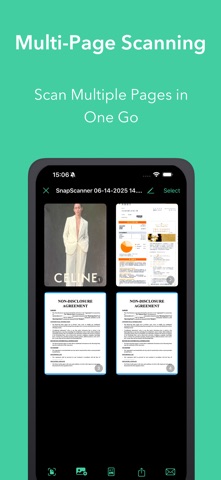
• Multi-page scanning in one session
• Import photos from your library, and documents are detected and straightened automatically
• Great for receipts, contracts, notes, forms, ID cards and more
Edit Every Page
• Crop edges by hand with precise corner handles
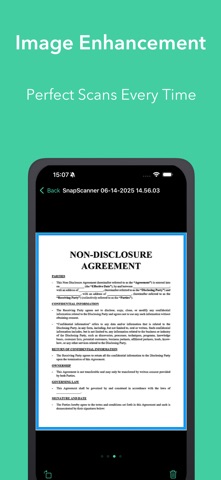
• Filters: Original, Enhanced, Grayscale and Black & White
• Apply a filter to one page or the whole document
• Rotate and reorder pages with drag and drop
• Non-destructive editing: re-crop or change filters anytime without losing quality
Text Recognition (OCR)
• Extract text from any scan, then select, copy and share it
• Create searchable PDFs: find and copy text inside exported files
• Search your documents by the words written in them, not just by name
Markup & Signatures
• Draw, write and highlight directly on pages
• Create your signature once and sign documents in seconds
• Saved signatures are ready to reuse anytime
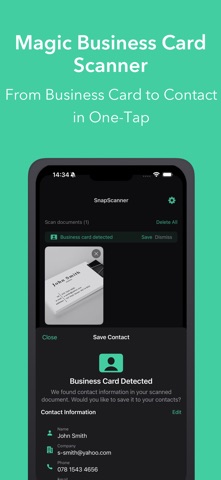
AI Business Card Scanner
• Scan business cards and extract name, phone, email, company and more
• Review and edit details before saving
• Save to Contacts or share as a vCard
QR & Barcode Tools
• Scan QR codes and barcodes instantly, from the camera or a photo
• Copy or share scanned content in one tap
• History of scanned codes for quick access
• Create your own QR codes with custom colors and logos
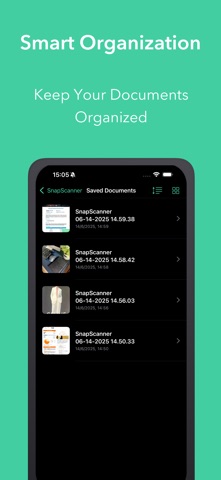
Smart Organization
• Folders to keep documents tidy
• Move documents between folders easily
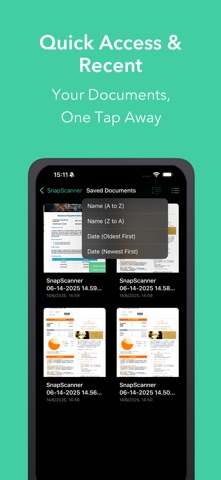
• Sort by name or date, in grid or list view
• Quick access to recent documents
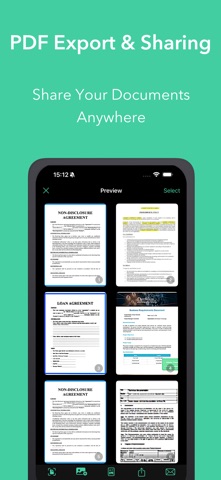
Export & Sharing
• Export as PDF, images or one long image
• Customizable PDFs: page size, orientation, margins, page numbers and background
• Choose export quality for smaller files or full resolution
• Password-protect your PDFs
• Share via email, messaging apps, AirDrop or cloud storage
Privacy & Security
• Documents are stored on your device
• Lock the app with Face ID, Touch ID or your passcode
• PDF passwords are kept safely in the iOS Keychain
Additional Features
• Dark mode and light mode
• Available in 16 languages
• Regular updates and improvements
Perfect for:
• Students and educators
• Business professionals and office workers
• Freelancers signing contracts on the go
• Home organization and personal paperwork
Download SnapScanner today: scan, edit, sign and organize your documents, all in one place!