AppBrain
AppBrain
  • Apps
  • Apps being viewed right now Trending apps today Most popular apps All-time most installed apps Top rated apps iPhone and iPad apps
  • Intelligence ▾
    Intelligence overview → Track any Android app or your whole market
    Track & analyze
    Keyword Tracker & OptimizerTrack & improve Play rankings App Performance ReportOne-off PDF for any app StatisticsFree Android & Play market stats
    Promote your app
    Featured Apps App Links
  • Intelligence
  • Pricing
  • Dashboard
  • Sign up
  • Log in
App Store Apps > Productivity > Snaviq: Screenshot Assistant
Snaviq: Screenshot Assistant icon

Snaviq: Screenshot Assistant

by daejung youn · Productivity · Free
On the App Store since June 2026 · Data updated 2026-10-25

Snaviq: Screenshot Assistant is made and published by daejung youn. AppBrain is an independent app data site and isn't affiliated with daejung youn. The app name, icon, screenshots and description belong to daejung youn and are shown as published on the App Store.

AppBrain's verdict

Last updated
June 22, 2026
Size
52.2 MB
Official page on the App Store

User feedback

Ratings and reviews on the App Store

Comments on Snaviq: Screenshot Assistant for iOS

We don't have enough comments to show example comments. Please check back later.

Store listing

By daejung youn, from the App Store
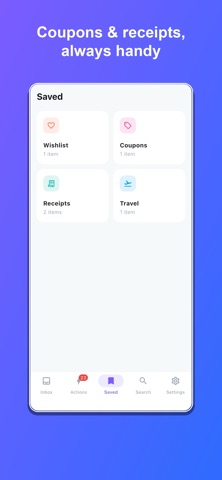
Snaviq: Screenshot Assistant Screenshot 1 of 4
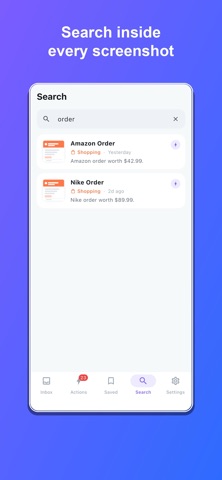
Snaviq: Screenshot Assistant Screenshot 2 of 4
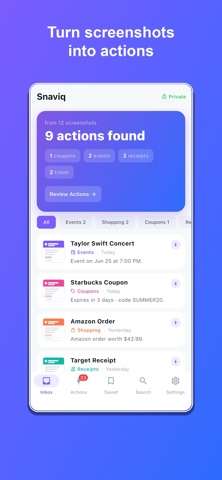
Snaviq: Screenshot Assistant Screenshot 3 of 4
Snaviq: Screenshot Assistant Screenshot 4 of 4
Screenshots by daejung youn, from the the App Store listing
Description by daejung youn Written by the developer, not by AppBrain. Click to read.
Snaviq is an AI screenshot assistant. It reads your screenshots on your device and turns them into things you can actually do — add an event to your calendar, get reminded before a coupon expires, save a product to your wishlist, file a receipt, and more.

You take screenshots to remember something for later. Snaviq makes sure you don't forget — and acts on it for you.

WHAT SNAVIQ DOES
• Events → Add concerts, tickets and appointments straight to your calendar
• Coupons → Get reminded before a code or warranty expires
• Receipts → File them in a vault and export to PDF
• Shopping → Save products to a wishlist and reopen the original link
• Travel → Keep boarding passes and bookings organized
• Links & QR → Open, copy or save in a tap
• Contacts → Add a phone number or email from any screenshot

AUTOMATIC & SMART
Snaviq automatically reads each screenshot and pulls out the details that matter — dates, prices, coupon codes,
order and tracking numbers, links and QR codes — then suggests exactly what to do next. No manual tagging required.

SEARCH EVERYTHING
Instantly search across the text inside all your screenshots. Find that order number, coupon, flight or receipt in seconds.

100% PRIVATE
All analysis happens on your device using on-device text recognition. Your screenshots are never uploaded — not to us, not to anyone. What's in your camera roll stays on your iPhone.

SNAVIQ PRO
Upgrade to unlock unlimited analysis, unlimited search and saved items, calendar and reminder automation, the coupon and receipt vaults, travel assistant and wishlist. Available as a weekly or yearly subscription, or a one-time lifetime purchase.

Turn screenshots into actions. Download Snaviq.

Snaviq Pro is an auto-renewable subscription (weekly or yearly), or a one-time lifetime purchase.
• Payment is charged to your Apple ID at purchase confirmation.
• A subscription auto-renews unless turned off at least 24 hours before the end of the current period; your account is charged for renewal within 24 hours before the period ends.
• Manage or cancel anytime in your Apple ID account settings.

Privacy Policy: https://snaviq-7319c.web.app/privacy
Terms of Use (EULA): https://snaviq-7319c.web.app/terms
Official page on the App Store

Safety and technology

Found in the app by AppBrain
Price
Free
App size
52.2 MB
Content rating
Everyone

Technologies used by Snaviq: Screenshot Assistant

Releases

Updates seen on the App Store
Version
1.0.06
Launched
June 2026

No changelog data

Alternatives

Similar apps and more from daejung youn

Alternatives to Snaviq: Screenshot Assistant

Text2Cal: Calendar AI icon Text2Cal: Calendar AI
Yahav Fuchs
3.6
Free
5 ratings
Shift Calendar & Paycheck icon Shift Calendar & Paycheck
SOFTWARECARAFT
5.0
Free
1 ratings
Sense: Shared Family Calendar icon Sense: Shared Family Calendar
MyShoperoo
4.8
Free
44 ratings
Mollama icon Mollama
飞 杨
3.4
Free
36 ratings
Timesheet tasks: Time Deposit icon Timesheet tasks: Time Deposit
Jorge Romanos
4.6
Free
33 ratings
Noto - Elegant Note icon Noto - Elegant Note
Soysauce Lab
4.6
Free
1.3K ratings
Lidar Room Scanner - 5DPlan icon Lidar Room Scanner - 5DPlan
Gil Nakache
4.1
Free
143 ratings
Chuck – Email with Superpowers icon Chuck – Email with Superpowers
410 Labs
4.8
Free
15.0K ratings

More from daejung youn

Fateos: Astrology & Friend icon Fateos: Astrology & Friend
daejung youn
5.0
Free
7 ratings
DayPiece: Habit Tracker icon DayPiece: Habit Tracker
daejung youn
5.0
Free
1 ratings
Hovio: Home Records icon Hovio: Home Records
daejung youn
0.0
Free

Rankings

App Store top charts

App Store Rankings for Snaviq: Screenshot Assistant

This app is not ranked

About the app and developer

About Snaviq: Screenshot Assistant

Snaviq: Screenshot Assistant is a productivity app developed by daejung youn.

What is the rating of Snaviq: Screenshot Assistant?

Snaviq: Screenshot Assistant has no ratings yet.

Is Snaviq: Screenshot Assistant free?

Snaviq: Screenshot Assistant is free. The app size is 52.23 MB. The latest version available is 1.0.06. The last update was on June 22, 2026.

What are the requirements for Snaviq: Screenshot Assistant?

The app has a content rating of Everyone. The app has been available on the App Store since June 2026.

Developer information for daejung youn

daejung youn

Address:

Share Snaviq: Screenshot Assistant

Apps other people are watching Popular Productivity Apps Today's trending apps Price drops on Google Play Top new apps
Text2Cal: Calendar AI icon Text2Cal: Calendar AI
Shift Calendar & Paycheck icon Shift Calendar & Paycheck
Sense: Shared Family Calendar icon Sense: Shared Family Calendar
Mollama icon Mollama
Timesheet tasks: Time Deposit icon Timesheet tasks: Time Deposit
Noto - Elegant Note icon Noto - Elegant Note
Lidar Room Scanner - 5DPlan icon Lidar Room Scanner - 5DPlan
Chuck – Email with Superpowers icon Chuck – Email with Superpowers
Overview Alternatives Reviews Rankings Technology
AppBrain Intelligence premium content

Subscribe now to get full and unlimited access to AppBrain Intelligence. You'll have access to:

  • App Intelligence dashboard (performance timeline, competitor comparison, country rankings, insight cards)
  • Detailed ranking data per app
  • Full timeline per developer
  • Device market shares data per country
  • Unlimited keyword tracking
1 Month

$75/mo
(billed every month)

SAVE 0%
Subscribe
3 Months

$65/mo
($195 billed every 3 months)

SAVE 13%
Subscribe
1 Year

$57.50/mo
($690 billed every year)

SAVE 23%
Subscribe
Each subscription will automatically renew 3 days before the expiration date for the same time period. Subscriptions can be cancelled at any time before the renewal.

AppBrain is an app data site, we track rankings, ratings, installs for all apps and games on Google Play and the App Store. AppBrain doesn't host app files or APKs, all install links go directly to the official store. All trademarks are owned by their respective owners.

More apps

  • Top Android apps being viewed
  • V-blink 777: Casino Online
  • Bruno Reels Casino Real Money
  • View My Tesco

App statistics

  • Android statistics
  • Google Play Developer stats
  • Trending Android Apps
  • Trending iOS apps
  • Top popular Apps
  • Buy the best Android phone
  • Buy & sell app businesses

About AppBrain

  • Contact
  • Privacy
  • Documentation
  • DMCA takedowns
  • Blog
  • Android App Marketing: Learn how to better market your Android app
© 2010-2026 - AppBrain