

Snippet: Templates Keyboard
Snippet: Templates Keyboard is made and published by Yechiel Ben David. AppBrain is an independent app data site and isn't affiliated with Yechiel Ben David. The app name, icon, screenshots and description belong to Yechiel Ben David and are shown as published on the App Store.
AppBrain's verdict
- Last updated
- August 30, 2026
Rankings
App Store top chartsApp Store Rankings for Snippet: Templates Keyboard
Competitors
Similar apps and more from Yechiel Ben DavidAlternatives to Snippet: Templates Keyboard


More from Yechiel Ben David


Releases
Updates seen on the App Store- Version
- 3.1
- Launched
- April 2026
No changelog data
User feedback
Ratings and reviews on the App StoreComments on Snippet: Templates Keyboard for iOS
We don't have enough comments to show example comments. Please check back later.
Technology
Found in the app by AppBrain- Price
- Free
- App size
- 2.97 MB
- Content rating
- Everyone
Technologies used by Snippet: Templates Keyboard
About the app and developer
About Snippet: Templates Keyboard
Snippet: Templates Keyboard is a productivity app developed by Yechiel Ben David.
User Ratings
The app has no ratings yet.
App Information
Snippet: Templates Keyboard is freely available from the App Store. The app size is 2.97 MB. The latest version available is 3.1. The last update was on August 30, 2026.
Technical Requirements
The app has a content rating of Everyone. The app has been available on the App Store since April 2026.
Developer information for Yechiel Ben David
Address:
Frequently asked questions about Snippet: Templates Keyboard
Is Snippet: Templates Keyboard free?
Yes. Snippet: Templates Keyboard is free on the App Store.
Is Snippet: Templates Keyboard still available?
Yes. Snippet: Templates Keyboard is on the App Store, and the last update we saw was on August 30, 2026.
How large is Snippet: Templates Keyboard?
Snippet: Templates Keyboard is 2.97 MB.
Is Snippet: Templates Keyboard suitable for children?
App Store rates the content of Snippet: Templates Keyboard as suitable for everyone.
Who made Snippet: Templates Keyboard?
Snippet: Templates Keyboard was developed by Yechiel Ben David. It is listed in the productivity category on the App Store.
What are the best alternatives to Snippet: Templates Keyboard?
People looking at Snippet: Templates Keyboard also look at these productivity apps: Snippet Keyboard - Quick Paste, ClipNote - Notes & Keyboard, Quicki: Auto Paste Keyboard, Creazy: Organize Content Plan, Sync Contacts for Google.
Store listing
By Yechiel Ben David, from the App Store


Description by Yechiel Ben David Written by the developer, not by AppBrain. Click to read.
ON EVERY DEVICE
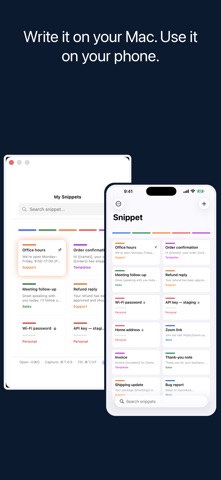
Write a reply on your Mac and it is on your phone before you pick it up. Your snippets, your categories, and your colors sync through your own iCloud account. No sign-up, no separate subscription, and nothing to restore by hand on a new device.
THE KEYBOARD
Save a reply once. Then, in Messages, Mail, WhatsApp, or anywhere else, switch to the Snippet keyboard and tap it in. No app switching, no copy and paste, and no losing your place in the conversation.
SMART FILL
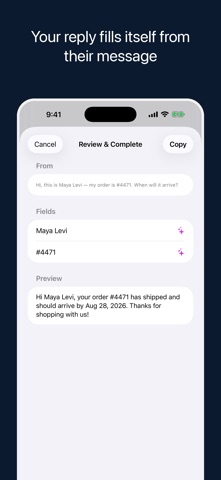
Select the message you just received, tap Share ▸ Snippet, and pick one of your templates. Snippet reads that message and fills every {{field}} in your reply from it — the name, the date, the order number, the address.
It never makes anything up. A value is used only if it actually appears in the message you selected; anything Snippet cannot find is left blank for you to complete. The message is held for that moment only and is never saved.
In practice: their message says "this is Maya Levi, my order is #4471". You pick your shipping-update template, and the reply comes back with the name and the order number already in it, ready to send.
Clients, customers, candidates, bookings: the same handful of questions, all day.
CATEGORIES, ASSIGNED FOR YOU
Other snippet apps hand you empty folders. Snippet reads each new snippet as you save it and files it into a colored category on its own, on your device. A genuinely new topic goes to "Other" instead of being forced into the wrong place. Nothing is uploaded, and it works offline.
ON YOUR MAC
Grab selected text from any app with a keyboard shortcut, and paste a snippet straight back.
EVERYTHING ELSE
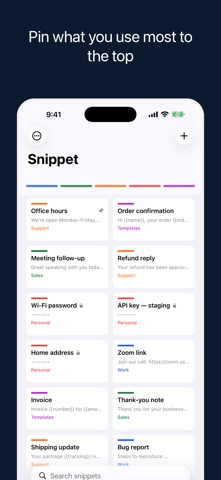
• Pin the snippets you reach for most, and they sit at the top of the keyboard
• Write {{date}} or {{time}} in a snippet and it fills itself in when you use it
• Share extension — save selected text as a snippet, or run Smart Fill on it
• Instant search in any language, ignoring case and accents
• Categories you can rename and merge
• Title and tag suggestions while you write
• Lock a category behind Face ID or Touch ID, so what is in it stays private
FREE, WITH A ONE-TIME PRO UPGRADE
The keyboard, iCloud sync, automatic categorization, search, capture, and the Share extension are free. Pro adds Smart Fill, category encryption, and unlimited snippets — one purchase, not a subscription, covering Mac and iPhone together.
Snippet has no advertising and no analytics.
The automatic categorization, Smart Fill, and title suggestions run on Apple Intelligence and need a supported device on iOS 26 or macOS 26. Everything else works on iOS 17 and macOS 14 or later: the keyboard, sync, search, capture and encryption.