

Snippety - Snippets Manager
Snippety - Snippets Manager is made and published by Wojciech Kulik. AppBrain is an independent app data site and isn't affiliated with Wojciech Kulik. The app name, icon, screenshots and description belong to Wojciech Kulik and are shown as published on the App Store.
AppBrain's verdict
Established- Rating on App Store
- 4.83
- 71 ratings
- Last updated
- October 8, 2026
It doesn't have enough ratings yet to judge what users think.
Rankings
App Store top chartsApp Store Rankings for Snippety - Snippets Manager
Competitors
Similar apps and more from Wojciech KulikAlternatives to Snippety - Snippets Manager





More from Wojciech Kulik

Releases
Updates seen on the App Store- Version
- 13.1.73
- Launched
- September 2020
No changelog data
User feedback
Ratings and reviews on the App StoreComments on Snippety - Snippets Manager for iOS
We don't have enough comments to show example comments. Please check back later.
Technology
Found in the app by AppBrain- Price
- Free
- App size
- 40.4 MB
- Content rating
- Everyone
Technologies used by Snippety - Snippets Manager
About the app and developer
About Snippety - Snippets Manager
Snippety - Snippets Manager is a productivity app developed by Wojciech Kulik.
User Ratings
Snippety - Snippets Manager is rated 4.83 out of 5 stars. The rating is based on 71 ratings.
App Information
Snippety - Snippets Manager is freely available from the App Store. The app size is 40.38 MB. The latest version available is 13.1.73. The last update was on October 8, 2026.
Technical Requirements
The app has a content rating of Everyone. The app has been available on the App Store since September 2020.
Developer information for Wojciech Kulik
Address:
Store listing
By Wojciech Kulik, from the App Store




Description by Wojciech Kulik Written by the developer, not by AppBrain. Click to read.
Snippety integrates seamlessly with every app and text field. Use the dedicated Snippety Keyboard to expand your shortcuts instantly while typing. Want to save something on the fly? Create new snippets directly from any selected text using the Share menu.
With native iCloud sync, your entire snippet library is always up to date across your iPhone, iPad, and Mac. Install Snippety on all your Apple devices for a seamless and unified typing experience.
Seamless Integration:
• Dedicated Snippety Keyboard to let you access your snippets wherever you type.
• Snippety Keyboard lets you easily switch between typing and expanding keywords. Select Snippet Expander, type a predefined keyword, and the snippet will expand automatically.
• Snippety Keyboard supports QWERTY, QWERTZ, AZERTY, and Dvorak layouts, allowing you to search snippets and fill placeholders directly from the keyboard.
• Share menu extension to create text snippets from any application.
• Integration with Shortcuts app.
• Minimalistic and beautiful design adjusted to light and dark mode.
Smart Placeholders:
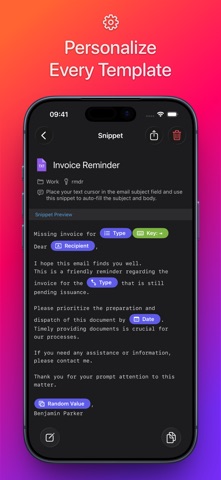
• Create reusable templates by replacing customizable parts with smart placeholders.
• Take advantage of 20 smart placeholders: auto-incrementing number, AI assistant, calculated date, calculated time, clipboard content, random value, hyperlink, note, selectable date, selectable value, multiselect, selected text, snippet reference, text transformation, text variable, text variable reference, and multiline text variable. MacOS application supports also script, clipboard history, and file content placeholders.
• Avoid repeating the same parameters, with Snippety you can insert the same value into multiple places of your template.
• Use conditional blocks to dynamically show or hide parts of your snippet based on provided conditions.
• Build reusable parts of your snippets and reference them in other templates.
AI Integration:
• Enable AI features in all your applications by using AI placeholders.
• Access AI directly from Snippety Keyboard without opening the app.
• Ask Snippety to generate templates and insert placeholders using AI computing power.
• Smart AI assistant placeholder is ready to perform any task for you using the selected text or clipboard content.
iCloud Collaboration:
• Share selected snippets with co-workers, friends, or across your personal devices, even if they use different Apple IDs.
• The new collaboration is built using native Apple technologies, ensuring your data remains secure and never passes through third-party servers.
• Control who can access each shared snippet and choose between read-only or write permissions.
Flexible:
• Syntax highlighting supporting 50+ formats.
• Rich Text (RTF), HTML, and Markdown support (with images).
Unlimited access:
• Sync your snippets seamlessly across Mac, iPhone, and iPad.
• Share snippets using secure links.
Snippety is free to download and use with up to 8 active snippets. Upgrade to Snippety Pro to unlock:
• Unlimited snippets & keyboard usage
• iCloud Collaboration
• Backup import
• Shortcuts integration
• Custom AI API integration
NOTE: Snippety Keyboard works with snippets in any language, but the keyboard itself allows typing English letters + diacritics. Keyboard input is used to fill placeholders, search, or expand snippets by keyword, and these features are limited to the English alphabet. These limitations do NOT affect the app - only the Snippety Keyboard.
Terms of Use: https://snippety.app/terms-of-use
Privacy Policy: https://snippety.app/privacy-policy