

Snuzu: Pushup Alarm Clock
Snuzu: Pushup Alarm Clock is made and published by Dejan Stojadinovic. AppBrain is an independent app data site and isn't affiliated with Dejan Stojadinovic. The app name, icon, screenshots and description belong to Dejan Stojadinovic and are shown as published on the App Store.
AppBrain's verdict
New- Rating on App Store
- 4.80
- 5 ratings
- Last updated
- October 2, 2026
Snuzu: Pushup Alarm Clock came out 82 days ago. It doesn't have enough ratings yet to judge what users think.
Rankings
App Store top chartsApp Store Rankings for Snuzu: Pushup Alarm Clock
Competitors
Similar apps and more from Dejan StojadinovicAlternatives to Snuzu: Pushup Alarm Clock


Releases
Updates seen on the App Store- Version
- 1.8.3
- Launched
- July 2026
No changelog data
User feedback
Ratings and reviews on the App StoreComments on Snuzu: Pushup Alarm Clock for iOS
We don't have enough comments to show example comments. Please check back later.
Technology
Found in the app by AppBrain- Price
- Free
- App size
- 138.3 MB
- Content rating
- Everyone
Technologies used by Snuzu: Pushup Alarm Clock
About the app and developer
About Snuzu: Pushup Alarm Clock
Snuzu: Pushup Alarm Clock is a productivity app developed by Dejan Stojadinovic.
User Ratings
Snuzu: Pushup Alarm Clock is rated 4.80 out of 5 stars. The rating is based on 5 ratings.
App Information
Snuzu: Pushup Alarm Clock is freely available from the App Store. The app size is 138.30 MB. The latest version available is 1.8.3. The last update was on October 2, 2026.
Technical Requirements
The app has a content rating of Everyone. The app has been available on the App Store since July 2026.
Developer information for Dejan Stojadinovic
Address:
Store listing
By Dejan Stojadinovic, from the App Store


Description by Dejan Stojadinovic Written by the developer, not by AppBrain. Click to read.
— GET UP WITH WAKE-UP MISSIONS
Can't wake up to a sound alone? Turn off your alarm by doing something: solve math problems, match memory tiles, shake your phone, walk it off, make your bed, drink a glass of water, or find a real item around your home and take its photo. Animated previews show you how each one works.
— BUILT FOR HEAVY SLEEPERS
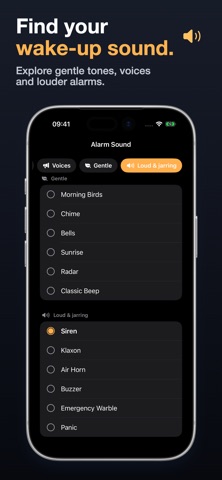
Chain up to five missions in a row, add a wake-up check that makes sure you stayed up, and turn on alarm locking. Pick a loud sound and a full screen wallpaper that make going back to sleep hard.
— CALM SLEEP SOUNDS, FREE
Fall asleep faster with 36 sounds across Nature, Noise, Ambience, ASMR and Music: rain, ocean, brown noise, fireplace, piano and more. Set a sleep timer, keep playing in the background, and control it from the Lock Screen.
— A STEADIER NIGHT ROUTINE
Set a sleep goal and a wind-down reminder that nudges you before bedtime. Check how noisy your bedroom is, then look back at your nights in History. Connect Apple Health to see recorded sleep and sleep stages next to your alarms.
— STREAKS THAT KEEP YOU GOING
Every morning you complete adds to your streak and unlocks trophies, so getting up on time turns into a habit.
— Made for
- People who set alarm after alarm and still snooze through them
- Early risers and night shift workers
- Anyone tired all the time who wants a better sleep routine
- Light sleepers who wonder how noisy their bedroom really is
- People who fall asleep easier with calming sounds
- Anyone building a morning and evening habit that sticks
- Anyone who wants their Apple Health sleep next to their alarm history
— ROUTINE IDEAS
Morning study habit
1. Add an Item Search mission and pick only "Book" in its item settings.
2. When the alarm rings, you have to find your book and photograph it.
3. It's already in your hands, so start reading.
Better sleep in five nights
1. Set a sleep goal and turn on the wind-down reminder.
2. When it nudges you, start a calming sound with a sleep timer.
3. Keep it up for five nights and compare them in History.
— FREE TO KEEP USING
One regular alarm, one quick alarm and the full sleep sound library are free. Snuzu Pro unlocks more alarms, mission chains, wake-up checks, Push-Ups and Squats. Try Pro missions before you subscribe.
Gentle wake needs Snuzu running in the background. Live Activities show its progress when allowed. Alarm permission is required; camera, microphone, speech recognition and motion access depend on your missions. Photo missions need an internet connection. Some sleep sounds and wallpapers download the first time you use them.
— SNUZU PRO
Available plans, local prices, and any eligible trial are shown before purchase. Subscriptions renew automatically unless canceled at least 24 hours before the current period ends. Payment is charged to your Apple ID; renewal is charged within 24 hours before the period ends. Manage or cancel subscriptions in your App Store account settings. If a lifetime option is offered, it is a one-time purchase and does not renew.
support@snuzu.app
https://snuzu.app/privacy
https://snuzu.app/terms