Solfegissimo
Solfegissimo is made and published by Gerald Jakubczak. AppBrain is an independent app data site and isn't affiliated with Gerald Jakubczak. The app name, icon, screenshots and description belong to Gerald Jakubczak and are shown as published on the App Store.
AppBrain's verdict
- Last updated
- September 8, 2026
Rankings
App Store top chartsApp Store Rankings for Solfegissimo
Competitors
Similar apps and more from Gerald JakubczakAlternatives to Solfegissimo
More from Gerald Jakubczak
Releases
Updates seen on the App Store- Version
- 1.0
- Launched
- September 2026
No changelog data
User feedback
Ratings and reviews on the App StoreComments on Solfegissimo for iOS
We don't have enough comments to show example comments. Please check back later.
Technology
Found in the app by AppBrain- Price
- Free
- App size
- 4.82 MB
- Content rating
- Everyone
Technologies used by Solfegissimo
About the app and developer
About Solfegissimo
Solfegissimo is an education app developed by Gerald Jakubczak.
User Ratings
The app has no ratings yet.
App Information
Solfegissimo is freely available from the App Store. The app size is 4.82 MB. The latest version available is 1.0. The last update was on September 8, 2026.
Technical Requirements
The app has a content rating of Everyone. The app has been available on the App Store since September 2026.
Developer information for Gerald Jakubczak
Address:
Store listing
By Gerald Jakubczak, from the App StoreDescription by Gerald Jakubczak Written by the developer, not by AppBrain. Click to read.
THE LESSONS: UNDERSTAND BEFORE YOU PRACTISE
Six short illustrated lessons lay the groundwork, to read before playing and to revisit whenever you like: the staff, the treble clef, the bass clef, how to find a note, note values, and several notes played at once.
Every new note is introduced before the exercise that uses it: shown alone on the staff, named, and located on the keyboard using the groups of black keys as landmarks. A beginner then knows where it sits under their fingers, not just what it is called.
THE EXERCISES: READING IN TIME
34 exercises, across two clefs. The playhead moves, the metronome ticks if you want it, and you play each note as it passes. The octave has to be right — that is what really teaches reading, rather than guessing a name.
Four families follow one another:
- Note reading, one note at a time
- Two notes in a row, the intervals
- Two notes together, written one above the other
- Chords, three notes at a time
The treble clef runs from G-A up to the top of the staff, then comes the bass clef. Both meet on middle C, the bridge from one clef to the other.
STARS OPEN WHAT COMES NEXT
Every round shows the notes you hit, missed and got wrong. The more accurate you are, the more stars you earn, up to three — and a completed exercise opens the next one. Nothing is timed, and everything can be replayed as often as you like.
FOUR WAYS TO ANSWER
- The on-screen piano keyboard
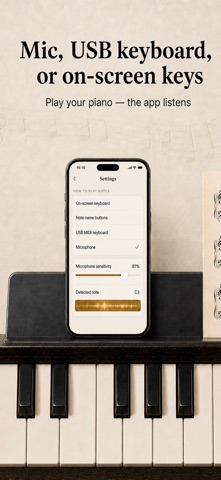
- Note-name buttons, in Do Re Mi or C D E
- A MIDI piano connected over USB
- The microphone, which detects the pitch from your instrument's actual sound
Nothing is mandatory: everything can be completed on the on-screen keyboard alone, with no instrument.
COMING BACK EVERY DAY
A daily streak is kept just by showing up, and a quiet reminder rings at the time you choose — never on days you have already played. The progress report shows exercises completed, stars earned, average accuracy and flawless rounds, then the detail grouped by clef.
EVERYTHING IS ADJUSTABLE
French or international note naming, interface in French or English, adjustable tempo, metronome, note timbre and sound effects.
OFFLINE, NO ACCOUNT
Everything works without a connection. No sign-up, no ads, no personal data sent. Your progress stays on your device.
PRICING
The first seven exercises are free. A single purchase unlocks the rest of the treble clef and the whole bass clef, on iPhone, iPad and Mac. One payment, no subscription, Family Sharing included.