

Solframe: Photo Collage Print
Solframe: Photo Collage Print is made and published by Yefga Torra Prima. AppBrain is an independent app data site and isn't affiliated with Yefga Torra Prima. The app name, icon, screenshots and description belong to Yefga Torra Prima and are shown as published on the App Store.
AppBrain's verdict
- Last updated
- October 25, 2026
- Size
- 20.9 MB
User feedback
Ratings and reviews on the App StoreComments on Solframe: Photo Collage Print for iOS
We don't have enough comments to show example comments. Please check back later.
Store listing
By Yefga Torra Prima, from the App Store

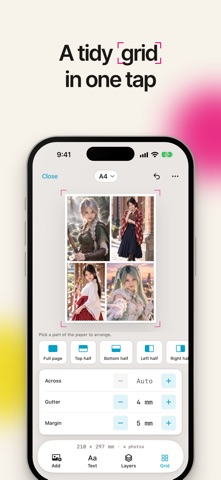
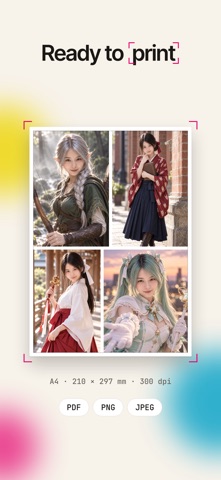
Description by Yefga Torra Prima Written by the developer, not by AppBrain. Click to read.
12 photos. One beautiful layout. Less than a second.
Meet Solframe. The little app that makes arranging photos feel effortless.
Pick your pictures, choose a size, and watch everything fall into place. No fighting templates. No unwanted crops. No wondering why your A4 print came out looking… not quite A4.
Just your photos, your way.
LESS FIDDLING. MORE MAKING.
- Drop in photos. Solframe arranges them automatically, keeping their original proportions.
- Circles, hearts, stars, hexagons? Clip photos into shapes, even several on one photo.
- Backgrounds you don't want? Gone in a tap.
- Drag, pinch, rotate, rearrange. Make every little detail yours.
- Add names, dates, captions, or whatever the moment deserves.
A4 MEANS A4. REALLY.
Millimetres matter. Especially when you're printing.
Choose A4, US Letter, 4×6, 5×7, square, or your own exact dimensions. Portrait, landscape, printer-friendly margins. All sorted.
Going digital? Make layouts at 1080×1350, 1080×1080, 1080×1920, or any custom pixel size.
iPhone wallpapers and widgets? We've done the pixel maths for you.
MAKE IT. SAVE IT. PRINT IT.
- Export a PDF at its actual physical size.
- Save crisp, print-ready images at 300 DPI.
- Print directly with AirPrint, as often as you want.
What you see is what you get. Imagine that.
THINK OUTSIDE THE PAGE.
One page not enough? Poster mode spreads your image across multiple sheets, with cutting guides, glue overlap, and assembly marks. Print, piece together, and go big.
More of a screen person? Split a canvas into a social media feed grid instead.
YOUR HOME SCREEN COULD USE SOME LOVE.
Turn any layout into a small, medium, or large Home Screen widget. Change it whenever you feel like it.
Making a Lock Screen wallpaper? Our guide shows where the clock and date will sit. No more faces hiding behind the time.
MORE ROOM. MORE FUN.
Made for iPhone Duo and iPad.
Unfold Duo, turn sideways, and put your canvas on one side and tools on the other. Partially folded? The layout works around the hinge.
Left-handed or right-handed, you decide where the canvas belongs.
FOUND A PHOTO? SEND IT OVER.
Share pictures straight into Solframe from Photos, Messages, or any app with a share sheet. They'll be ready when you are.
YOUR PHOTOS. YOUR BUSINESS.
No photo uploads. Ever.
Browsing is read-only, selected photos are copied into the app's storage, and your layouts stay on your device unless you export them.
Optional iCloud sync uses your own iCloud Drive. We never see your files.
FREE TO MAKE SOMETHING GREAT.
Every layout tool, paper size and screen size is free, and so is AirPrint. A few extras are available as optional in-app purchases.
No design degree required. Just photos and a little imagination.
Go on. Make something worth keeping.
Subscriptions automatically renew unless cancelled at least 24 hours before the current period ends. Manage or cancel yours in Apple Account settings.
Terms of Use: https://solframe.vercel.app/tnc
Privacy Policy: https://solframe.vercel.app/privacy-policy
Safety and technology
Found in the app by AppBrain- Price
- Free
- App size
- 20.9 MB
- Content rating
- Everyone
Technologies used by Solframe: Photo Collage Print
Releases
Updates seen on the App Store- Version
- 1.3
- Launched
- September 2026
No changelog data
Alternatives
Similar apps and more from Yefga Torra PrimaAlternatives to Solframe: Photo Collage Print


More from Yefga Torra Prima

Rankings
App Store top chartsApp Store Rankings for Solframe: Photo Collage Print
About the app and developer
About Solframe: Photo Collage Print
Solframe: Photo Collage Print is a photo & video app developed by Yefga Torra Prima.
What is the rating of Solframe: Photo Collage Print?
Solframe: Photo Collage Print has no ratings yet.
Is Solframe: Photo Collage Print free?
Solframe: Photo Collage Print is free. The app size is 20.93 MB. The latest version available is 1.3. The last update was on October 25, 2026.
What are the requirements for Solframe: Photo Collage Print?
The app has a content rating of Everyone. The app has been available on the App Store since September 2026.
Developer information for Yefga Torra Prima
Address:
Frequently asked questions about Solframe: Photo Collage Print
Is Solframe: Photo Collage Print free?
Yes. Solframe: Photo Collage Print is free on the App Store.
Is Solframe: Photo Collage Print still available?
Yes. Solframe: Photo Collage Print is on the App Store, and the last update we saw was on October 25, 2026.
How large is Solframe: Photo Collage Print?
Solframe: Photo Collage Print is 20.93 MB.
Is Solframe: Photo Collage Print suitable for children?
App Store rates the content of Solframe: Photo Collage Print as suitable for everyone.
Who made Solframe: Photo Collage Print?
Solframe: Photo Collage Print was developed by Yefga Torra Prima. It is listed in the photo & video category on the App Store.
What are the best alternatives to Solframe: Photo Collage Print?
People looking at Solframe: Photo Collage Print also look at these photo & video apps: Photo Print: Size & Layout, Big Grid - Photo Collage, Photo Printer: Print to Size, GridIns - Collage & Stitch, NoCrop Photo BorderーWhiteFrame.