

SoSoCamera Beauty
SoSoCamera Beauty is made and published by kitamura hira. AppBrain is an independent app data site and isn't affiliated with kitamura hira. The app name, icon, screenshots and description belong to kitamura hira and are shown as published on the App Store.
AppBrain's verdict
- Last updated
- August 13, 2024
- Size
- 23.9 MB
User feedback
Ratings and reviews on the App StoreComments on SoSoCamera Beauty for iOS
We don't have enough comments to show example comments. Please check back later.
Store listing
By kitamura hira, from the App Store

Description by kitamura hira Written by the developer, not by AppBrain. Click to read.
How to use:
Below the main screen is the toolbar.
- The button in the center of the toolbar is the photo capture button. Press it to start taking pictures. If you long-press it, a countdown button will appear, allowing you to choose between a 3-second or 10-second countdown for taking pictures.
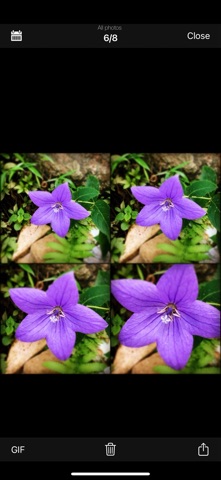
- The button on the left of the toolbar is the album button. Pressing it will open your album. In the album, you can effortlessly share photos with friends and convert photos into GIF images.
- The first button on the right side of the toolbar is the photo style button. After pressing it, you can set photo styles and color filters.
- The second button on the right side of the toolbar is the button to set the number of shots and the interval time between shots. You can adjust the number of rows and columns using the plus and minus signs. Besides adjusting the number of shots here, you can also quickly change the number of continuous shots and their arrangement by swiping up, down, left, or right on the capture screen.
About the number of shots:
- The free version can capture up to 16 shots (4x4), while upgrading to the full version allows up to 64 shots (8x8).
* When set to 1x1, it resembles a Polaroid style (the frame can be removed in the settings).
* When set to 1xN or Nx1, it resembles a film strip style (the frame can be removed in the settings).
About Beauty filter:
- Currently, only supported by the front camera.
About GIFs:
- After generating, you can click the interval time button at the lower-right corner to adjust the interval time for each frame. Then click the share button at the top-left corner to save it to the album or share it with friends.
About In-App Purchases:
- Upgrading removes ads and increases the number of shots.
* This in-app purchase is a one-time buy, so you can purchase with confidence.
Safety and technology
Found in the app by AppBrain- Price
- $0.99
- App size
- 23.9 MB
- Content rating
- Everyone
Technologies used by SoSoCamera Beauty
Releases
Updates seen on the App Store- Version
- 8.4
- Launched
- April 2011
No changelog data
Alternatives
Similar apps and more from kitamura hiraAlternatives to SoSoCamera Beauty





More from kitamura hira






Rankings
App Store top chartsApp Store Rankings for SoSoCamera Beauty
About the app and developer
About SoSoCamera Beauty
SoSoCamera Beauty is a photo & video app developed by kitamura hira.
User Ratings
The app has no ratings yet.
App Information
SoSoCamera Beauty costs $0.99. The app size is 23.91 MB. The latest version available is 8.4. The last update was on August 13, 2024.
Technical Requirements
The app has a content rating of Everyone. The app has been available on the App Store since April 2011.
Developer information for kitamura hira
Address:
Frequently asked questions about SoSoCamera Beauty
Is SoSoCamera Beauty free?
No. SoSoCamera Beauty costs $0.99 on the App Store.
Is SoSoCamera Beauty still available?
Yes. SoSoCamera Beauty is on the App Store, and the last update we saw was on August 13, 2024.
How large is SoSoCamera Beauty?
SoSoCamera Beauty is 23.91 MB.
Is SoSoCamera Beauty suitable for children?
App Store rates the content of SoSoCamera Beauty as suitable for everyone.
Who made SoSoCamera Beauty?
SoSoCamera Beauty was developed by kitamura hira. It is listed in the photo & video category on the App Store.
What are the best alternatives to SoSoCamera Beauty?
People looking at SoSoCamera Beauty also look at these photo & video apps: BitCam, Low Camera - Low Quality Cam, LOCam - Retro film Camera, Film camera & Instant cam app, 写真 アルバス-フォトブック/フォトアルバム・ネットプリント.