

SpeakCam - Voice Teleprompter
SpeakCam - Voice Teleprompter is made and published by Shenzhen Quanjing Digital Intelligence Technology Co., Ltd. AppBrain is an independent app data site and isn't affiliated with Shenzhen Quanjing Digital Intelligence Technology Co., Ltd. The app name, icon, screenshots and description belong to Shenzhen Quanjing Digital Intelligence Technology Co., Ltd. and are shown as published on the App Store.
AppBrain's verdict
- Last updated
- October 1, 2026
Rankings
App Store top chartsApp Store Rankings for SpeakCam - Voice Teleprompter
Competitors
Similar apps and more from Shenzhen Quanjing Digital Intelligence Technology Co., Ltd.Alternatives to SpeakCam - Voice Teleprompter


Releases
Updates seen on the App Store- Version
- 1.7.1
- Launched
- August 2026
No changelog data
User feedback
Ratings and reviews on the App StoreComments on SpeakCam - Voice Teleprompter for iOS
We don't have enough comments to show example comments. Please check back later.
Technology
Found in the app by AppBrain- Price
- Free
- App size
- 4.43 MB
- Content rating
- Everyone
Technologies used by SpeakCam - Voice Teleprompter
About the app and developer
About SpeakCam - Voice Teleprompter
SpeakCam - Voice Teleprompter is a photo & video app developed by Shenzhen Quanjing Digital Intelligence Technology Co., Ltd.
User Ratings
The app has no ratings yet.
App Information
SpeakCam - Voice Teleprompter is freely available from the App Store. The app size is 4.43 MB. The latest version available is 1.7.1. The last update was on October 1, 2026.
Technical Requirements
The app has a content rating of Everyone. The app has been available on the App Store since August 2026.
Developer information for Shenzhen Quanjing Digital Intelligence Technology Co., Ltd.
Frequently asked questions about SpeakCam - Voice Teleprompter
Is SpeakCam - Voice Teleprompter free?
Yes. SpeakCam - Voice Teleprompter is free on the App Store.
Is SpeakCam - Voice Teleprompter still available?
Yes. SpeakCam - Voice Teleprompter is on the App Store, and the last update we saw was on October 1, 2026.
How large is SpeakCam - Voice Teleprompter?
SpeakCam - Voice Teleprompter is 4.43 MB.
Is SpeakCam - Voice Teleprompter suitable for children?
App Store rates the content of SpeakCam - Voice Teleprompter as suitable for everyone.
Who made SpeakCam - Voice Teleprompter?
SpeakCam - Voice Teleprompter was developed by Shenzhen Quanjing Digital Intelligence Technology Co., Ltd. It is listed in the photo & video category on the App Store.
What are the best alternatives to SpeakCam - Voice Teleprompter?
People looking at SpeakCam - Voice Teleprompter also look at these photo & video apps: Fordexa Teleprompter, PromptCam: Teleprompter, Teleprompter: Read to Camera, RTL Teleprompter, Auto Scroll: VocaPrompter.
Store listing
By Shenzhen Quanjing Digital Intelligence Technology Co., Ltd., from the App Store




Description by Shenzhen Quanjing Digital Intelligence Technology Co., Ltd. Written by the developer, not by AppBrain. Click to read.
SpeakCam is built for creators: paste your script, tap record, speak naturally. The prompter scrolls to wherever you are. Misread a word, skip a line, add a filler? It keeps up — and if you flub a sentence and start over, it jumps back to the start of the line with you.
FLOATING PROMPTER
- Shrinks into a small window that floats over the Camera app or any recording app
- Voice-following keeps working while you shoot in another app
- Visible only to you — never recorded
- Tap to hide, double-tap to resize, drag it anywhere
VOICE-FOLLOWING TELEPROMPTER
- The script scrolls as you speak, at your pace
- Forgives misreads, skips and improvised lines
- Voice, constant-speed and manual modes, switchable anytime
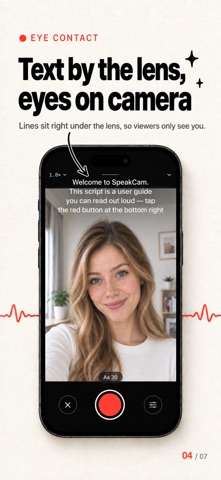
- Sits right under the lens so your eyes barely move; font size, segmenting and position all adjustable
PRESENT MODE
- Images, PDFs or web slides as the main picture while you talk from a small window — all in one video
- Drag, resize and reshape the window; ink annotations with four pen styles
- Write [next] in your script and the slide turns as you reach it; Bluetooth clickers and volume buttons work too
- Export up to 4K
RECORDING
- 9:16, 3:4, 1:1 or 16:9 — what you frame is what you get
- Up to 4K 60 fps, zoom, tap to focus, stabilization, torch, front-camera mirror
- Pause mid-take, think, resume — one seamless take
- Instant preview: save to Photos, share directly, or retake in one tap
TELEPROMPTER MODE
- Turn your phone into a pure prompter panel for an external camera or DSLR
- Portrait or landscape, mirror mode for beam-splitter rigs, screen brightness control
- No camera, no files — just your script
LANGUAGES
- Interface in English, 简体中文, 繁體中文, 日本語, 한국어, Deutsch, Español, Français and Português
- Display language and speech-recognition language can be set independently
PRIVACY FIRST
No data collection, no account, no server, no ads. Scripts and videos stay on your device; speech recognition runs on-device whenever possible.
PRO SUBSCRIPTION
Script management is free forever. Pro unlocks recording, the floating prompter, Present mode and Teleprompter mode, via monthly or yearly auto-renewing subscriptions, or a one-time lifetime purchase. Payment is charged to your Apple Account at confirmation of purchase. Subscriptions renew automatically unless auto-renew is turned off at least 24 hours before the end of the current period. Manage or cancel anytime in Settings > Apple Account > Subscriptions.
Terms of Use (EULA): https://www.apple.com/legal/internet-services/itunes/dev/stdeula/
Privacy Policy: https://cam.pdg.red/en/privacy