Teleprompter: Read to Camera
Teleprompter: Read to Camera is made and published by Yurii Koshkin. AppBrain is an independent app data site and isn't affiliated with Yurii Koshkin. The app name, icon, screenshots and description belong to Yurii Koshkin and are shown as published on the App Store.
AppBrain's verdict
- Last updated
- October 5, 2026
Rankings
App Store top chartsApp Store Rankings for Teleprompter: Read to Camera
Competitors
Similar apps and more from Yurii KoshkinAlternatives to Teleprompter: Read to Camera
More from Yurii Koshkin
Releases
Updates seen on the App Store- Version
- 1.0.5
- Launched
- September 2026
No changelog data
User feedback
Ratings and reviews on the App StoreComments on Teleprompter: Read to Camera for iOS
We don't have enough comments to show example comments. Please check back later.
Technology
Found in the app by AppBrain- Price
- Free
- App size
- 7.32 MB
- Content rating
- Everyone
Technologies used by Teleprompter: Read to Camera
About the app and developer
About Teleprompter: Read to Camera
Teleprompter: Read to Camera is a photo & video app developed by Yurii Koshkin.
What is the rating of Teleprompter: Read to Camera?
Teleprompter: Read to Camera has no ratings yet.
Is Teleprompter: Read to Camera free?
Teleprompter: Read to Camera is free. The app size is 7.32 MB. The latest version available is 1.0.5. The last update was on October 5, 2026.
What are the requirements for Teleprompter: Read to Camera?
The app has a content rating of Everyone. The app has been available on the App Store since September 2026.
Developer information for Yurii Koshkin
Address:
Store listing
By Yurii Koshkin, from the App StoreDescription by Yurii Koshkin Written by the developer, not by AppBrain. Click to read.
READ WITH CONFIDENCE
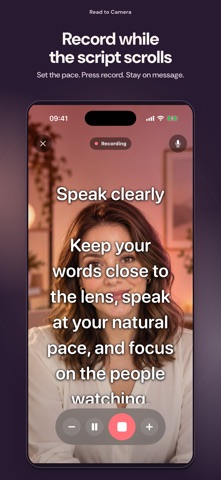
• Write or paste scripts in a private on-device library
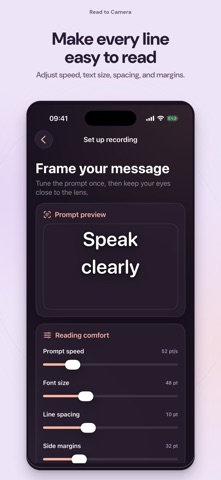
• Adjust scrolling speed, text size, line spacing, margins, colors, and background opacity
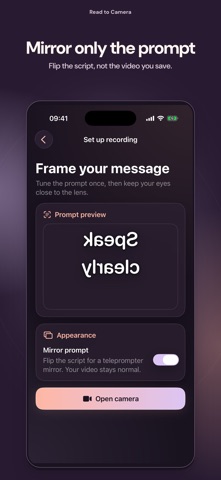
• Mirror only the prompt for a beam-splitter setup while your saved video stays normal
• Choose a 3, 5, or 10 second countdown
RECORD A CLEAN VIDEO
• Record with the front camera and microphone, or explicitly continue without sound
• Choose portrait or landscape before recording and keep that orientation locked
• Pause or resume the prompt and change its speed while recording
• Preview, save to Photos, share, or record another take
• Prompt controls never appear in the finished video
Access can vary
Access varies: some can export one watermark-free video; others need Pro before recording. See your option before recording.
PRIVATE BY DESIGN
Your scripts and recording drafts stay on this iPhone. Read to Camera needs no account, cloud workspace, or product-owned server. Usage analytics are optional and never include scripts, recordings, camera video, or microphone audio.
PRO OPTIONS
Monthly Pro includes a 3-day free trial only when the App Store confirms eligibility, then renews monthly at the localized App Store price. Lifetime Pro is a one-time purchase. Restore purchases anytime from Settings or the paywall.
Built for creators, presenters, educators, auditions, courses, product videos, social content, and any moment when you want to speak clearly without looking away from the lens.
Terms of Use (EULA): https://www.apple.com/legal/internet-services/itunes/dev/stdeula/